Getting Started 7
Getting Started
1
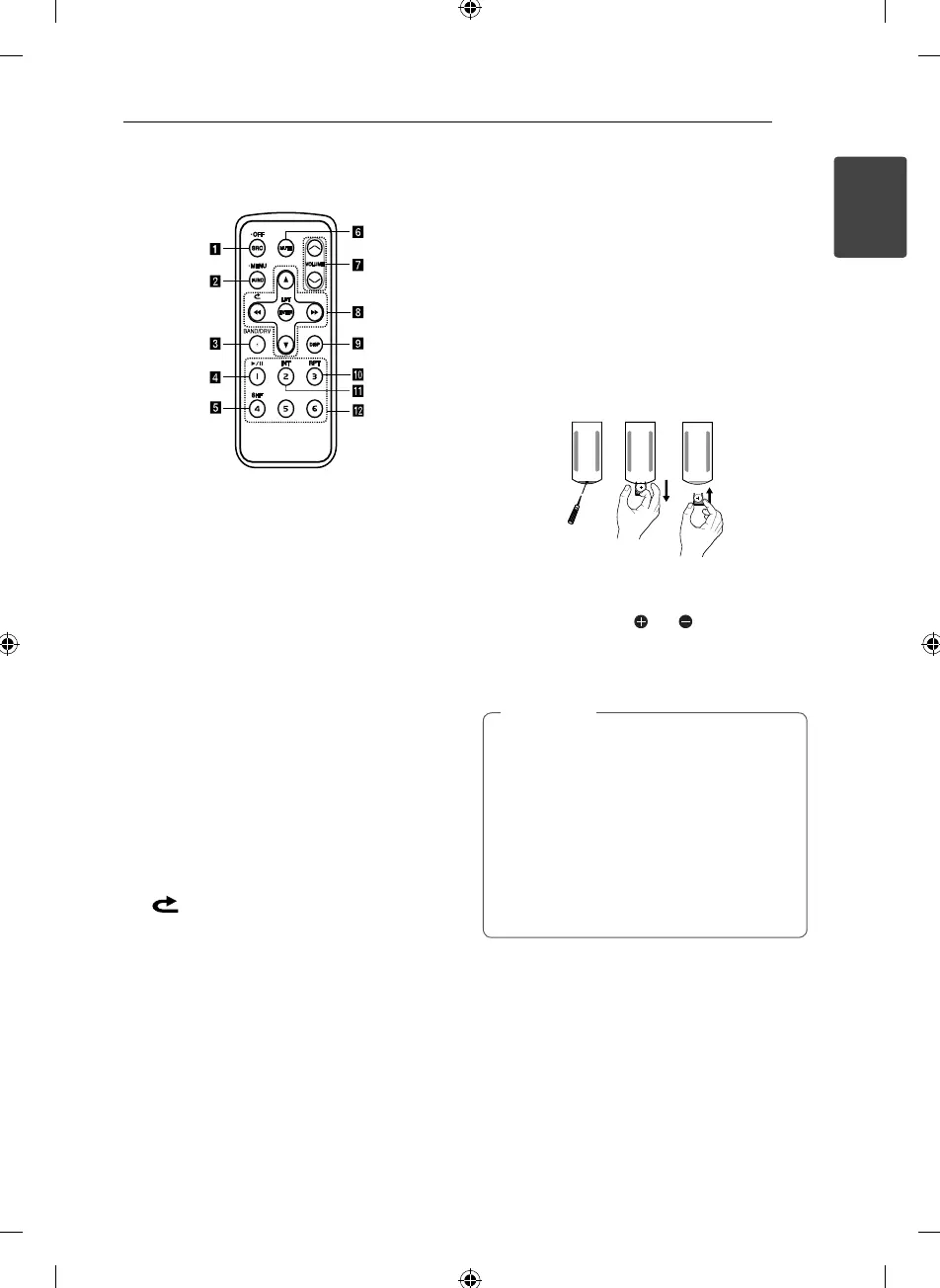
Remote control
a
SRC / • OFF
• When pressed, selects function sources.
• When pressed and held, powers unit o .
b
FUNC
When pressed, sets playback items in each
mode.
• MENU
When pressed and held, activates setting
menu.
c
BAND
Selects a band in Tuner mode.
DRV
Moves to a next USB drive.
d
d/M
Plays or pauses playback.
e
SHF Shu es playback.
f
MUTE Temporarily stops the sound.
g
VOLUME
W
/
S
Adjusts volume level.
h
c
/
v
Skip / Search / Seek / Tune
Returns to the previous step.
w
/
s
• List up / down
• Adjusts settings.
• Moves 10 MP3 / WMA tracks backward or
forward if there is no folder or one folder on a
CD.
• Moves to the previous or next folder if there
are more than 2 folders on a CD.
ENTER / LIST
• Con rms the settings.
• Checks tracks, les or preset stations.
i
DISP
• Press it, you can check the clock time.
• Press and hold it, you can turn on / o the
display window and the light of LED buttons.
j
RPT
Repeats playback.
k
INT
Intro scan.
l
Numeric buttons (1 to 6)
Selects a numbered preset station in TUNER.
Battery Installation
1. Pull out the battery holder with a sharp product
like a ball point pen.
2. Put the battery with
and correctly on the
battery holder.
3. Push the battery holder back into its original
position.
Use only one CR2025 (3 V) lithium battery.
Remove the battery if the remote control is
not used for a long period of time.
Do not leave the product in a hot or humid
place.
Do not handle the battery with metallic
tools.
Do not store the battery with metallic
materials.
,
Note



 To Next Page