EasyManua.ls Logo

LG M2280DF - Picture Reset

LG M2280DF
156 pages
Print Icon
To Next Page IconTo Next Page
To Previous Page IconTo Previous Page
Loading...
79
PICTURE CONTROL
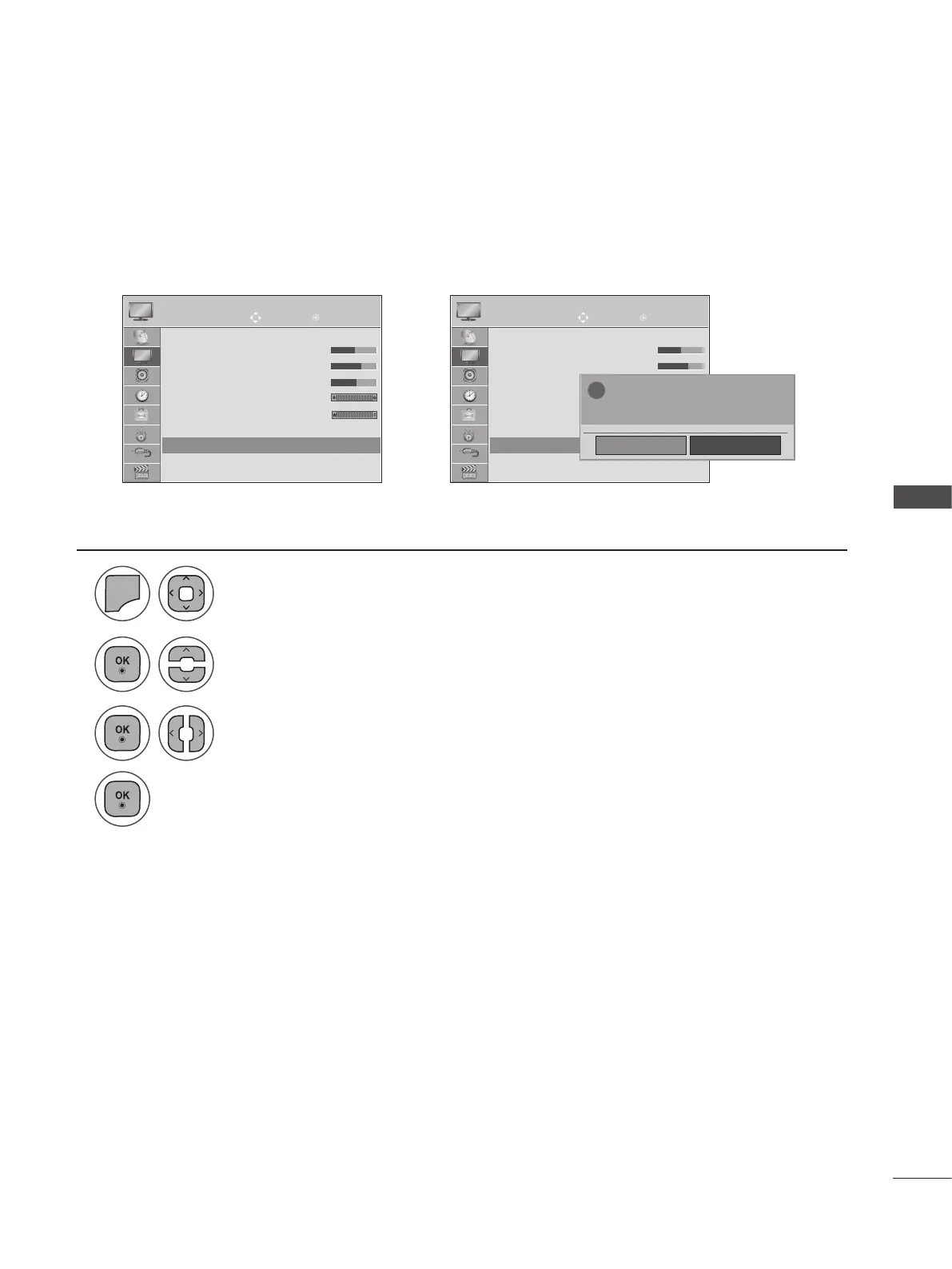
Settings of the selected picture modes BACK to the default factory settings.
PICTURE RESET
Move Move
OK OK
PICTURE PICTURE
▲
• Brightness 50
• Sharpness 70
• Colour 50
• Tint 0
• Colour Temperature 0
• Advanced Control
• Picture Reset
Screen
▲
• Brightness 50
• Sharpness 70
• Colour 60
• Tint 0
• Colour Temperature 0
• Advanced Control
• Picture Reset
Screen
• Picture Reset ꔉ • Picture Reset ꔉ
➩
NO
Yes
?
All picture setting will be resetted.
continue?
1
2
3
4
MENU
Select Picture Reset.
Select Yes or No.
Select PICTURE.
• Press the MENU or EXIT button to close the menu window.
• Press the BACK button to move to the previous menu screen.

Table of Contents