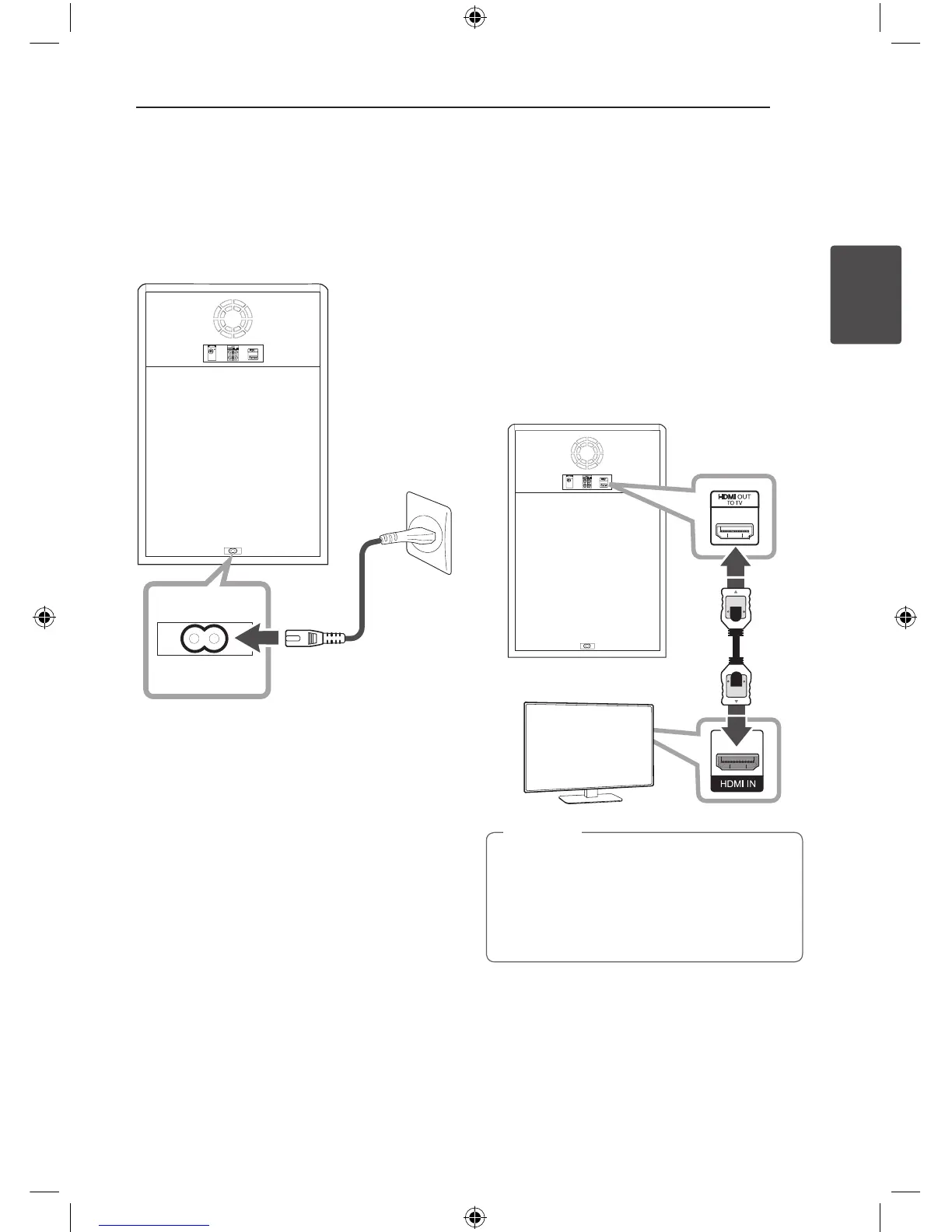
Connecting the Power
cord
1. Connect the power cord to the unit.
2. Plug the power cord into an outlet.
Connections to Your
TV
HDMI Out Connection
If you have a HDMI TV or monitor, you can connect
it to this unit using a HDMI cable (Type A, High
Speed HDMI™ Cable).
Connect the HDMI OUT jack on the unit to the
HDMI IN jack on a HDMI compatible TV or monitor.
Set the TV’s source to HDMI (refer to TV’s Owner’s
manual).
Unit
TV
y
You can fully enjoy digital audio and video
signals together with this HDMI connection.
y
When you use HDMI connection, you can
change the resolution for the HDMI output.
(Refer to “Resolution Setting” on page 16.)
,
Tip
OM7550D-FB.DINDLLK_FULL BOOK_ENG_MFL68982108.indd 15 2015-07-24 5:00:30



 To Next Page