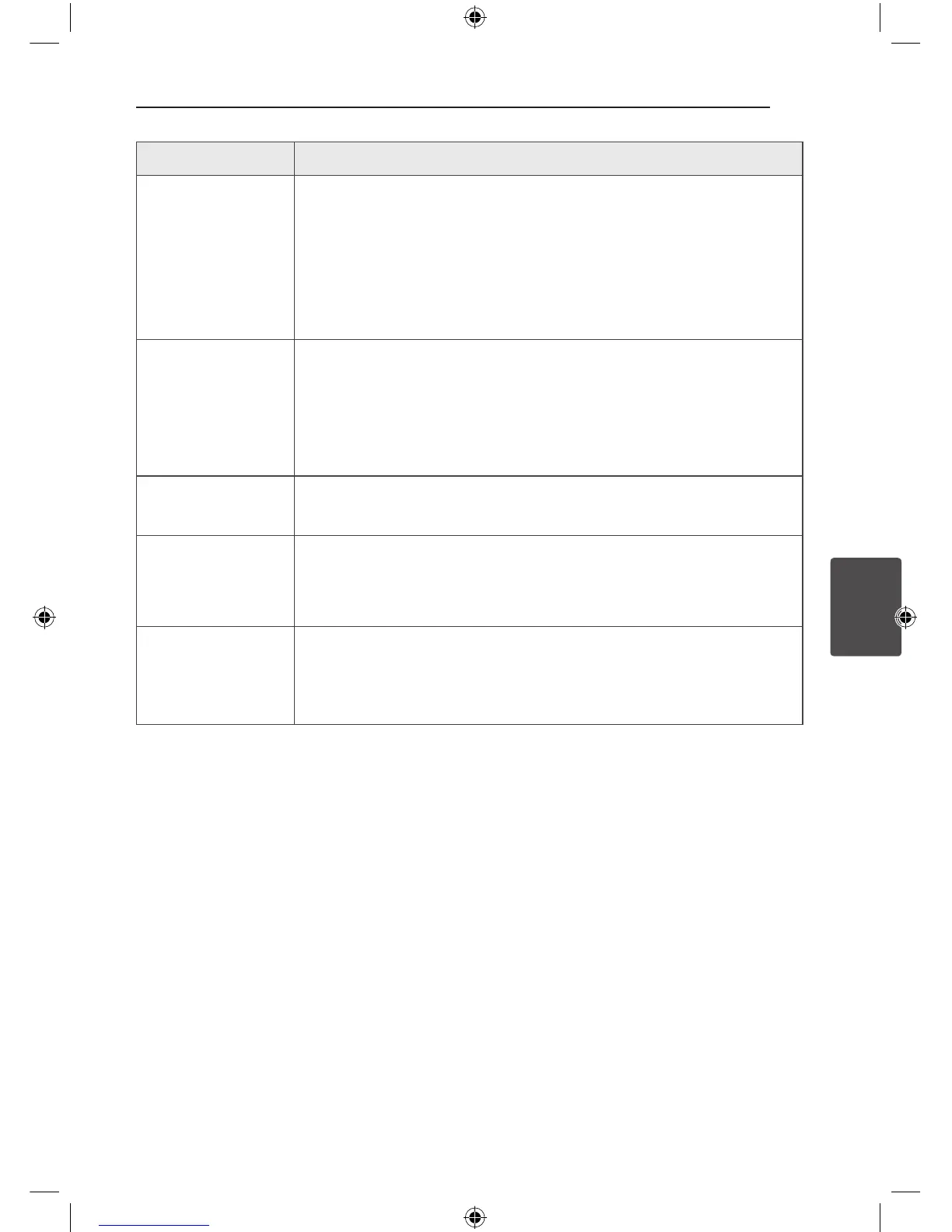
Problem Cause & Solution
Radio stations cannot be
tuned in properly.
y
The antenna is positioned or connected poorly.
Connect the antenna securely.
y
The signal strength of the radio station is too weak.
Tune to the station manually.
y
No stations have been preset or preset stations have been cleared (when
tuning by scanning preset channels).
Preset some radio stations, see page 28 for details.
The remote control does
not work properly.
y
The remote control is too far from the unit.
Operate the remote control within about 7 m.
y
There is an obstacle in the path of the remote control and the unit.
Remove the obstacle.
y
The batteries in the remote control are exhausted.
Replace the batteries with new ones.
No speaker light
y
Check the speaker light eects by pressing LIGHTING.
LG Sound Sync does not
work.
y
Check whether your LG TV supports LG Sound Sync.
y
Check connection of LG Sound Sync.
y
Check sound setting of your TV and this unit.
The AUTO POWER
function does not work.
y
Check connection of the external device such as TV or Bluetooth device.
y
Depending on the connected device, this function may not operate.
OM7550D-FB.DINDLLK_FULL BOOK_ENG_MFL68982108.indd 41 2015-07-24 5:00:35



 To Next Page