36
ENTERTAINMENT
PHOTO LIST
You can see the photos stored on a
connected device.
Supported Photo Files
PHOTO (*.JPEG)
Baseline: 64-pixel (width) x 64-pixel
(height) - 15360-pixel (width) x
8640-pixel (height)
Progressive: 64-pixel (width) x 64-pixel
(height) - 1920-pixel (width) x 1440-pixel
(height)
y
Only JPEG files are supported.
y
Non-supported files are displayed in
the form of an icon.
y
An error message is displayed for
corrupted files or file formats that
cannot be played.
y
Corrupted files may not be displayed
properly.
y
It may take some time to view
high-resolution images in full screen.
Browsing Photo List
1 Connect a USB storage device.
2 Press the SETTINGS button.
3 Accesses the MY MEDIA.
4 Use the orbutton to
select Photo List and press the OK
button.
5 Use the or button to
select the file you want and press the
OK button.
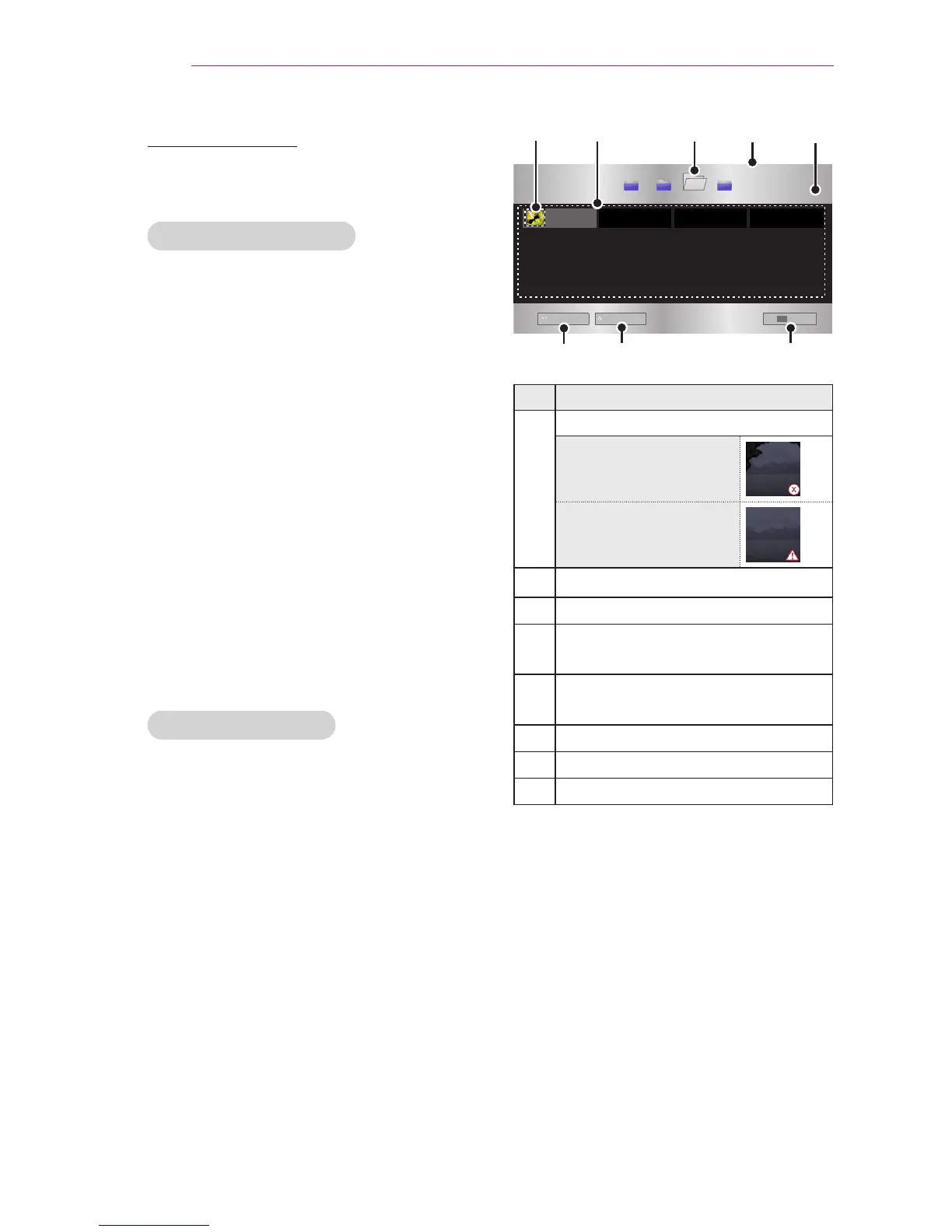
Photo List
USB STORAGE DEVICE
Butterfly_...
d
book doc pic
Go to root folder Go to upper folder
Page Change
Exit
Description
Thumbnails
Abnormal file
File not supported
File List
Moves to the upper level folder.
Current page/Total no. of folder
pages
Current page/Total no. of file
pages
Moves to the top level folder.
Moves to the upper level folder.
Exit



 To Next Page