28
MAINTENANCE
Clean the outer filter
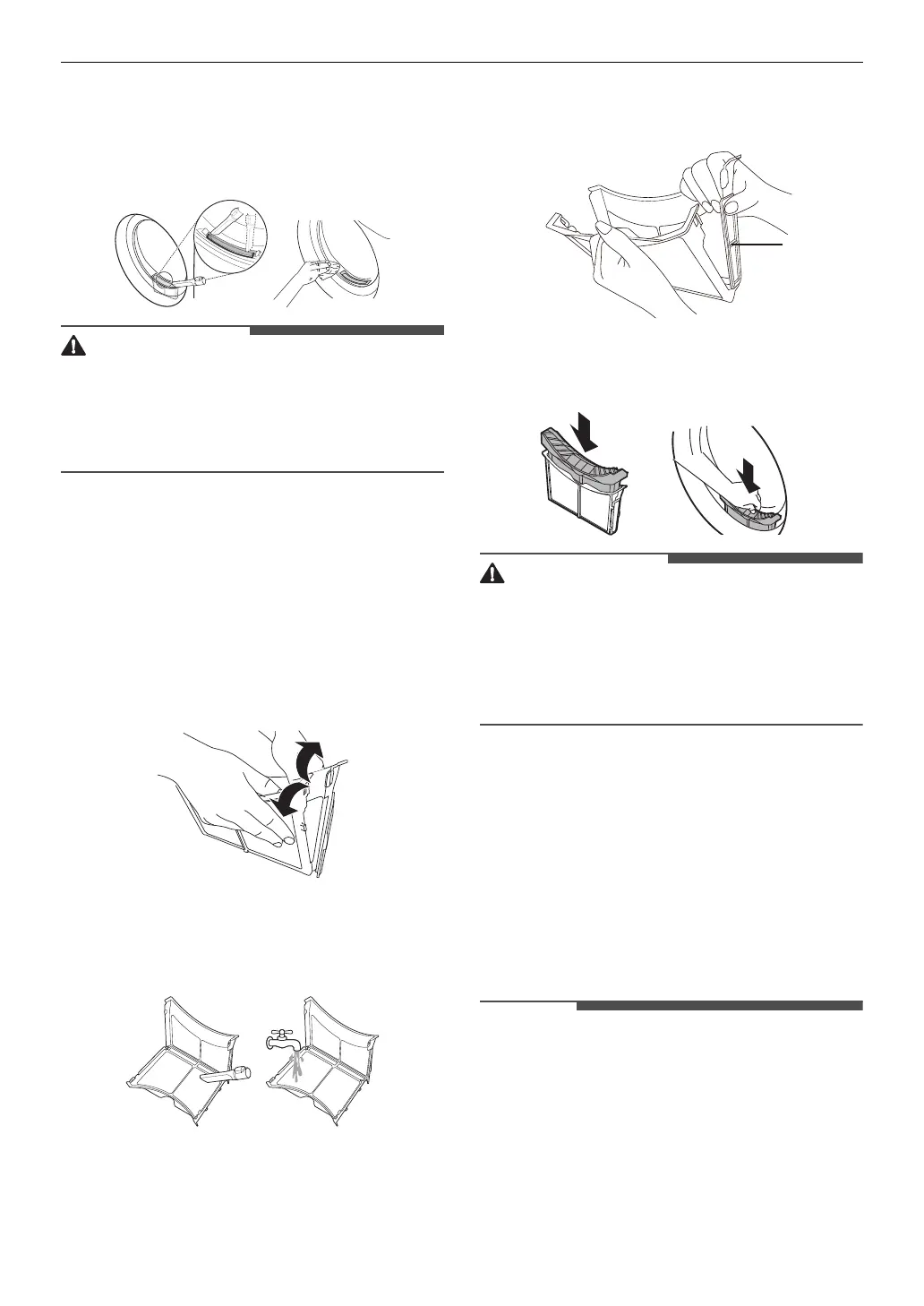
1
Remove the dust or lint around the
filter inlet.
• When the lint drops into the filter inlet,
it may cause degradation of drying
performance and increase in drying
time.
2
Pull out the outer filter.
3
Remove the inner filter.
4
Open the outer filter by unfolding in
the direction of the arrow grasping
the top edge of the outer filter.
5
Clean the residual lint using vacuum
cleaner or washing under running
water.
• Dry the filter completely if the filter
is moist. Failure to do so, odour may
occur in the appliance.
6
Close the outer filter while pushing
the side
a
of the filter.
7
Close them, and reinsert the both lint
filters.
• Do not load or remove any clothes
when the lint filter is not in a place. The
clothes can drop into the filter inlet
and it may cause the appliance to
malfunction.
Emptying the Water
Container
Condensed water is collected in the
water container.
Empty the water container after every
use. Not doing so will affect the drying
performance.
• If the water container is full, the
E
icon
glows and a chime will sound while the
appliance is operating. If this should
occur, the water container needs to be
emptied within the next hour.
• When the condensed water is drained
out directly through the optional drain
a


 To Next Page