29
MAINTENANCE
ENGLISH
hose, there is no need to empty the
water container.
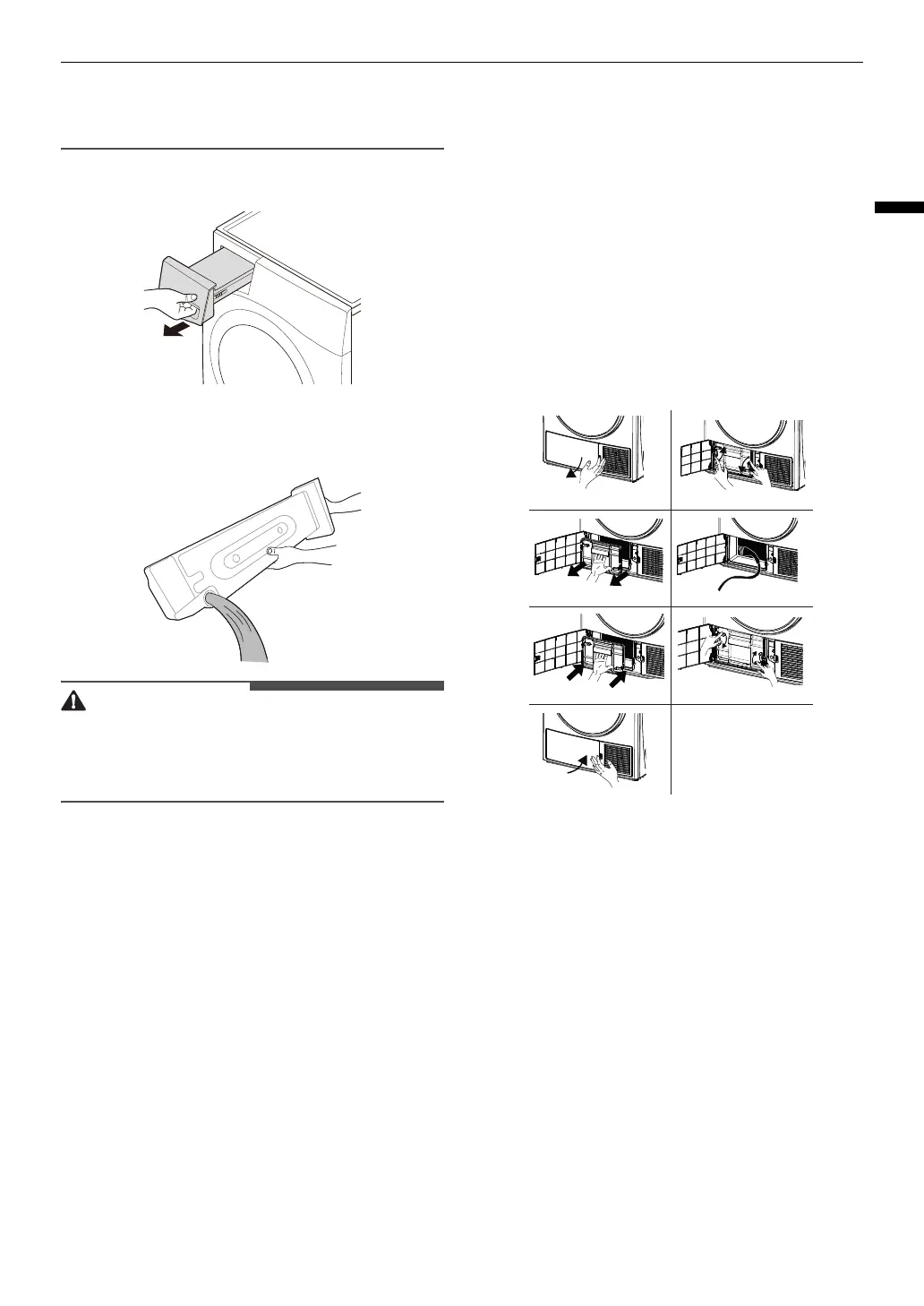
1
Pull out the water container.
2
Empty the water container into the
sink.
• Do not drink the condensed water or
reuse it. It could be lead to health
problems for people and animals.
3
Refit it back into the appliance.
• Push in the water container fully
into the appliance until it is in place.
4
Press the
Start/Pause
button.
Cleaning the Appliance
Periodically
Cleaning The Heat
Exchanger
Clean the heat exchanger when the
J
lights up .
Clean the heat exchanger after 30
drying cycles or 3 times a month even if
J
is not lights up.
1
Open the kick plate cover as shown.
2
Unlock the exchanger cover by
turning in the direction shown with
arrows.
3
Take out the exchanger cover as
shown.
4
Clean the front surface of the
exchangeras shown.
5
Fit the exchanger cover as shown.
1
3
5
2
4
6
7


 To Next Page