Connecting 13
Connecting
2
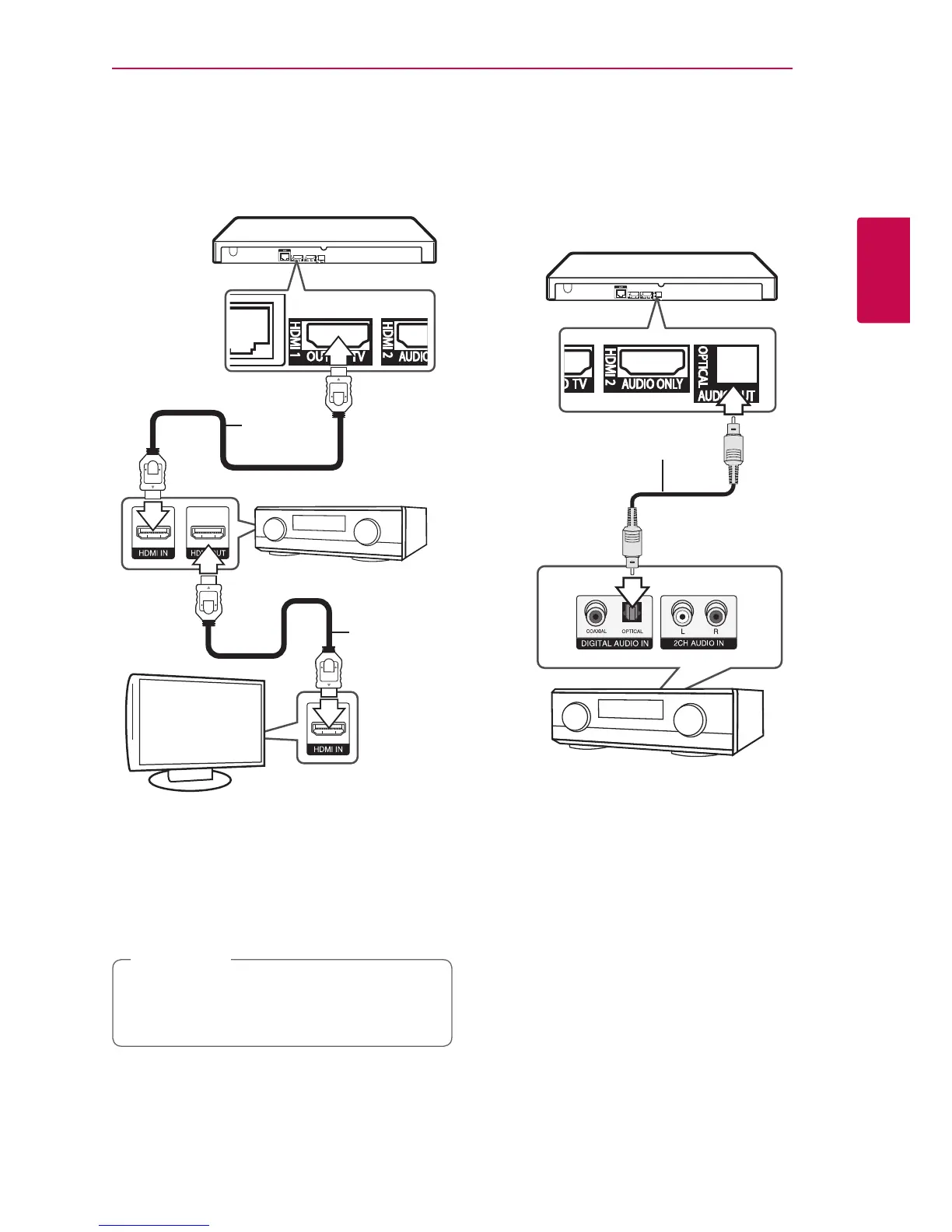
Case 2 : HDMI1 OUT TO TV connection
Connect the player’s HDMI OUT (HDMI1 OUT TO TV)
jack to the corresponding in jack on your amplier
using a HDMI cable.
HDMI cable
HDMI
cable
TV
Receiver/Amplier
Rear of the unit
Connect the amplier’s HDMI output jack to HDMI
input jack on your TV using a HDMI cable if your
amplier has HDMI output jack. (Refer to amplier’s
owner’s manual.)
You will need to activate the player’s digital output.
(See “[AUDIO] Menu” on page 23)
Depending on the supported resolution of the
TV or Amplier, the picture may not be output.
Connect to Case 1.
,
Note
Connecting to an Amplifier via
Digital Audio Output
Connect the player’s OPTICAL AUDIO OUT jack to the
corresponding in jack on your amplier using a optical
digital audio cable.
Optical cable
Receiver/Amplier
Rear of the unit
You will need to activate the player’s digital output.
(See “[AUDIO] Menu” on page 23.)


 To Next Page