Connecting 15
Connecting
2
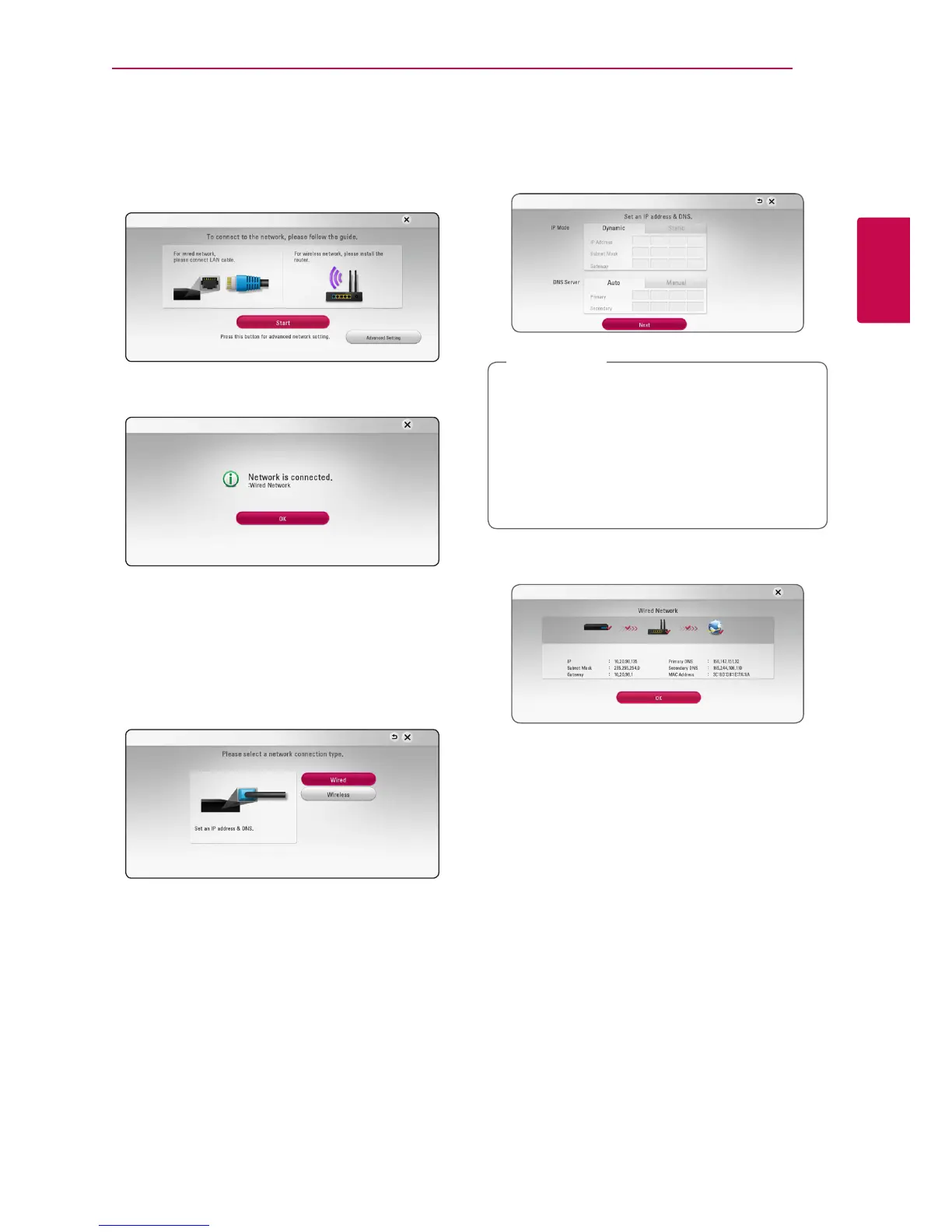
1. Select [Connection Setting] option in the
[Settings] menu then press ENTER (b).
2. Read the preparations for the network settings
and then press ENTER (b) while [Start] is
highlighted.
Network will automatically be connected to the
unit.
Advanced Setting
If you want to set the network settings manually,
use W/S to select [Advanced Setting] on the
[Network Setting] menu and press ENTER (b).
1. Use W/S to select [Wired] and press
ENTER (b).
2. Use W/S/A/D to select the IP mode
between [Dynamic] and [Static].
Normally, select [Dynamic] to allocate an IP
address automatically.
If there is no DHCP server on the network and
you want to set the IP address manually, select
[Static] then set [IP Address], [Subnet Mask],
[Gateway] and [DNS Server] using
W/S/A/D and numerical buttons. If you
make a mistake while entering a number, press
CLEAR to clear the highlighted part.
,
Note
3. Select [Next] and press ENTER (b) to apply
network settings.
Network connection status is displayed on the
screen.
4. Press ENTER (b) while [OK] is highlighted to
finish the wired network settings.


 To Next Page