System Setting26
System Setting
3
Software
[Information]
Displays the current software version.
[OSS Notice]
LGE Open Source Software Notice is displayed.
[Update]
You can update the software by connecting the
unit directly to the software update server (see
page 46).
Closed Caption
Closed caption (CC) is the process of displaying text
on a screen to provide additional or interpretive
information for the hearing impaired.
This function allows you to adjust various settings of
closed caption.
a
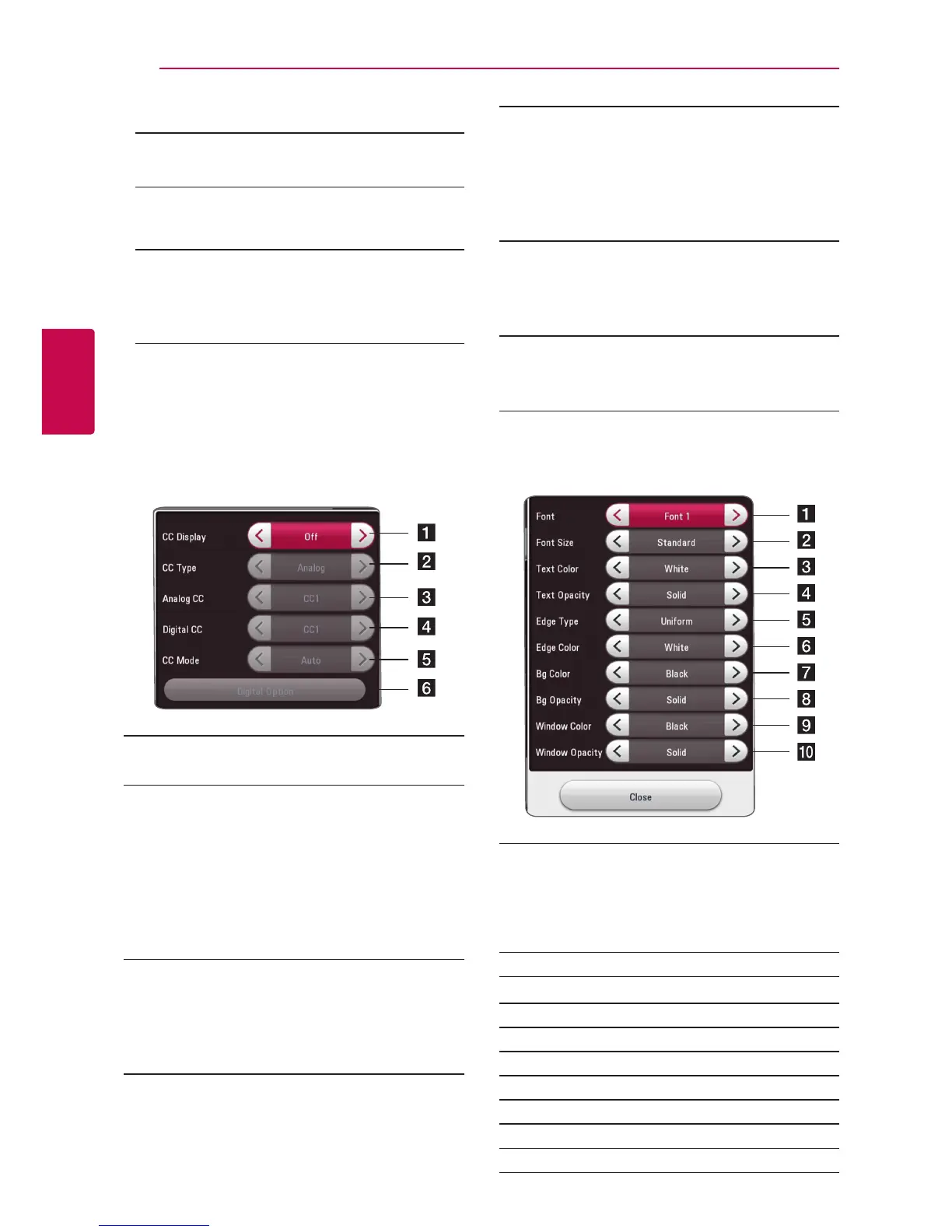
[CC Display]
Turns on or off this function.
b
[CC Type]
Selects the closed caption type between
[Analog] and [Digital].
[Analog] : Select this when you play a disc or
some video les that support [Analog] CC type.
[Digital] : Select this when you play Online
content or some video les that support
[Digital] CC type.
c
[Analog CC]
(When [CC Type] is selected to [Analog])
Displays the audio portion of a movie as text
on the screen. CC1 is the most common mode
in use.
d
[Digital CC]
(When [CC Type] is selected to [Digital])
The language option of the online content
can be selected here. (but language option
will be supported fully or partially according to
contents)
e
[CC Mode]
(When [CC Type] is selected to [Digital])
Selects the closed caption mode between
[Custom] and [Auto].
f
[Digital Option]
(When [CC Mode] is selected to [Custom])
You can adjust detail settings of closed caption.
Adjusting the [Digital Option]
When [CC Mode] is selected to [Custom], you can
adjust detail settings of closed caption.
a
Selects a typeface for the text.
Font1 : Default / Font2 : Courier
Font3 : TimesNewRoman / Font4 : Helvetica
Font5 : Arial / Font6 : Casual
Font7 : Cursive / Font8 : SmallCapital
b
Selects the font size.
c
Selects a color for the text.
d
Adjusts the opacity for the text color.
e
Selects an edge type.
f
Selects a color for the edges.
g
Selects a background color.
h
Adjusts the opacity for the background color.
i
Selects a window color.
j
Adjusts the opacity for the window color.


 To Next Page