Note that you can view H
2
O concentrations in units of degrees C or mmol/mol. To change the
units in the Main window, go to the View menu and toggle the H2O in ppt menu item on and
off. Alternatively, you can click on the H
2
O units being displayed in the Main window to change
the display.
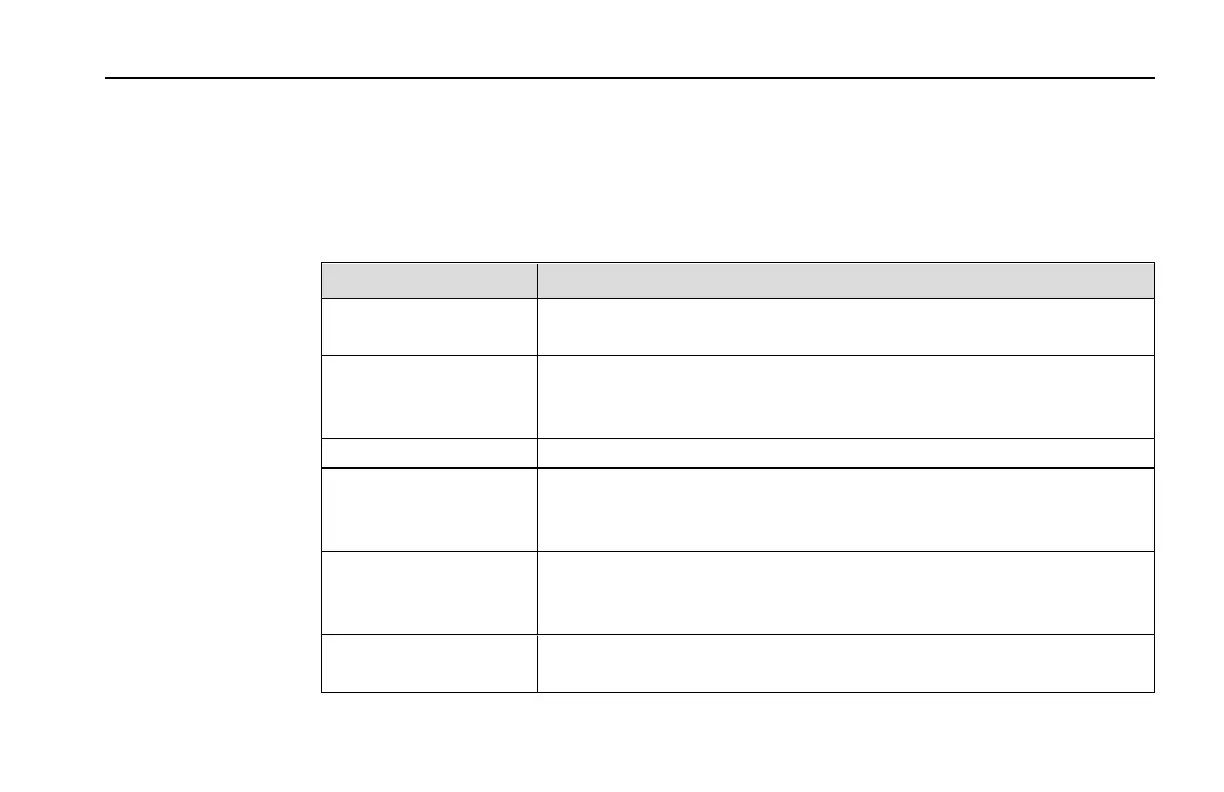
The LI-840A parameters displayed in the Main window are as follows:
Parameter Description
Cell Temperature Temperature (°C) in the LI-840A optical cell. This value should
remain near 50 °C when the heater is turned ON.
Cell Pressure Barometric pressure (kPa) measured in the LI-840A optical cell. This
value can be used to correct measurements for the effects of atmo-
spheric pressure.
Output Rate Displays data output rate chosen at connection.
Heater Shows status of heater (ON/OFF), which is used to maintain the
optical cell at a constant 50 °C. The heater is turned ON/OFF in the
Settings window.
Pressure Comp. Shows whether pressure compensation is ON/OFF. When ON, meas-
urements are corrected for the effects of pressure fluctuations on gas
density and band broadening.
Alarms Shows status of High and Low alarms, whose values are set in the Set-
tings window. Alarms are enabled (ON), or disabled (OFF).
3-5Section 3. Operation
Section 3



 To Next Page