18
10: Programmable output setting
This function is not supported by this model.
11: Shutdown point for programmable output
This function is not supported by this model.
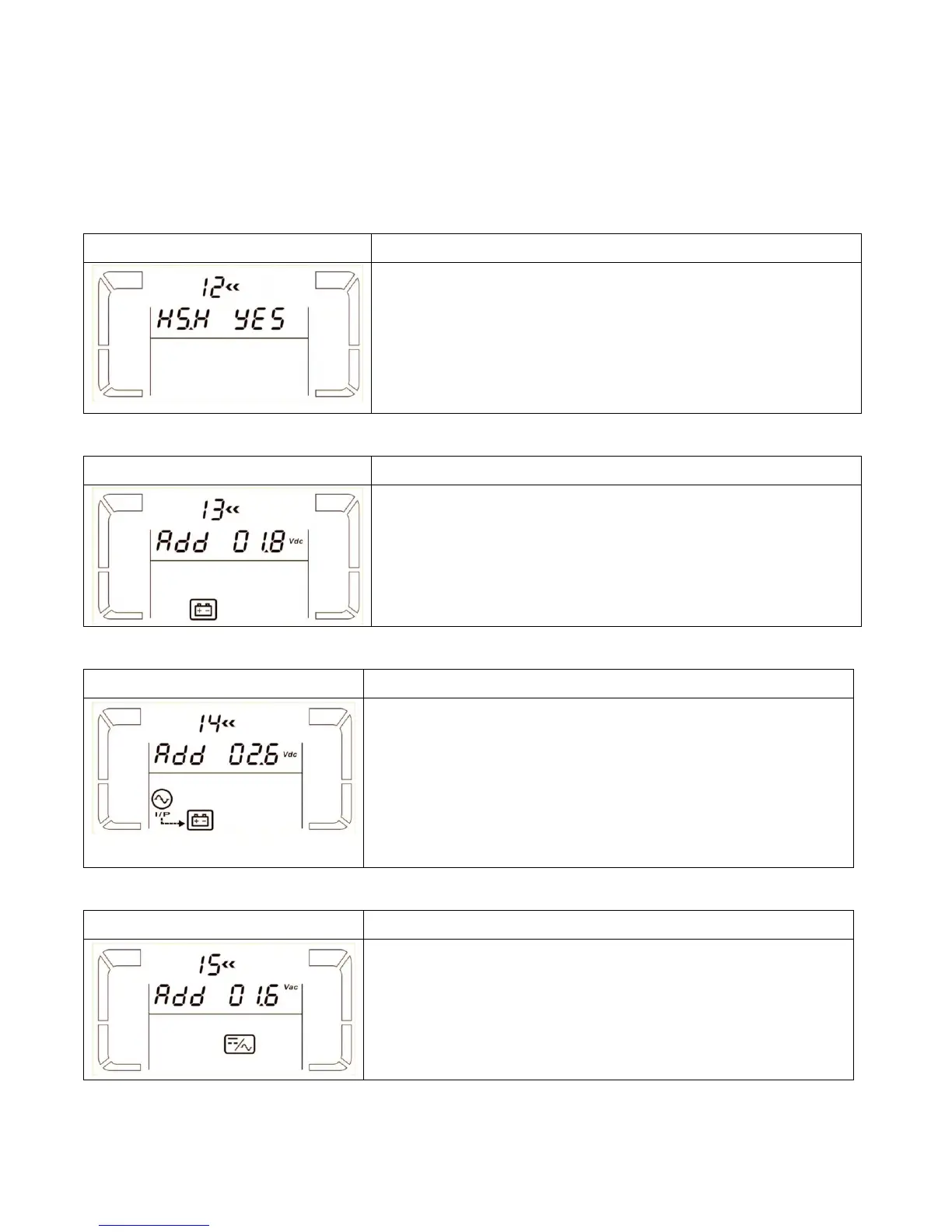
12: Hot standby function enable/disable
Parameter 2: HS.H
Enable or disable Hot standby function. You may choose following
two options in Parameter 3:
YES: Hot standby function is enabled. It means that the current
UPS is set to host of the hot standby function, and it will restart
after AC recovery even without battery connected.
NO: Hot standby function is disabled. The UPS is running at
normal mode and can’t restart without battery
13: Battery voltage adjustment
Parameter 2: Select “Add” or “Sub” function to adjust battery
voltage to real figure.
Parameter 3: the voltage range is from 0V to 5.7V, the default
value is 0V.
14: Charger voltage adjustment
Parameter 2: you may choose Add or Sub to adjust charger
voltage
Parameter 3: the voltage range is from 0V to 9.9V, the default
value is 0V.
NOTE:
*Before making voltage adjustment, be sure to disconnect all
batteries first to get the accurate charger voltage.
*We strongly suggest to use the default value (0). Any
modification should be suitable to battery specifications.
15: Output voltage adjustment
Parameter 2: you may choose Add or Sub to adjust inverter
voltage
Parameter 3: the voltage range is from 0V to 6.4V, the default
value is 0V.


 To Next Page