EasyManua.ls Logo

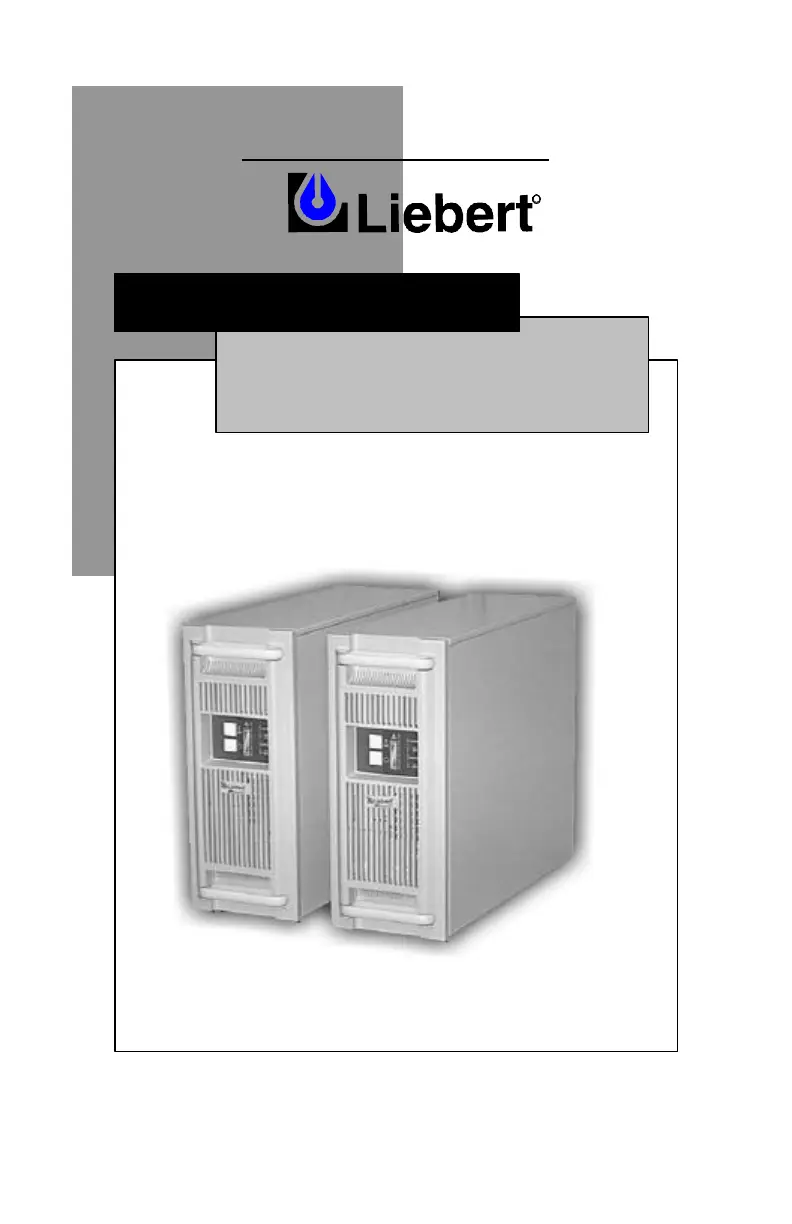
Liebert GXT - User Manual

Liebert GXT
23 pages
Print Icon
To Next Page IconTo Next Page
Loading...
POWER PROTECTION
USER MANUAL
English / Español
R
1800-2700 VA
208V
UPStation GXT™

Questions and Answers

  • A
    Amanda BurgessAug 16, 2025
    Why does my Liebert UPS have reduced battery time?
    • M
      Megan RamosAug 17, 2025
      Reduced battery time in your Liebert UPS can occur for several reasons: the batteries may not be fully charged; keep the UPS plugged in continuously for at least 24 hours to recharge them. The UPS might be overloaded; check the load level display and reduce the load. Also, batteries may not be able to hold a full charge due to age. In this case, replace the batteries.
  • J
    Jeffrey GentryAug 19, 2025
    What to do if the battery indicator is illuminated on my Liebert GXT UPS?
    • M
      Mr. James AdamsSep 12, 2025
      If the battery indicator is illuminated on your Liebert UPS, it means the UPS is operating from battery mode. This could be due to several reasons: * The UPS is not plugged in. Ensure the UPS is securely plugged into the wall socket and the feeder breaker is on. * The UPS input protection has opened. Save your data, close applications, and reset the input breaker. * The utility voltage is out of the UPS input range. Save your data, close applications, and ensure the utility supply voltage is within acceptable limits for the UPS.
  • A
    Abigail MaloneAug 22, 2025
    How to fix a Liebert GXT that fails to start?
    • J
      James OrtizAug 22, 2025
      If your Liebert UPS fails to start when the on button is pressed, it could be due to a short circuit or overload. Ensure the UPS is off, disconnect all loads, and make sure nothing is lodged in the output sockets. Also, verify that the loads are not defective or shorted internally. If the internal fuse is blown, this indicates an internal fault, and the UPS requires qualified service.
  • H
    hendrixpamelaAug 25, 2025
    What does it mean when the Fault and Bypass indicators and all load level LEDs are illuminated on my Liebert GXT UPS?
    • C
      Christopher SmithAug 26, 2025
      When the Fault and Bypass indicators and all load level LEDs are illuminated on your Liebert UPS, it indicates that the UPS is overloaded or the connected equipment is faulty. To resolve this, check the load level display and remove non-essential loads. Recalculate the load VA and reduce the number of loads connected to the UPS. Also, check the connected equipment for any faults.
  • L
    Lisa PattersonAug 27, 2025
    Why are the Fault and Bypass indicators and diagnostic LED A illuminated on my Liebert GXT?
    • L
      Lauren OrtegaAug 27, 2025
      When the Fault and Bypass indicators and diagnostic LED A are illuminated on your Liebert UPS, it indicates that the UPS internal fan has a problem or the UPS has shut down due to a temperature condition, and the load is on bypass power. Make sure the UPS is not overloaded, the ventilation openings are not blocked, and the room ambient temperature is not excessive. Wait 30 minutes to allow the UPS to cool down, then restart it.
  • M
    Monica NealAug 30, 2025
    What does it mean when Fault and Bypass indicators and diagnostic LED C & E are illuminated on Liebert UPS?
    • S
      Stacey McbrideAug 30, 2025
      When the Fault and Bypass indicators and diagnostic LED C & E are illuminated on your Liebert UPS, it means that the UPS shut down due to a command from the communications port(s). Your UPS has received a signal or command from the attached computer. If this was inadvertent, ensure the communication cable used is correct for your system.
  • S
    Sandra GonzalezSep 2, 2025
    What does it mean when Fault and Bypass indicators and diagnostic LED B are illuminated on Liebert GXT?
    • B
      Brandon HendersonSep 2, 2025
      When the Fault and Bypass indicators and diagnostic LED B are illuminated on your Liebert UPS, it indicates an internal DC bus overvoltage issue, and the UPS requires qualified service.
  • B
    Brittany WilliamsSep 4, 2025
    What does it mean when Fault and Bypass indicators and diagnostic LED C are illuminated on Liebert UPS?
    • D
      davidandrewsSep 4, 2025
      When the Fault and Bypass indicators and diagnostic LED C are illuminated on your Liebert UPS, it indicates a power control fault, and the UPS requires qualified service.
  • M
    Molly HallSep 7, 2025
    What does it mean when Fault and Bypass indicators and diagnostic LED D are illuminated on Liebert UPS?
    • J
      Joshua JohnsonSep 8, 2025
      When the Fault and Bypass indicators and diagnostic LED D are illuminated on your Liebert UPS, it indicates a PFC fault, and the UPS requires qualified service.
  • J
    Justin GonzalesSep 12, 2025
    What does it mean when Fault and Bypass indicators and diagnostic LED E are illuminated on Liebert UPS?
    • D
      Dustin MaddenSep 12, 2025
      When the Fault and Bypass indicators and diagnostic LED E are illuminated on your Liebert UPS, it indicates an inverter fault, and the UPS requires qualified service.

Summary

Important Safety Instructions

General Safety Precautions

Covers essential safety warnings and guidelines for product installation and operation.

Major Components

General Installation

Tower UPS Installation

Step-by-step guide for installing the UPS in a tower configuration.

Rack-Mount UPS Conversion and Installation

Procedures for converting and installing the UPS in a rack-mount configuration.

Optional Battery Cabinet(s) Installation

Controls and Indicators

Operation

Normal Mode Operation

Details how the UPS functions during standard utility power conditions.

Battery and Recharge Modes

Explains operation during utility failure and the battery recharge process.

Communications Interface Port

Maintenance

Battery Replacement Procedures

Battery Replacement Steps

Provides detailed, step-by-step instructions for replacing UPS batteries.

Troubleshooting

Audible Alarm Conditions

Lists specific audible alarms and their corresponding conditions and meanings.

Troubleshooting Guide

Provides guidance on identifying and resolving common UPS problems and error indicators.

Specifications

Liebert GXT Specifications

General IconGeneral
Battery TypeSealed Lead-Acid (SLA)
TopologyDouble Conversion Online
Frequency50/60 Hz
DisplayLCD
Form FactorTower/Rackmount
Output Voltage120V, 208V, 230V, 240V
Input Voltage120V, 208V, 230V, 240V
Communication InterfaceRS-232, USB
Operating Temperature0°C to 40°C (32°F to 104°F)
Operating Humidity0% to 95% (non-condensing)
DimensionsVaries by model
WeightVaries by model

Related product manuals