EasyManua.ls Logo

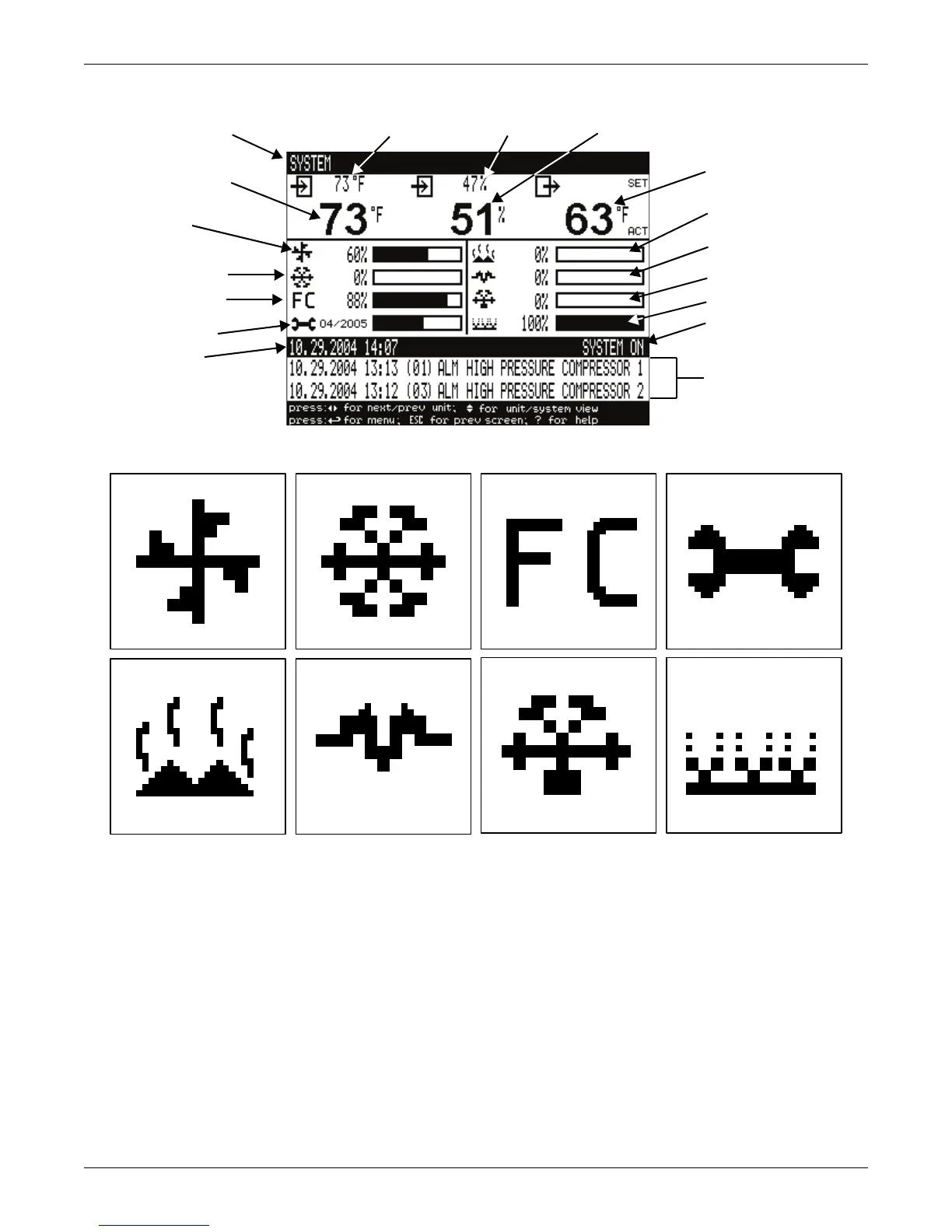
Liebert ICOM - Figure 3 Status Menu, Large Display, Graphical View; Figure 4 Liebert Icom Default Screen Symbols

Liebert ICOM
84 pages
Print Icon
To Next Page IconTo Next Page
To Previous Page IconTo Previous Page
Loading...
Liebert iCOM Display Components and Functions
4
Figure 3 Status menu, large display, graphical view
Figure 4 Liebert iCOM default screen symbols
Evaporator
Fan Speed
Temperature
Setpoint
Humidity
Setpoint
Humidity
Sensor
Reading
Supply
Air Temperature
Percent Hot Water
Heating
Percent Electric
Heating
Percent Dehumidifying
Percent Humidifying
System (or Unit) On/Off
Most Recent Alarms
(Date, Time, Unit,
Description)
System or
Unit # view
Temperature Sensor
Reading
Percent Cooling
Free-Cooling
Percentage
Next Maintenance
Date and Time
fan
cooling
maintenance
hot water
electric heat
dehumidification humidification
freecooling

Table of Contents