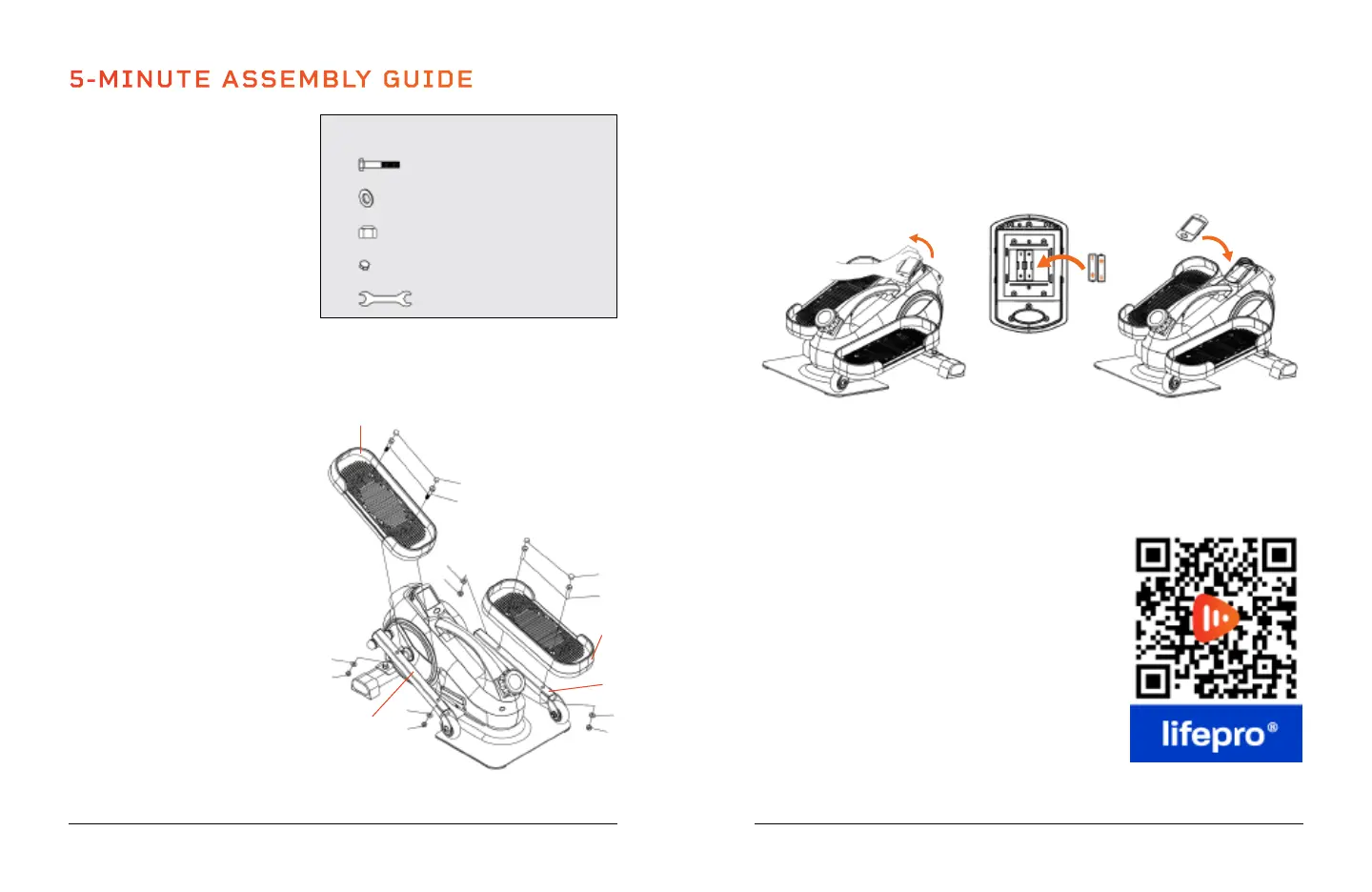
ATTACH THE PEDALS
1. Align the left pedal (F) with the
screw holes in the left pedal
arm (H).
2. Insert two bolts (A) through
the top of the pedal and
through the pedal arm.
3. Put a washer (B) onto the end
of each bolt.
4. Screw a nylon lock nut (C) onto
the end of each bolt.
5. Use the wrench (E) to tighten
the two nuts, securing the
pedal to the pedal arm. Make
the nuts as tight as you can.
6. Remove the adhesive backing
from two foam pads (D) and
firmly press one to each bolt
head.
7. Align the right pedal (G) with
the screw holes in the right
pedal arm (I).
8. Repeat steps 2–6 to secure the
right pedal.
5-MINUTE ASSEMBLY GUIDE
8 FlexStride Plus User Manual Lifepro Endurance Training Collection 9
INSERT BATTERIES INTO THE MONITOR
1. Remove the monitor by carefully pulling it out from the top edge.
2. Insert two AAA batteries into the battery receptacle. Ensure they are
oriented correctly.
3. Carefully tuck the wires back in as you re-insert the monitor. Insert from the
bottom first, then press in the top of the monitor.
INSTALL A FITNESS APP TO MANAGE YOUR WORKOUTS
1. Scan the QR code below for a list of compatible fitness apps.
NOTE: If you do not already have a QR Code Scan app, you may need to
download one first. Many newer phones have a QR code scanning feature built
into the camera app.
2. Download your preferred fitness app.
3. On your phone, go to Settings > Bluetooth, to
turn on Bluetooth.
4. In the Bluetooth device list, connect to your
FlexStride Plus.
5. Open the app and create an account.
6. Now, you can create a personalized exercise
plan in the app. You can follow structured
pedaling workouts, including cycling routes
around the world. Track calories burned, your
speed, workout duration, and all of your workout
activity information. Create training goals,
complete fitness challenges, and more.
Apps are not affiliated with Lifepro. Some features may require in-app purchase.
ASSEMBLY NOTES
• Assemble the FlexStride Plus
on a flat, sturdy floor, covered
by a mat or cloth to protect
your carpet or flooring.
• Ensure the space is free of
obstructions.
F
G
H
C
C
B
B
B
B
A
A
D
D
C
C
I
A
B
C
D
E
M8 Bolts (x4)
D8 Flat Washers (x4)
M8 Nylon Lock Nuts (x4)
Foam Pads (x4)
Wrench (x1)
HARDWARE









 To Next Page