EasyManua.ls Logo

LifeSpan MARATHON - Built-in Program Exercise Details

LifeSpan MARATHON
40 pages
Print Icon
To Next Page IconTo Next Page
To Previous Page IconTo Previous Page
Loading...
16
Exercise time setting range0:05:0010:00:00,unit (h:m:s)
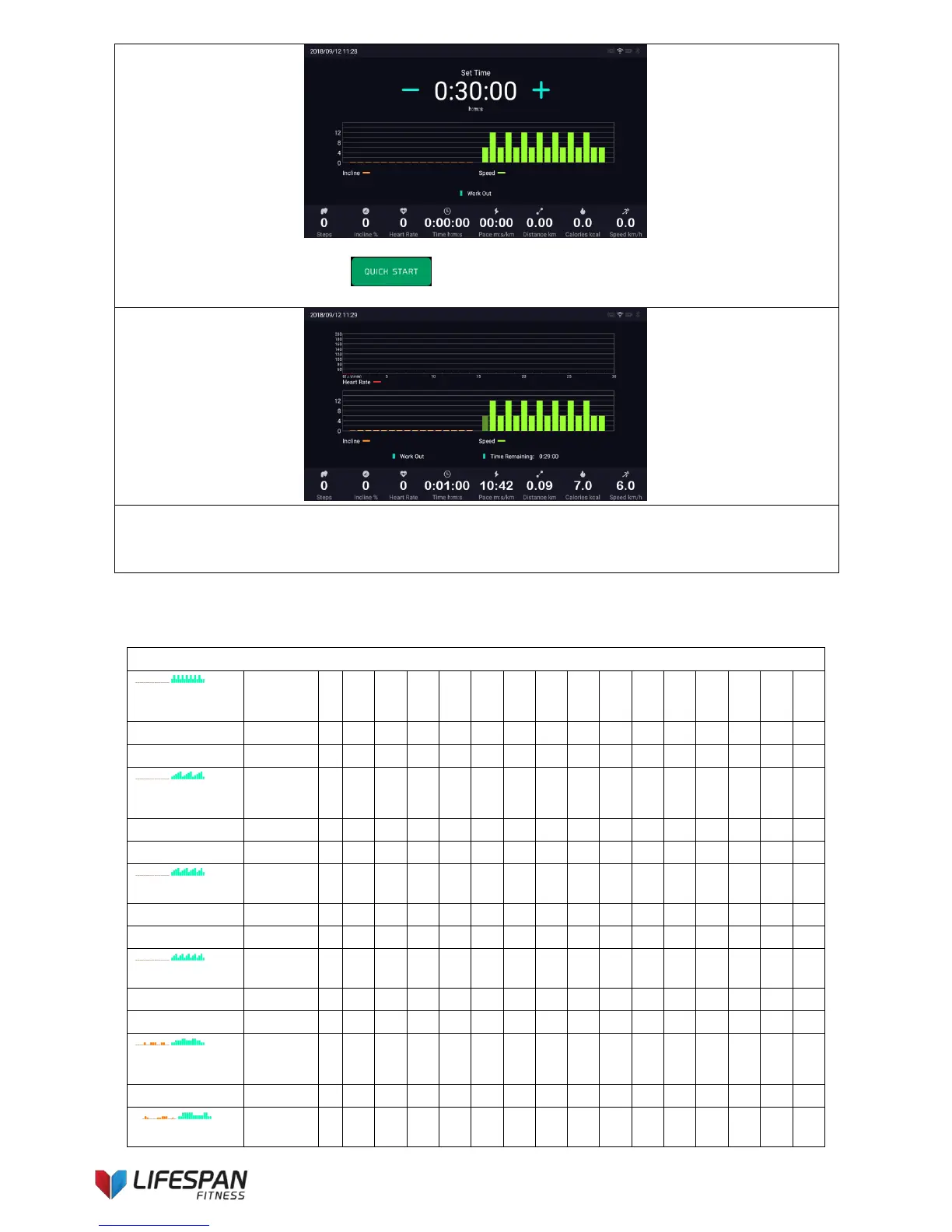
After completing the settings, press “QUICK START ” button to run the treadmill and start the
selected program. The display interface is as follows:
Program exercise: Select an appropriate program and adjust the required exercise time after start-up. Each
built-in program is divided into 16 segments, each movement time = set time / 16. The speed/incline values
for each segment of the program are shown in the table below. The incline and speed windows show the
current incline and speed values as the program moves to the next segment.
Built-in 12 Program Profile
Interval
Training
Segment
1
2
3
4
5
6
7
8
9
10
11
12
13
14
15
16
Speed
6
12
6
12
6
12
6
12
6
12
6
12
6
12
6
6
Incline
0
0
0
0
0
0
0
0
0
0
0
0
0
0
0
0
Pyramid
Training
Segment
1
2
3
4
5
6
7
8
9
10
11
12
13
14
15
16
Speed
4
6
8
10
12
4
6
8
10
12
4
6
8
10
12
4
Incline
0
0
0
0
0
0
0
0
0
0
0
0
0
0
0
0
Speed Training
Segment
1
2
3
4
5
6
7
8
9
10
11
12
13
14
15
16
Speed
6
8
10
12
6
8
10
12
6
8
10
12
6
8
12
6
Incline
0
0
0
0
0
0
0
0
0
0
0
0
0
0
0
0
Glute Workout
Segment
1
2
3
4
5
6
7
8
9
10
11
12
13
14
15
16
Speed
4
8
10
4
8
10
4
8
10
4
8
10
4
8
10
4
Incline
0
0
0
0
0
0
0
0
0
0
0
0
0
0
0
0
Aerobic
Exercise
Segment
1
2
3
4
5
6
7
8
9
10
11
12
13
14
15
16
Speed
4
4
8
8
8
10
10
8
8
8
10
10
8
8
4
4
Incline
0
0
0
0
4
0
0
4
4
4
0
0
4
4
0
0

Related product manuals