EasyManua.ls Logo

LifeSpan MARATHON - Virtual Scene Workout Functionality

LifeSpan MARATHON
40 pages
Print Icon
To Next Page IconTo Next Page
To Previous Page IconTo Previous Page
Loading...
17
5. Virtual Scene Workout
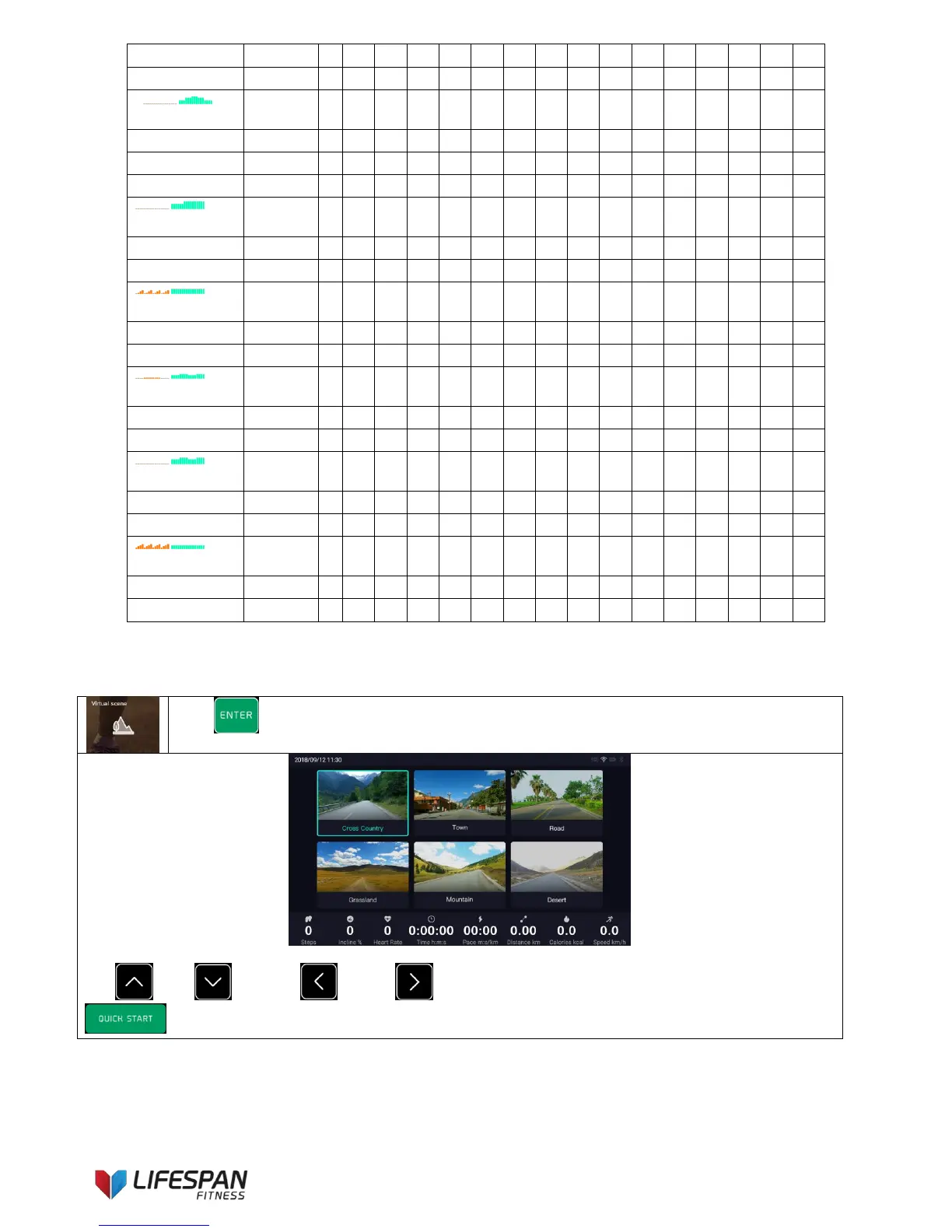
Press “ENTER” button to enter this category, the display interface is as follows
Use “UP”, “DOWN”, “LEFT, “RIGHT” buttons to select virtual scene type, press
“QUICK START button to start the treadmill and run the selected virtual scene workout.
Cross Country
Segment
1
2
3
4
5
6
7
8
9
10
11
12
13
14
15
16
Speed
4
4
10
10
10
10
10
6
6
6
6
6
10
10
4
4
Incline
0
4
2
0
0
0
0
2
2
4
4
4
0
0
2
0
Weight Loss
Segment
1
2
3
4
5
6
7
8
9
10
11
12
13
14
15
16
Speed
6
6
6
10
10
10
12
12
12
10
10
10
6
6
6
6
Incline
0
0
0
0
0
0
0
0
0
0
0
0
0
0
0
0
Calorie Burn
Segment
1
2
3
4
5
6
7
8
9
10
11
12
13
14
15
16
Speed
8
8
8
8
8
8
12
12
12
12
8
8
8
8
8
8
Incline
0
0
0
0
0
0
0
0
0
0
0
0
0
0
0
0
Endurance
Segment
1
2
3
4
5
6
7
8
9
10
11
12
13
14
15
16
Speed
8
8
8
8
8
8
8
8
8
8
8
8
8
8
8
8
Incline
0
2
4
6
0
2
4
6
0
2
4
6
0
2
4
6
Power Walk
Segment
1
2
3
4
5
6
7
8
9
10
11
12
13
14
15
16
Speed
6
6
6
6
8
8
8
8
6
6
6
6
8
8
8
8
Incline
0
0
0
0
2
2
2
2
2
2
2
2
0
0
0
0
Fitness Test
Segment
1
2
3
4
5
6
7
8
9
10
11
12
13
14
15
16
Speed
8
8
8
8
10
10
10
10
8
8
8
8
10
10
10
10
Incline
0
0
0
0
0
0
0
0
0
0
0
0
0
0
0
0
Hill Run
Segment
1
2
3
4
5
6
7
8
9
10
11
12
13
14
15
16
Speed
6
6
6
6
6
6
6
6
6
6
6
6
6
6
6
6
Incline
2
4
6
8
2
4
6
8
2
4
6
8
2
4
6
8

Related product manuals