Note: The system version, hardware performance and current network signal are the factors that could affect the
implementation of the screen projection. When the screen projection is completed, content of the mobile phone will
be synchronized to the treadmill screen.
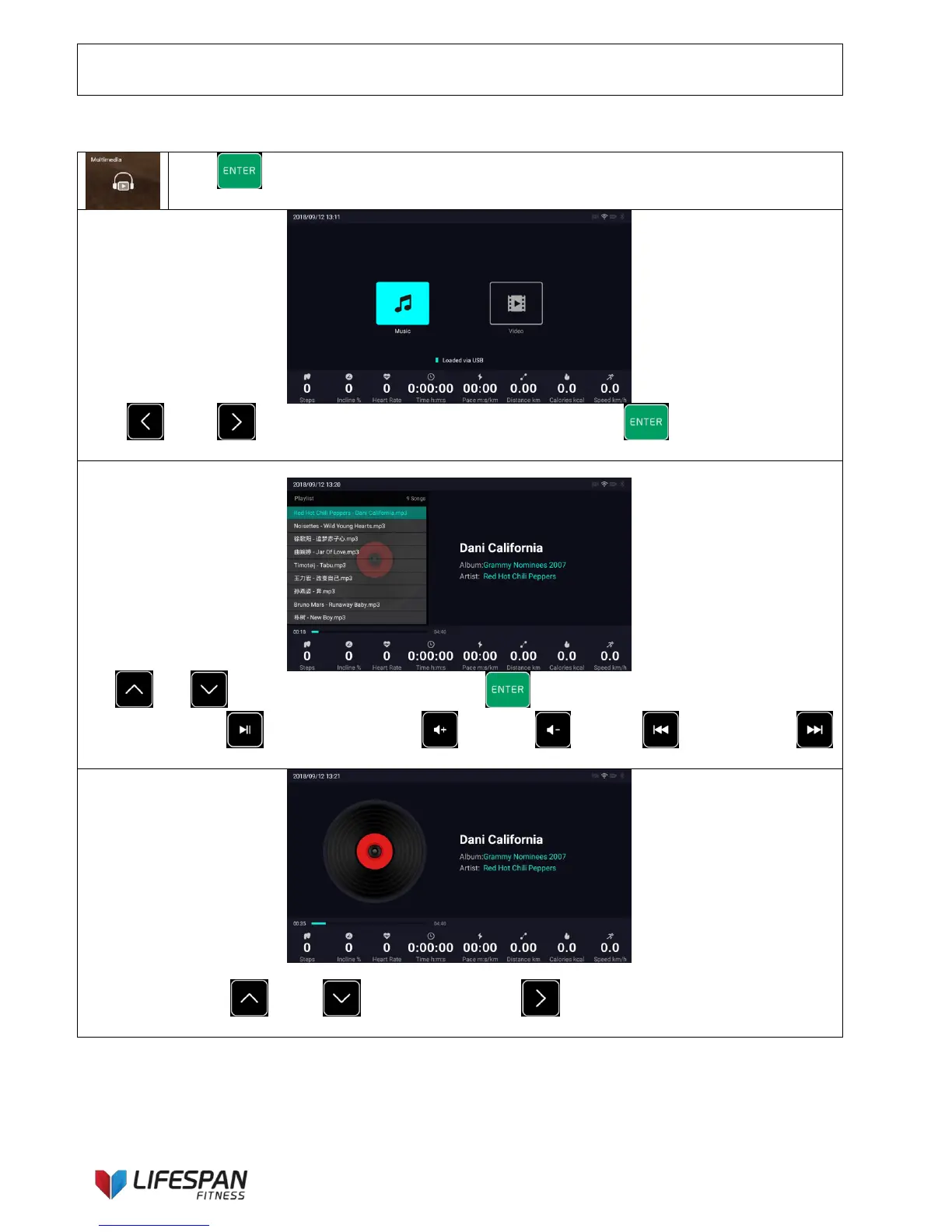
Press “ENTER” button to enter this category, the display interface is as follows:
Press “LEFT”, “RIGHT” buttons to select the media category and press “ENTER” button to enter
this function (local music). The display interface is as follows:
Select "local music" and enter, the display interface is as follows:
Use “UP”, “DOWN” buttons to select songs, press “ENTER” button to play music.
Operation steps: Use “PLAY/PAUSE” button, “Volume+”, “Volume-”, “Previous Song”,
“Next Song” buttons on the keypad to perform and implement the related functions.
The song list will be automatically eliminated after about 5 seconds or when there’s no operation conducted for
about 5 seconds. Use “UP” or “DOWN” buttons or use “RIGHT” button on the keypad to awaken
the song list.



 To Next Page