18
TOOLS AND HARDWARE REQUIRED FOR THIS PAGE
ALI
AAE
ABD
!*-
ABD
AAO
AAE (x2)
ABD (x4)
ABN (x2)
AAO (x2)
./4//,32%15)2%$&/24()30!'%
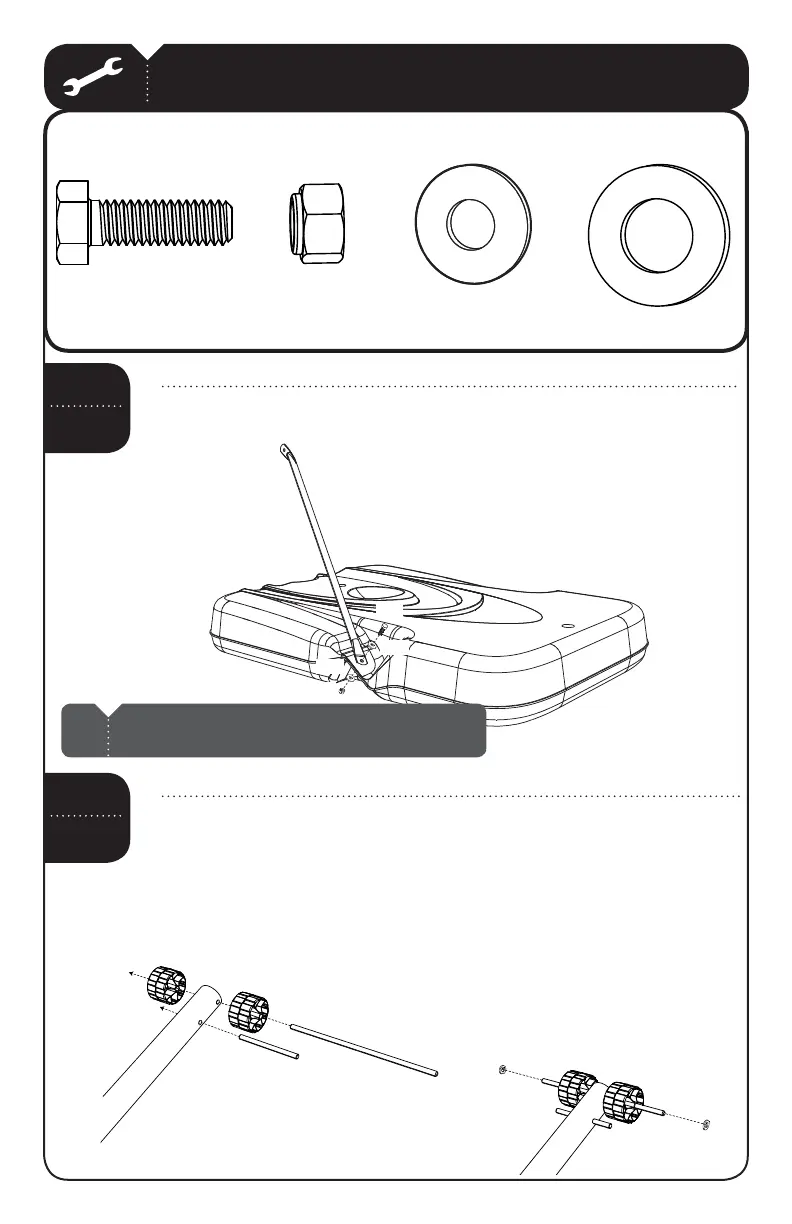
Attach the fl attened end of the Pole Brace (ALI) to the "ASE!*- with
the hardware shown. Only fi nger tighten the hardware.
SEC
2.1
Note: Repeat this step to install the other Pole Brace to
the other side of the Base.
!
Slide the vXv!XLE!*# through the 7HEELS!-5 and the holes
at the end of the Bottom Pole (ALE) as shown. Slide the vXv!XLE!*%
through the second set of holes at the end of the Bottom Pole as shown.
Then slide two 1/2” x 1/8” Spacers (ABN) onto the 1/2” x 15 3/4” Axle and
position them against the Wheels.
SEC
2.2
!*#
ABN
ABN
AMU
AMU
!*#
ALE
!*%



 To Next Page