10
1. Overview 2. Setup & Use
3. Optional
Accessories
4. Troubleshooting
5. Warranty, Safety
& Specifications
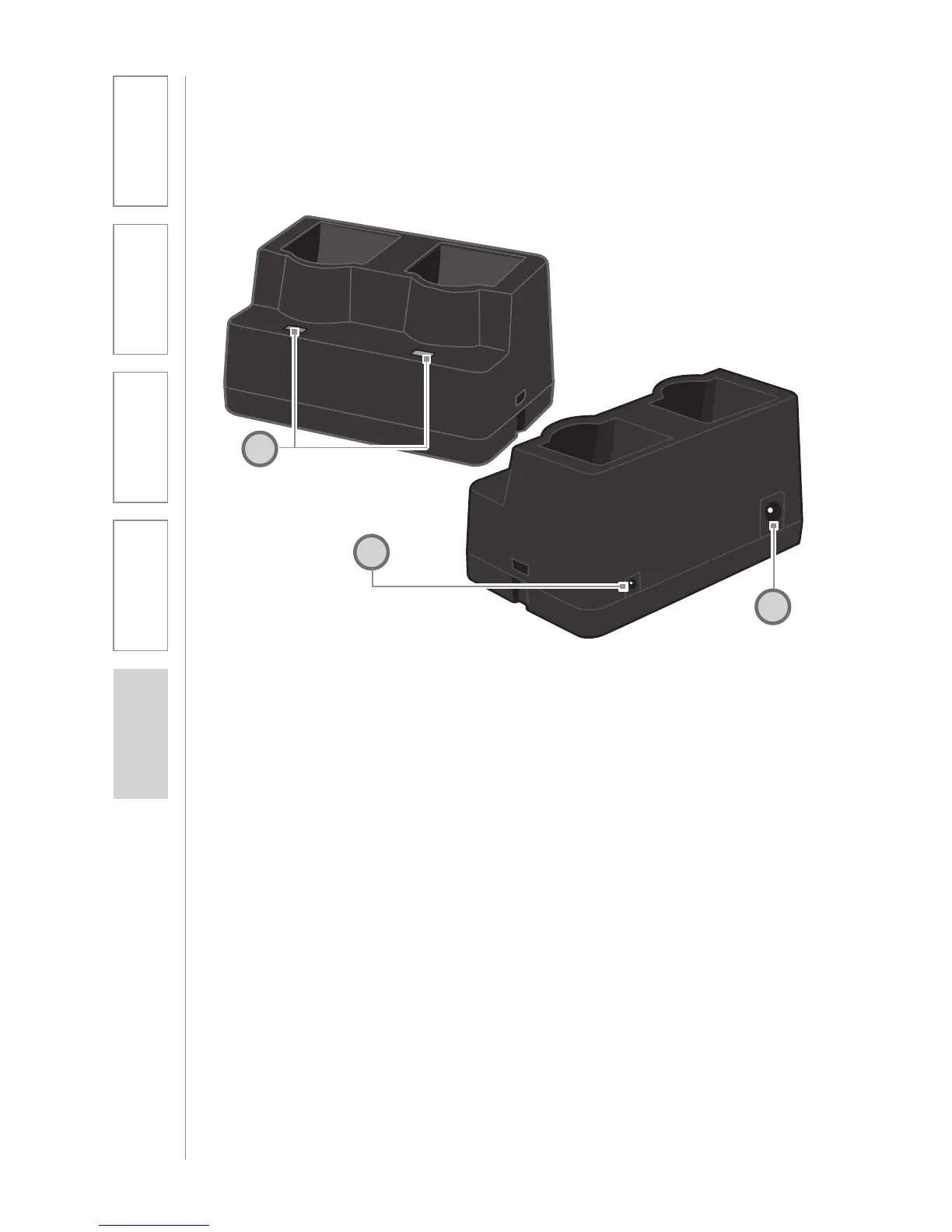
1. CHARGE INDICATORS: The light
glows red while the REDMIKE is
charging. When fully charged, the
light will glow green. A blinking
red light indicates that no battery
is sensed, (REDMIKE Yellow
Protective Tab may not have been
completely removed—see page
5, item 4.) A blinking green LED
means a non- Lightspeed battery
has been installed (possibly an
alkaline battery).
2. DC POWER PORT: Connect the
5V/1.0A DC power cord here.
3. OPTIONAL CHARGING PORT:
Plug the charging cord for the
optional LT71 or the REDMIKE
Share microphone here.
CRADLE CHARGER CONTROLS AND
CONNECTIONS
1
2
3


 To Next Page