12
1. Overview 2. Setup & Use
3. Optional
Accessories
4. Troubleshooting
5. Warranty, Safety
& Specifications
When fully charged, the circuit switches to a trickle charge, which will not
overcharge or damage the batteries. A fully charged 705iR can operate under
battery power for up to 6 hours.
2. CHARGING THE 705iR
1. Ensure the power knob (CH A
POWER) on top of the 705iR is
turned off.
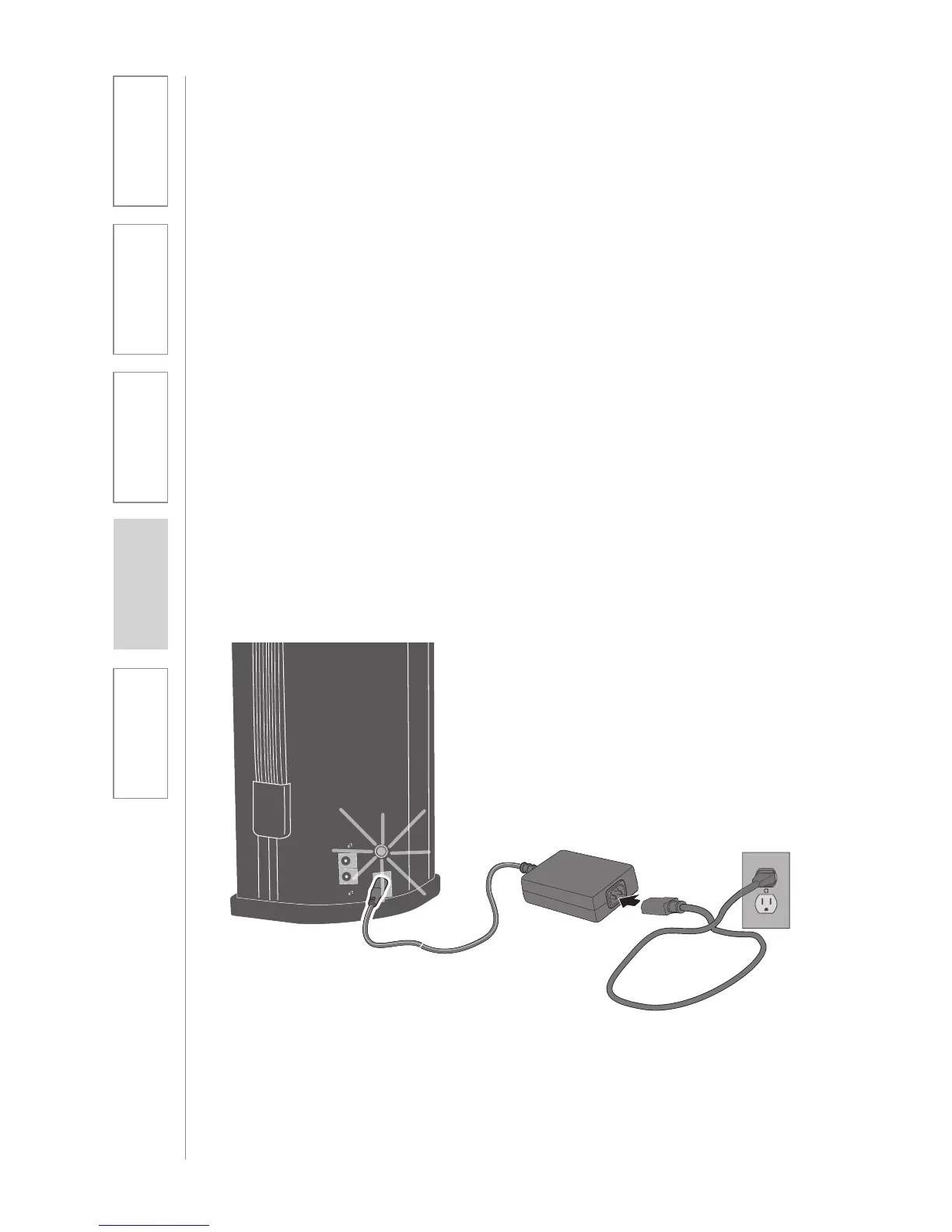
2. Plug the power supply/charger
cable into a standard AC outlet.
NOTE: Many users opt to only use the
AC power. If this is the case, it’s not
necesary to charge the battery.
3. Plug the other end of the power
supply/charger into the DC power
jack on the back of 705iR. The LED
above the DC will glow red. A solid
green LED indicates the 705iR is
fully charged.
DC POWER
CHARGER OUT
Caution:
Discharging NiMH batteries until no
charge remains can reduce battery life
and, with continued discharging, to fail.
Recharging the NiMH batteries in this
product every day will extend their life.


 To Next Page