EasyManua.ls Logo

Lightware UMX-TPS-TX120 - Editing an EDID; Creating an EDID - Easy EDID Creator

Lightware UMX-TPS-TX120
183 pages
Print Icon
To Next Page IconTo Next Page
To Previous Page IconTo Previous Page
Loading...
  

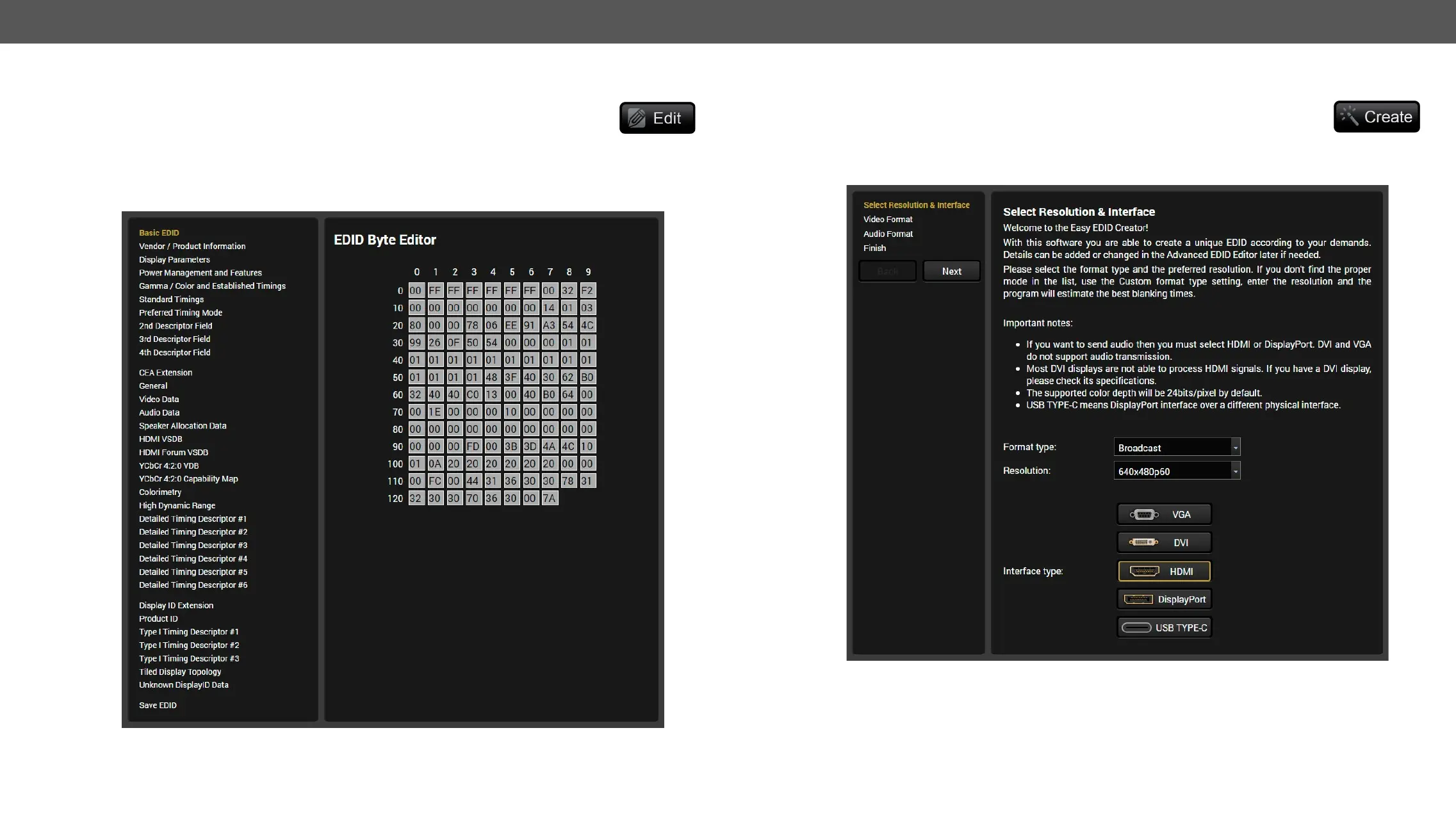
Editing an EDID
Select an EDID from Source panel and press the Edit button to display Advanced EDID Editor

including the additional CEA extensions. Any EDID from the devices memory or a saved
               

memory. For more details about EDID Editor please visit our website (www.lightware.com) and download
the EDID Editor Application note. #edid
EDID Editor window
Creating an EDID - Easy EDID Creator
Since above mentioned Advanced EDID Editor needs more complex knowledge about

Easy EDID Creator it is possible to create custom EDIDs in four simple steps. By clicking
on the Create button below Source panel, Easy EDID Creator is opened in a new window. For more details about
EDID Editor please visit our website (www.lightware.com) and download the EDID Editor Application note.
EDID Creator Window

Table of Contents