Suzhou Lily Tech. Co., Ltd.
Page 4. Total 5 pages
If【Egg turn times set U60】= 0, egg turning timer will never stop (never stop egg turning).
If【Egg turn times set U60】> 0, egg turning timer will stop (stop egg turning) after the counter value reaches U60,
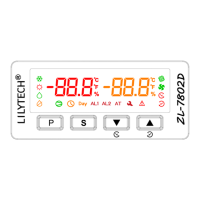
and , blink.
Egg turn period time (phase) saving
If【Egg turn period time saving U67】= 0, Egg turn period time is not saved.
If【Egg turn period time saving U67】= 1, Egg turn period time will be saved once every 30 minutes. When power
supply loses and come back, the timer time continues from the saved time.
Check egg turned times
See: Operation-> Check incubated days and egg turned times.
Egg turn counter reset manually
Keep〖S〗and〖▼〗depressed simultaneously for 5 seconds, display: “cnt” + “Clr”, the counter resets.
Egg turn counter reset after power supplied.
If【Reset egg turn counter after power supplied U66】= 0, the counter resets after power supplied.
If【Reset egg turn counter after power supplied U66】= 1, the counter does not reset after power supplied.
Stop egg turning
Keep〖P〗and〖S〗depressed simultaneously for 3 seconds, stop or start egg turn timer running.
When egg turn timer stops, and blink.
Egg turning manually
Keeping〖▲〗depressed for 3 sec. starts right egg turning, display , R4 energized, R3 deenergized.
Keeping〖▼〗depressed for 3 sec. starts left egg turning, display , R3 energized, R4 deenergized.
Incubation days
When incubated days has reached【Max incubation days set U69】, the day counter stops counting, blinks.
Note: after incubated days has reached the max incubation days, the controller will not stop control.
Check incubated days
See: Operation-> Check incubated days and egg turned times.
Incubated days reset manually
Keep〖S〗and〖▲〗depressed simultaneously for 5 seconds, display: “day” + “Clr”, the counter resets.
Incubated days reset after power supplied
If【Reset incubated days counter after power supplied U68】= 0, the counter resets after power supplied.
If【Reset incubated days counter after power supplied U68】= 1, the counter does not reset after power supplied.
External digit input (DI)
If【External digital input working mode U70】= 0, disable DI function.
If【External digital input working mode U70】= 1, alarm when DI is short.
If【External digital input working mode U70】= 2, alarm when DI is open.
When alarming, beeping (when【Beep alarming U71】= 1) , R1 keeps working, all other outputs are deenergized.
Buzzer alarming
When【Beep alarming U71】= 1, if there is failure, or effective DI input, there is beeping alarming.
Then failure disappears, no input to DI, the alarming stops.
Press〖P〗can stop beeping.
Sensor
The sensors can be calibrated by setting【Temperature calibration U30】and【Humidity calibration U52】.
When temperature sensor fails, display blinking “E1”, beeping, heating output deenergized, other outputs keep working.
When humidity sensor fails, display blinking “E2”, beeping, humidity output deenergized, other outputs keep working.
When【Beep alarming U71】= 0, no beeping.
Restore to factory set
Keep〖P〗and〖▲〗depressed simultaneously for 3 seconds, “UnL” displays. Then press〖▼〗3 times, all parameters
will restore to factory set, including the password (see the Operation->Parameter code table column “Factory set”).
PID parameters Auto Tuning (AT)
Auto tuning operation
By AT, we could find optimized parameters for most
temperature control system. AT step:
1. Set【Heater power during PID auto tuning U74】1
st
, or
set it in step 4. Factory set for it is 50%, which is
considered a best percent.
2. Set temperature setpoint (SP) for AT.
3. keep〖▲〗and〖▼〗depressed for 5 seconds, U74 value
will display, blinks.


 To Next Page