LK2 Service Manual
Page7 Copyright © 2000 Linn Products Limited. All rights reserved.
Contents Paul O'Neill
Step 3. Re-assemble the LK2
1. Re-attach the heatsink:
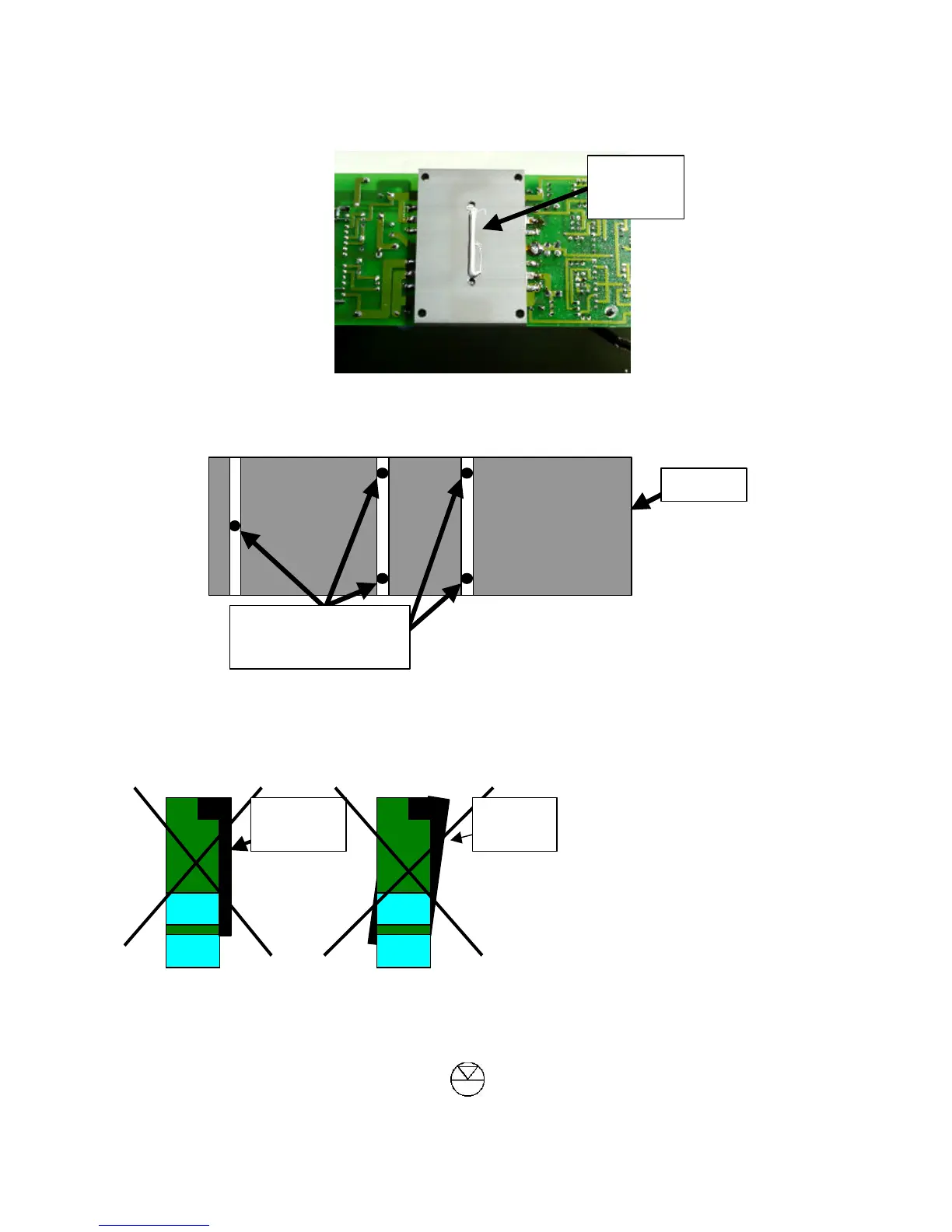
Apply heatsink compound in a single line along the centre of the coupling block as shown below
If board was attached to heatsink by nuts & bolts – follow the instructions below:
• Remove all five bolts from the board and slide the bolts into the slots, arranged as shown below
• Place the board onto the heatsink so that all the bolts pass through their respective holes on the
board (some readjustment is usually necessary).
• Screw the nuts onto the bolts but do not tighten fully.
• Adjust the position of the board with respect to the heatsink so that the two are matched up – i.e.
the two are parallel with each other and neither the board nor the heatsink are protruding at either
side (see pictures below – exaggerated to show problems clearly)
• Once heatsink and board are matched up, tighten bolts.
If heatsink was attached with allen screws:
Heatsink



 To Next Page