REMOTE CONTROL | 13
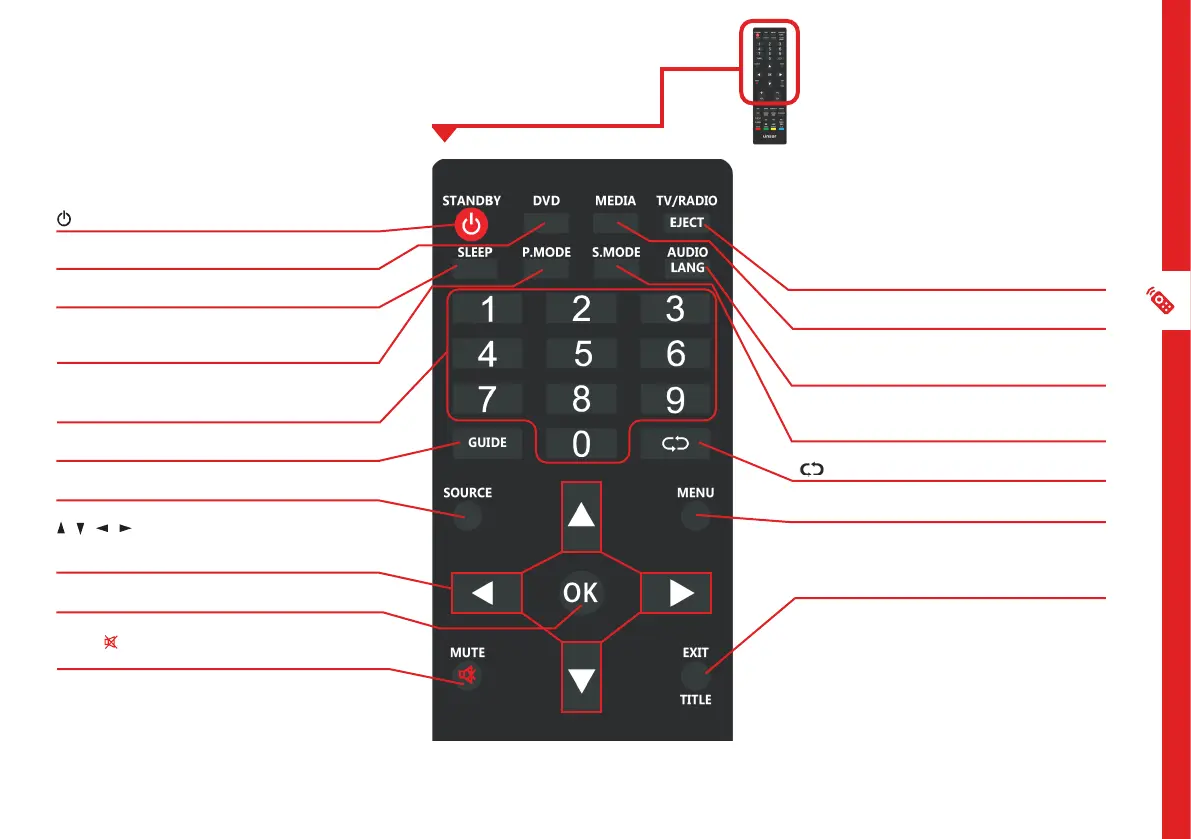
/STANDBY: Switch the TV to On or Standby
DVD: Select DVD mode*
SLEEP: Set the TV sleep timer
P-MODE: Cycle through the different picture
modes
NUMBER BUTTONS (0-9): Press to select a TV
channel directly when watching TV
GUIDE: Launch the TV Guide (DTV)
SOURCE: Switch the input source
/ / / : Press the UP/DOWN/LEFT/RIGHT
buttons to navigate the on-screen menus and
adjust the system settings
OK: Display the channels list (DTV).
MUTE/ : Mute the sound. Press again or press
VOL+ to restore the sound
Buttons & Functions
TV/RADIO/EJECT: Switch between TV or radio
/ Eject a disc (DVD)*
MEDIA: Select USB mode
AUDIO/LANG: Switch the available sound-
track language (DTV/DVD)*
S-MODE: Cycle through the different sound
modes
: Return to the previous channel
MENU: Display the main TV menu
TITLE/EXIT: Exit from the main TV menu
displayed on the screen; Display the DVD title
menu*
* DVD functions are not
applicable for this model.



 To Next Page