10
Upgrades
Your F3’s Railsounds system—the basics
L
ionel Railsounds is the most realistic
model railroad sound system in the
world. Your F3 Railsounds upgrade features
digital samples from an authentic F3 for the
ultimate in realism.
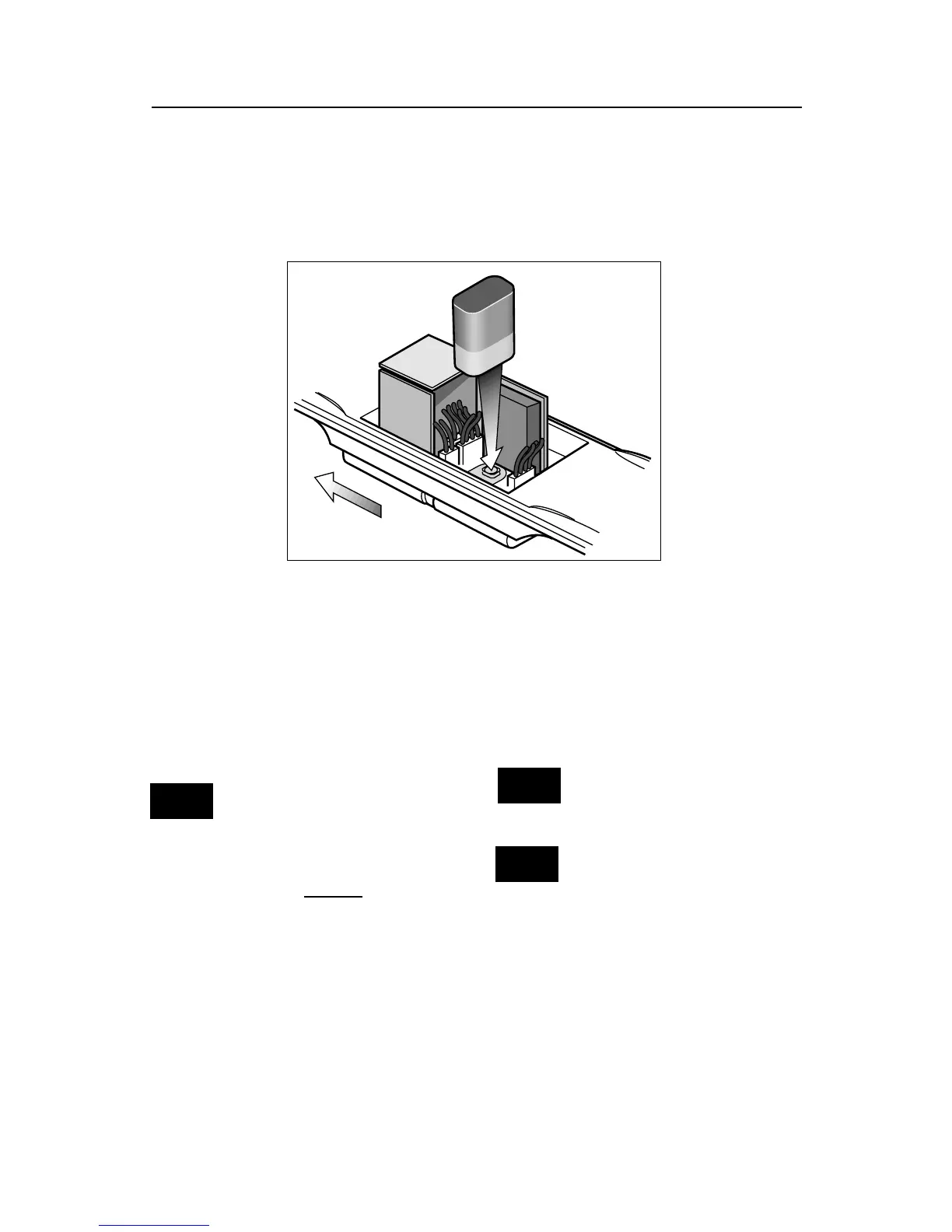
Begin by
installing a 9-
volt alkaline
battery in the
non-powered
F3A unit. This
ensures inter-
ruption free
operation of
Rail-Sounds.
Remove the
front screw on
the underside of
the frame and lift
the body up
slightly, pulling it
forward to release
the two rear clips
from the frame slots. Connect the 9-volt bat-
tery to the battery clip on the circuit board.
Replace the body and reinsert the screw.
Although track voltage powers
Railsounds, the battery is re-
quired for uninterrupted opera-
tion and shutdown sequences.
Use only alkaline batteries; do
not use “heavy duty” batteries.
Apply track power and the F3’s Railsounds
system delivers an authentic start-up
sequence, followed by sounds of the locomo-
tive at idle. As the F3’s speed increases, the
RPMs move through four levels of roar.
Sounds return to
idle only after
the locomotive
has come to a
complete halt. To
silence diesel
RPM roar (horn
and bell remain
unaffected), slide
the Railsounds
switch to its SIG
(signal) position
before powering
up the locomo-
tive. See page 18
for the non-pow-
ered F3A unit’s
switch location
and positioning. To return to the diesel RPM
roar, return the switch to the FULL position.
Discontinue locomotive power
for 10 seconds before changing
the Railsounds on/off switch.
If Railsounds “drops out” dur-
ing track power interrupts,
replace the battery.
Install a 9-volt alkaline battery in your non-powered
F3A unit. Remove the body, and connect the battery to
the circuit board. Then reinstall the body on the
frame.
Note!
Note!
Note!
To Front of F3









 To Next Page