18
Assigning your powered and non-powered F3A units a new ID#
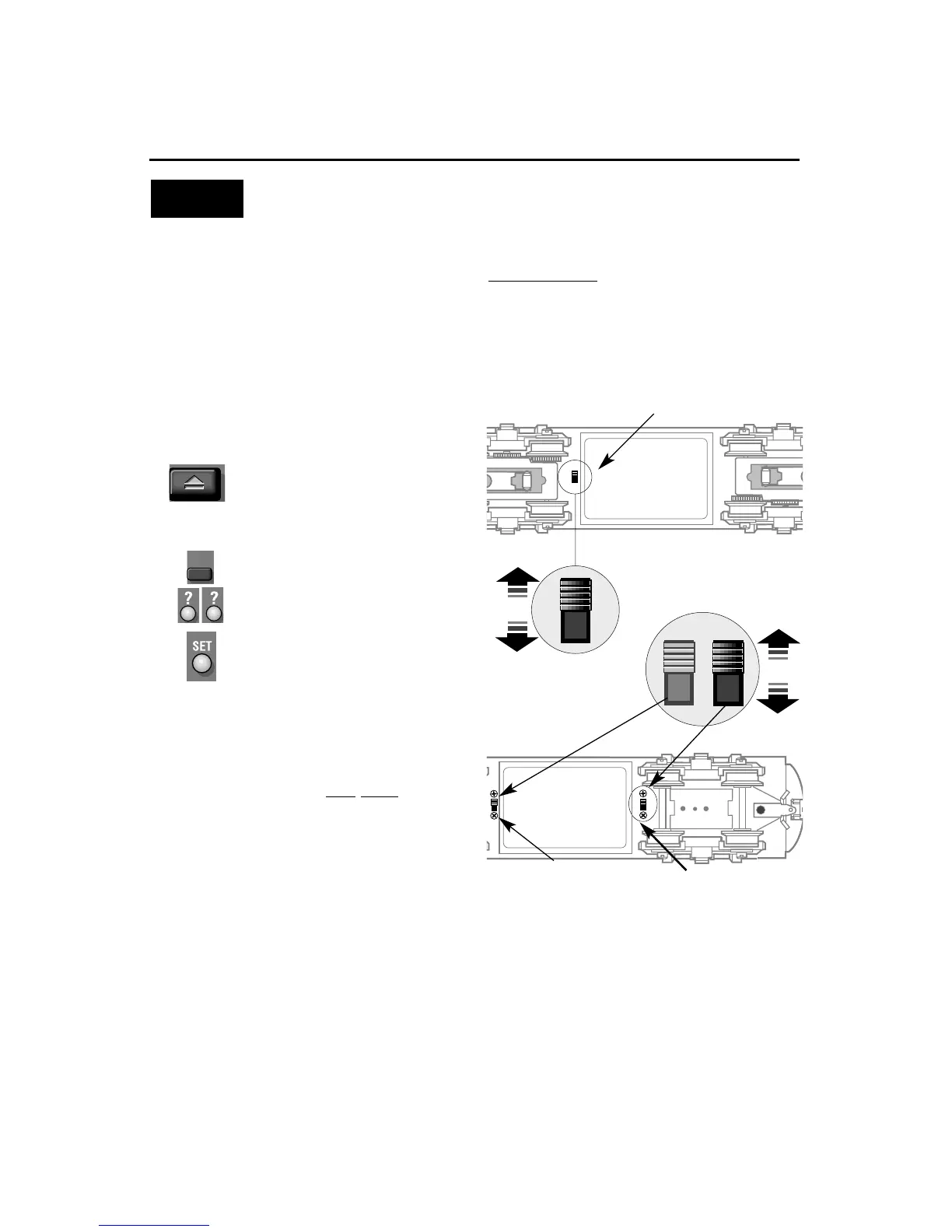
Assign a new I D# to your
Command-equipped F3 set
Command Base ON
Place the F3 set on track
PowerMasters set to CMD or
traditional power supplies ON FULL
Set the reverse unit control switches to
PROGRAM on both F3A Units
Turn track power on
(PowerMasters):
Press BOOST
Program the F3A units with a new
ID#:
Press ENG
Press a number you choose
(the ID#)
Press SET
Set BOTH reverse unit control
switches to FORWARD/RUN
Your F3 set remembers its ID#
forever; change it any time with
these steps
Example
TrainMaster Command operations
Using CAB-1, press ENG, the locomotive
ID#, then press the SET button located under
CAB-1’s removable panel. See the powered
F3A’s headlight flash and hear the non-pow-
ered F3A’s horn honk; that’s your signal that
the programming has been accepted. Slide
BOTH control switches to FORWARD/ RUN.
Your F3 set is now programmed to respond
to the number you entered.
We recommend that you chose an easy to
remember ID# for your engine. Some
possibilities are part of the engine road
number, your age, any two digit number
that is not used by another
engine. Write the number on a small
piece of tape and put this on the bottom
of the fuel tank to aid in remembering.
A
s your fleet of Command-equipped
Lionels grows, give your F3 set its own
ID#. Choose from any between 1 and 99. For
ease of use, give both locomotives
the same ID#.
Turn the Command Base ON and place the
F3 set on track. Power up, then slide BOTH
locomotives reverse unit control switches to
PROGRAM.
Non-powered F3A program
switch
F3 A reverse unit control switch
FORWARD
RUN
FULL
PROG
LOCK
SIG
PROGRAM
LOCK
FORWARD RUN
Non-powered F3A sound
switch









 To Next Page