Rev: 10.23.23 Page 16 CCD-0005481
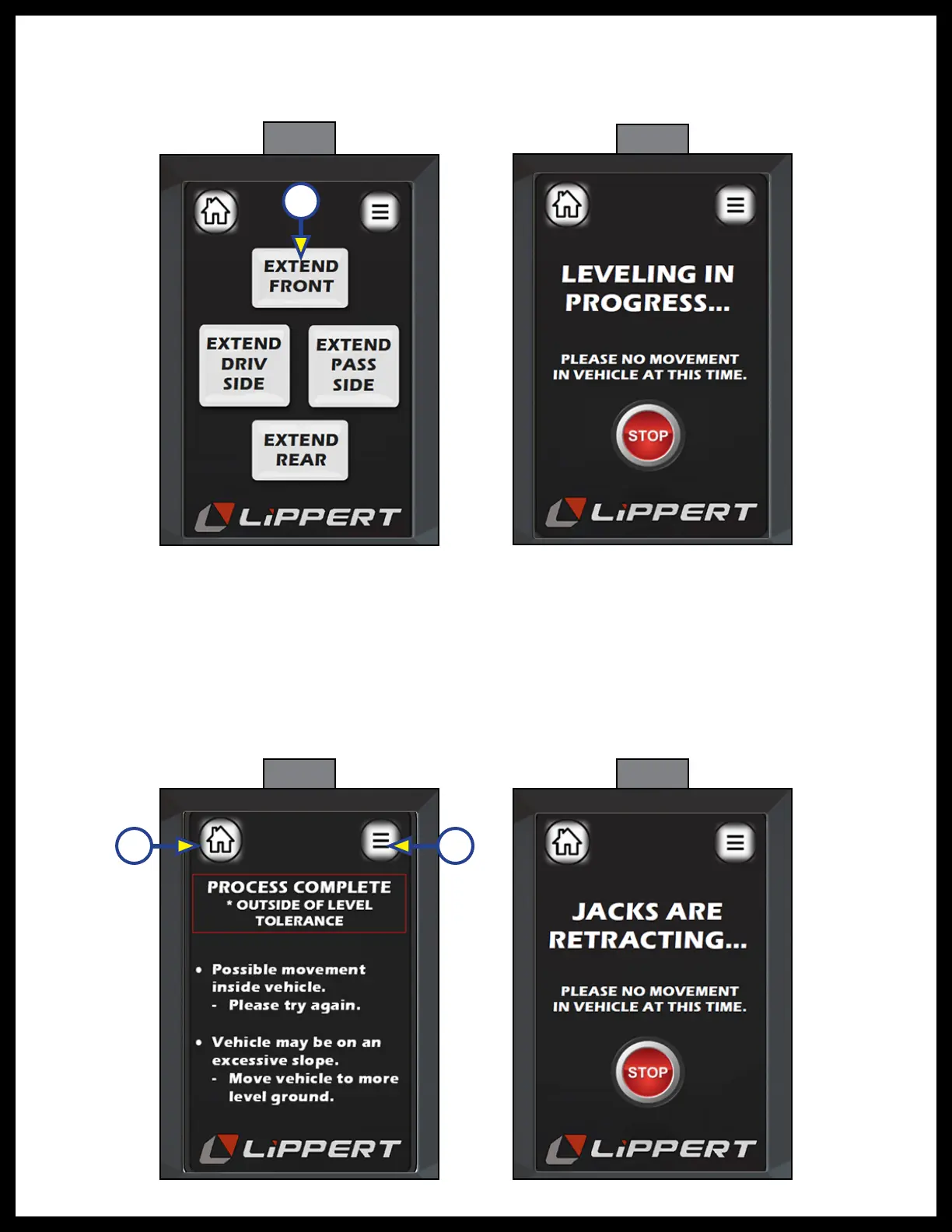
3. Figure 25 is assigned to “Manual Mode” button from menu screen (Fig. 24B). Each button, ex. Extend
Front (Fig. 25A) is a button that operates both front jacks. Each button is a pair of jacks and only
extends the jacks.
4. Figure 26 is the screen displayed during the leveling process.
5. During the, “Auto Level” process, (Fig. 23B), the "Leveling Error" screen (Fig. 27) will appear if:
• The control senses movement in the coach during the leveling process.
• Too much time has passed since the procedure started.
• Jack cylinders have reached full stroke so extend cannot occur.
• Coach is parked on too great of an incline (typically over 4.5 degrees) and cannot complete level
process.
6. To exit the Leveling Error screen, press Home (Fig. 27A) or Menu (Fig. 27B) icons.
Fig. 26
Leveling In Progress
Fig. 25
Manual Mode
A
Fig. 27
Leveling Error
Fig. 28
Jacks Are Retracting
A B



 To Next Page