Page 8 Pulse
TM
Smartpen User Manual
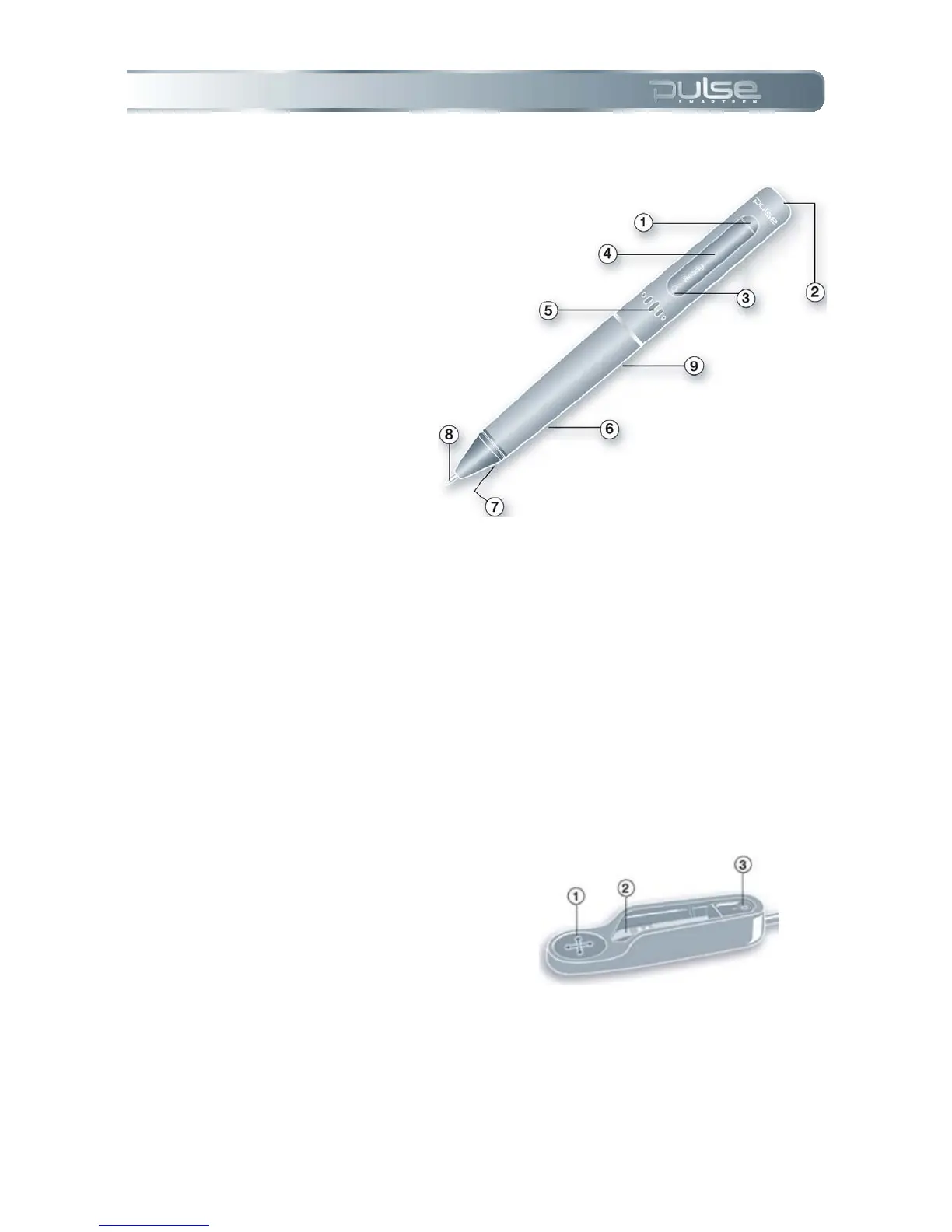
The Pulse Smartpen
1. Power button
2. Headset jack
3. Built-in microphone
4. Organic Light-Emitting Diode
(OLED) display
5. Built-in speaker
6. USB connector
7. Infrared camera
8. Removable ink cartridge
9. Rechargeable lithium battery
(non-removable)
USB Mobile Charging Cradle
The Pulse smartpen USB mobile charging cradle serves several important functions. Once you
dock your Pulse smartpen into the cradle, your written and recorded data will be automatically
transferred to your computer after the Livescribe Desktop application is opened. The cradle will
also allow you to charge your Pulse smartpen through the USB port on your computer.
1. Nav Plus (navigation control)- If
you have no Livescribe dot
paper available, you can use
this label to navigate your
Pulse smartpen menu and
applications.
2. USB connector- A magnet
helps your Pulse smartpen lock
snugly into place.
3. Ink cartridge removal ring- To
replace ink cartridges see
Chapter 9: Accessories &
Supplies.



 To Next Page