59
8.2 Download and Install
Preparation
a. Power the inverter and/ or Wi-Fi router on;
b. Make sure the Wi-Fi stick is connected to the inverter and the network is configured.
Procedure:
Method 1: Search for the keyword "Livoltek" from Google Play Store or Apple AppStore,
download and install the latest version of the monitoring software for free.
Method 2: Scan the following QR code and download the
latest installation package.
Step 1: Install LIVOLTEK APP
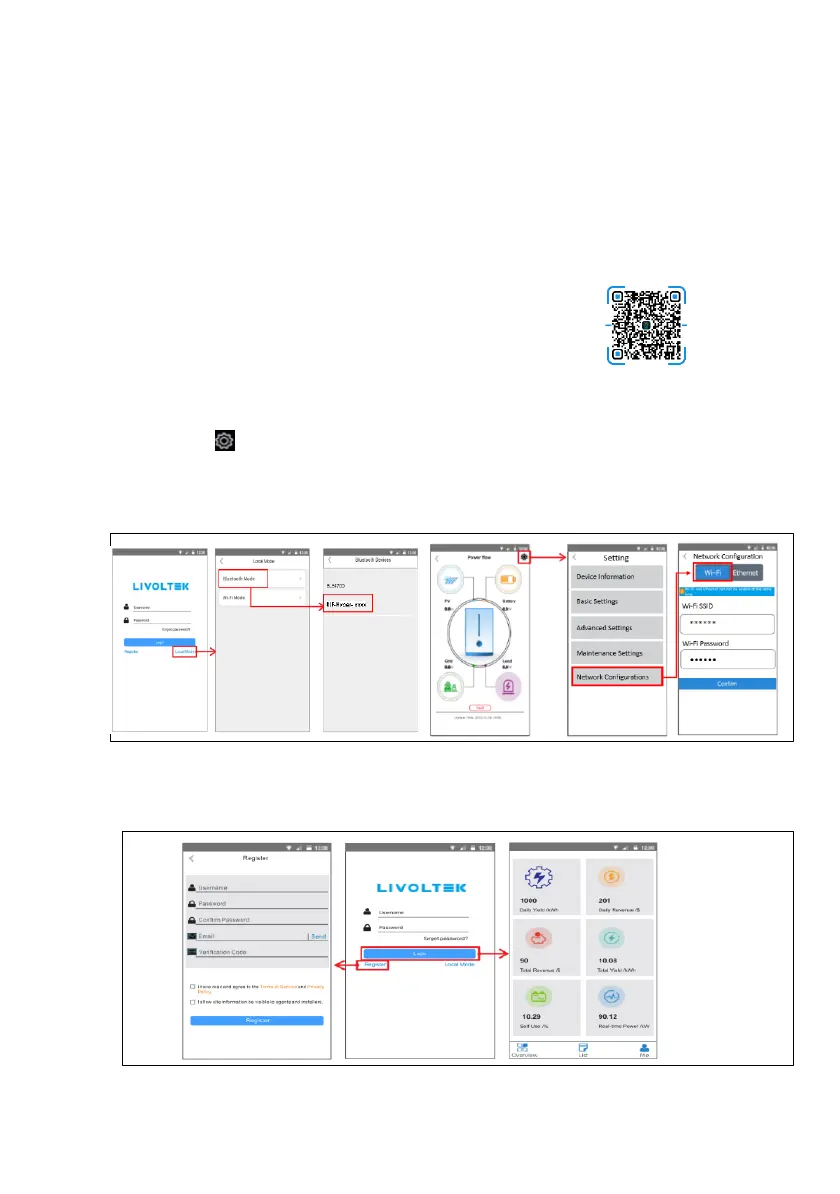
Step 2: Wi-Fi Configuration
• Click on "Local Mode" ----> "Bluetooth Mode".
• Find your inverter SN (named with "BLF-HP1- xxxx").
• Click on " " to go setting.
• Click on "Network Configurations"----> Choose "Wi-Fi"
• Enter wireless network name & password
• Click on "Confirm" and wait 10s, "Success" will display on the APP if successful.
Step 3: Registering an Installer Account
Open the app and login with the username & password. Register it first if you don’t have
an account, which provides access to the remote monitoring and management.
-7-





 To Next Page