98
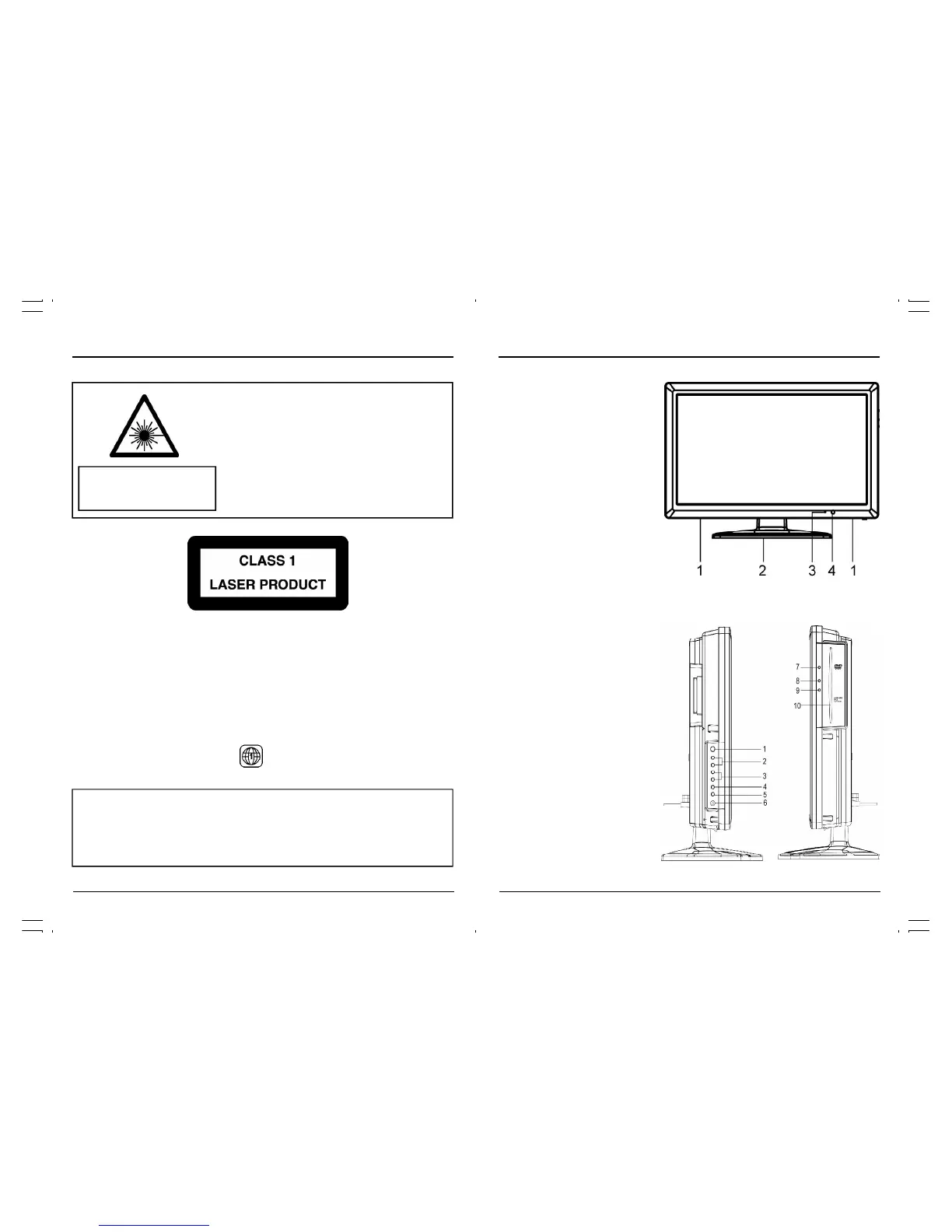
Location of Controls
Front View
1. Speaker
2. Stand base
3. Power indicator
4. Remote Sensor
Side View
1. Power Button
2. Channel up/down Buttons
3. Volume up/down Buttons
4. Menu Button
5. Input Button
6. Headphone Jack
7. Eject Button(DVD)
8. Play/Pause Button(DVD)
9. Stop Button(DVD)
10. DVD Tray
Invisible laser radiation when open
and interlock failed or defeated.
Avoid direct exposure to laser beam.
LASER SAFETY
This unit employs an optical laser beam system in the CD
mechanism, designed with built in safeguards. Do not attempt to
disassemble, refer to qualified service personnel.
Exposure to this invisible laser light light beam may be harmful
to the human eye.
THIS IS A CLASS-1 LASER PRODUCT. USE OF CONTROLS,
OR ADJUSTMENTS OR PROCEDURES OTHER THAN THOSE
SPECIFIED HEREIN, MAY RESULT IN HAZARDOUS LASER
LIGHT BEAM EXPOSURE.
This product incorporates copyright protection technology that is protected by U.S.patents
and other intellectual property rights. Use of this copyright protection technology must be
authorized by Macrovision, and is intended for home and other limited viewing uses only
unless otherwise authorized by Macrovision. Reverse engineering or disassembly is
prohibited.
Manufactured under license from Dolby Laboratories “ Dolby ”, “ Pro Logic ” and the double-D
symbol are trademarks of Dolby Laboratories. Confidential unpublished works.© 1992-1997
Dolby Laboratories, lnc. All rights reserved.
REGION MANAGEMENT INFORMATION
This DVD player is designed and manufactured to respond to the Region Management Informa-
tion that is recorded on a DVD disc. If the Region number describe on the DVD disc does not
correspond to the Region number of this DVD player, this DVD player cannot play that disc.
The Region number of this DVD player is
DANGER
Important Safety Instructions



 To Next Page