1514
Changing Channels
• Press the "CH / " buttons to change the higher or lower stored channel.
• Press the numeric button “0~9” to direct select the channels.
To return back the previous channel viewed
• Press the “SWAP” button to review the previous watching channel.
To review the on screen informations
• Press the “DISPLAY” button on the remote control to display channel information. When
you press this button, it will display a channel number and related information on screen.
To turn on or turn off the close caption
• Press the “CCD” button to turn ON or turn OFF close caption function.
To change the picture effect
• Press the “P.MODEL” button to select the picture effect.
• User
• Standard
• Dynamic
• Mild
To change the sound effect
• Press the “S.MODEL” button to select the sound effect.
• User
• Standard
• Music
• Movie
To set the sleep time
• Press the “SLEEP” button to select a predetermined time the TV will turn off. The sleep
time can be set to count down from 10 to 240 minutes.
To mute the sound
• Press the “ ” button to swich OFF the sound, press once again to switch ON the
sound.
To change the screen aspect ration
• Press the “ZOOM” button to change the aspect ratio of picture size.
• Full
• 4:3
• Original
• Zoom
To select Input mode
• Press the “INPUT” button to select Source Model.
AUTO POWER OFF
If no signal is continuously detected from the antenna or broadcasting for more than 10
minutes, the TV will power-off automatically.
Using Remote Control
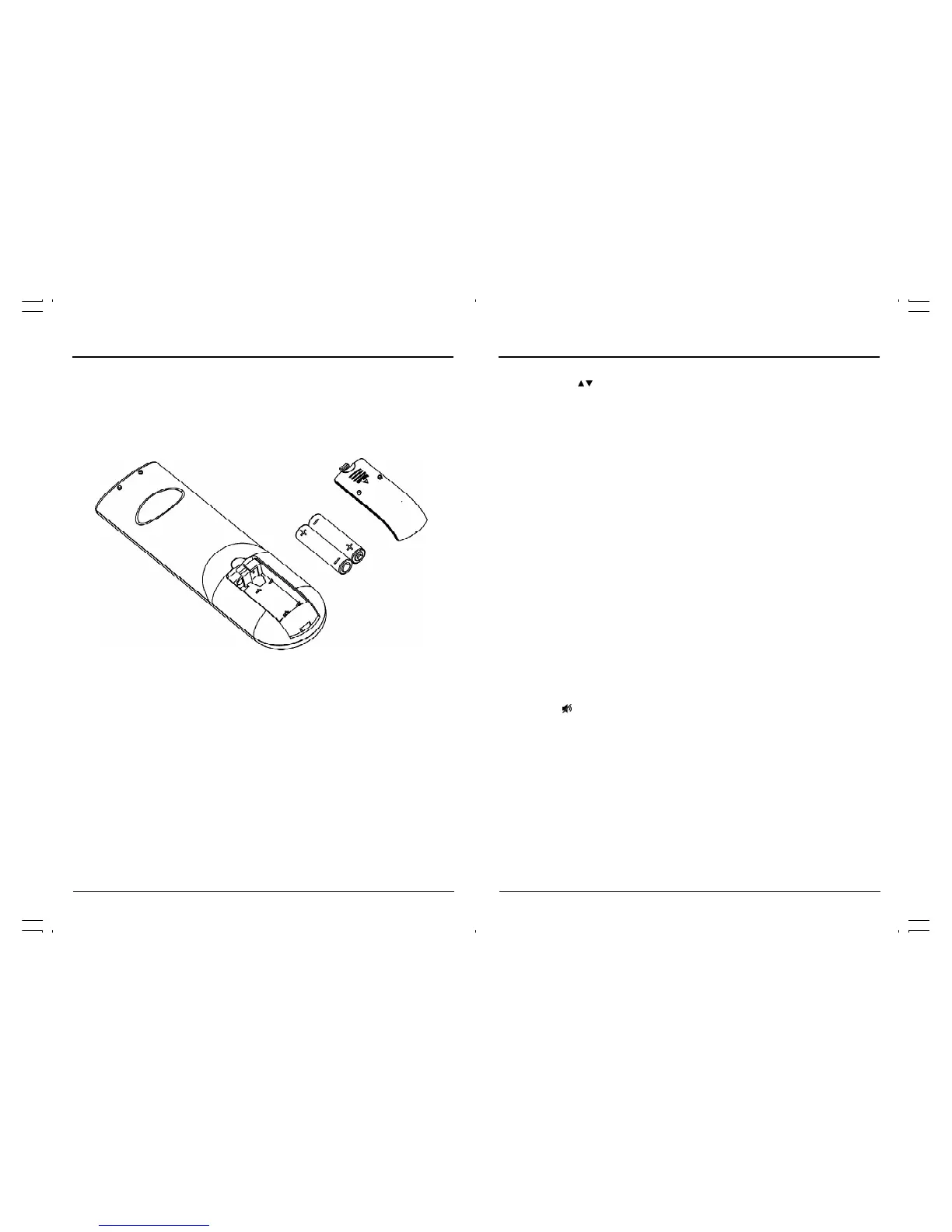
Inserting Remote Control Batteries
Battery Disposal
Please ensure batteries are disposed of safely. Never dispose of batteries in the fire or with house-
hold waste. Check with your local authority for disposal regulations.
The batteries (battery pack or batteries installed) shall not be exposed to excessive heat such
as sunshine, fire or the like.
CAUTION
• Do not attempt to recharge, short-circuit, disassemble, heat or throw the batteries into the
fire.
• Placing with wrong or mixed polarities batteries will result in damage to the batteries and
/or may result in a malfunction of the unit.
• Do not mix old and new batteries.
• Dispose of batteries properly in accordance with local law.
• Do not mix alkaline, standard (carbon-zinc),or rechargeable (nickel-cadmium) batteries.
On the back of the remote control, push down the catch on the battery compartment cover and
lift to remove it.
Insert the two AAA batteries supplied, ensuring that you follow the polarity diagram inside the
battery compartment.
Refit the cover.



 To Next Page