3130
Your television is designed to give you trouble-free performance for many years. If you have
a problem with your TV, try the solutions listed below.
If the suggestions listed below do not solve your problem,contact your local customer support
hotline.
There is no picture or sound, or the TV doesn’t turn on.
• Make sure the TV is plugged in.
• Make sure MUTE is not set on.
• Make sure the POWER is on.
• Make sure a headphone is not inserted.
• If there is neither picture nor sound, unplug the TV for 30 seconds, then plug it in and try
again.
There is no picture or sound on some UHF channels.
• Try another station. If the other stations are OK, it may be a station problem.
• Check that the antenna is connected & adjusted correctly, in good working order and has
no broken wires.
• See if anything is interfering with the antenna signal.
• Make sure the AIR/CABLE setting is correct.
The sound is OK, but the picture is poor.
• Try another station. If the other stations are OK, it may be a station problem.
• Check that the antenna is connected & adjusted correctly, in good working order and has
no broken wires.
There is poor reception on some channels.
• Try another station. If the other stations are OK, it may be a station problem.
• Check that the antenna is connected & adjusted correctly, in good working order and has
no broken wires.
Cannot tune to a cable channel.
• Make sure the AIR/CABLE setting is correct.
• The channel may not be programmed into memory.
The picture rolls, slants, shows lines, is grainy, has poor color, or has ghosts.
• Try another station. If the other stations are OK, it may be a station problem.
• Check that the antenna is connected & adjusted correctly, in good working order and has
no broken wires.
• See if anything is interfering with the antenna signal.
The remote control does not work.
• Make sure the TV is plugged in.
• Make sure there are fresh batteries in the remote control.
• Make sure there is nothing blocking the remote control signal.
TROUBLESHOOTING
About DISC Maintenance
On handling discs
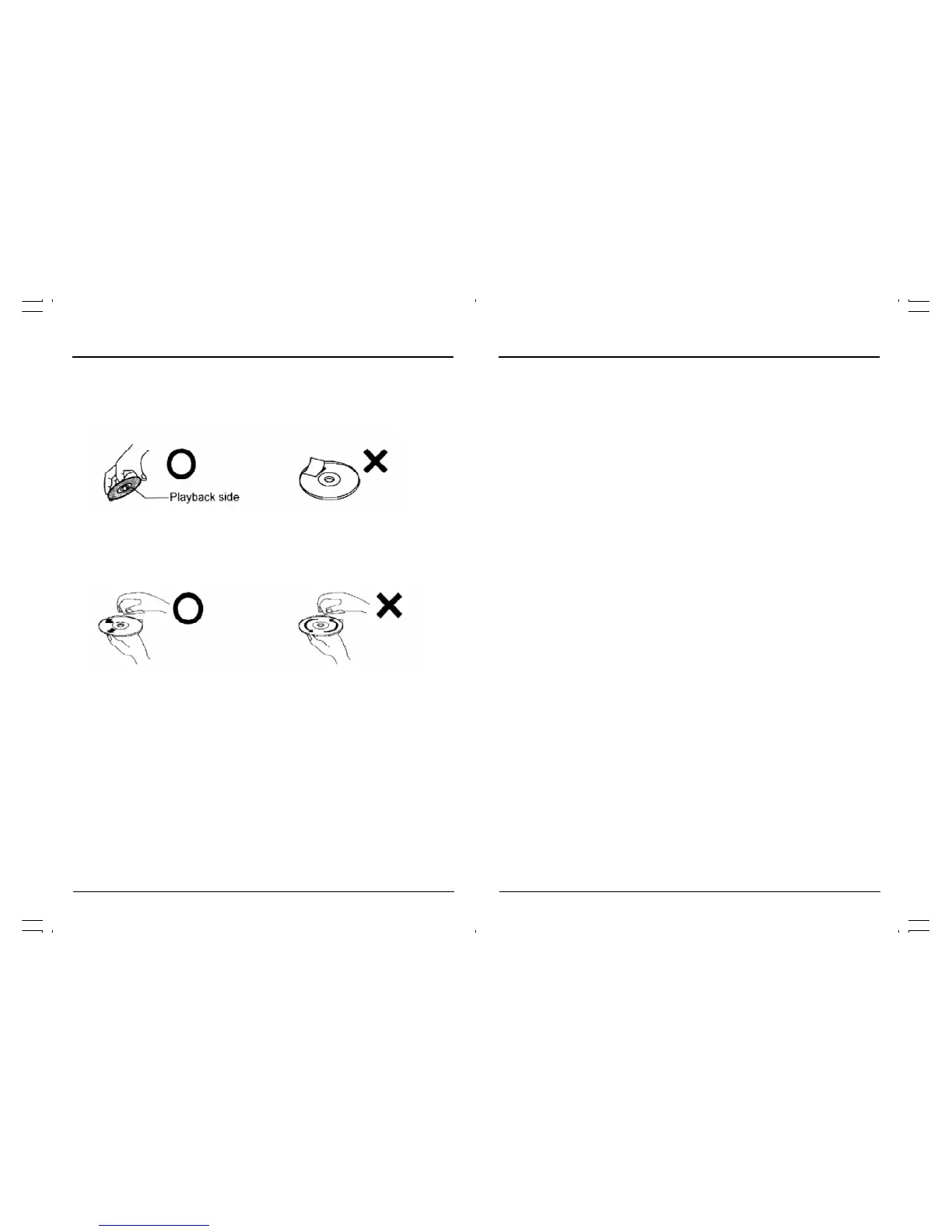
• Be sure to hold the edge of disc. Do not touch the surface of the disc.
• Do not attach paper or tape to discs.
On cleaning discs
• Wipe the disc with a clean, dry cloth from the center outward toward the edges.
• Do not wipe the disc in a circular motion around the center.
• Do not use liquid or aerosol cleaners.
On storing discs
• Store the disc in the case to avoid any risk of scratches, dirt or damage.
• Do not leave the disc exposed direct sunlight or in hot and humid places.
Playable discs
In this unit, use only discs that meet the standard, such as DVD-Video, DVD-R/RW(Video
format only), Audio CD,CD-R/CD-RW(CD-DA or jpeg format). If you use a non-standard disc,
we cannot guarantee playback. Even if such a disc can be played back, we cannot guaran-
tee the image or sound quality.
• This unit is designed to playback music Compact Discs(CD) that conform to the CD standard.
CDs that contain(copy-restriction)signals to protect copyrights cannot be played back.
• Some CD-R/RWs and DVD-R/RW cannot be played back depending on the recording
conditions.
• When you play an 8cm disc, you need the adapter(not supplied).
DVD player operation,continued



 To Next Page