Gocator Line Profile Sensors: User Manual
Getting Started • 38
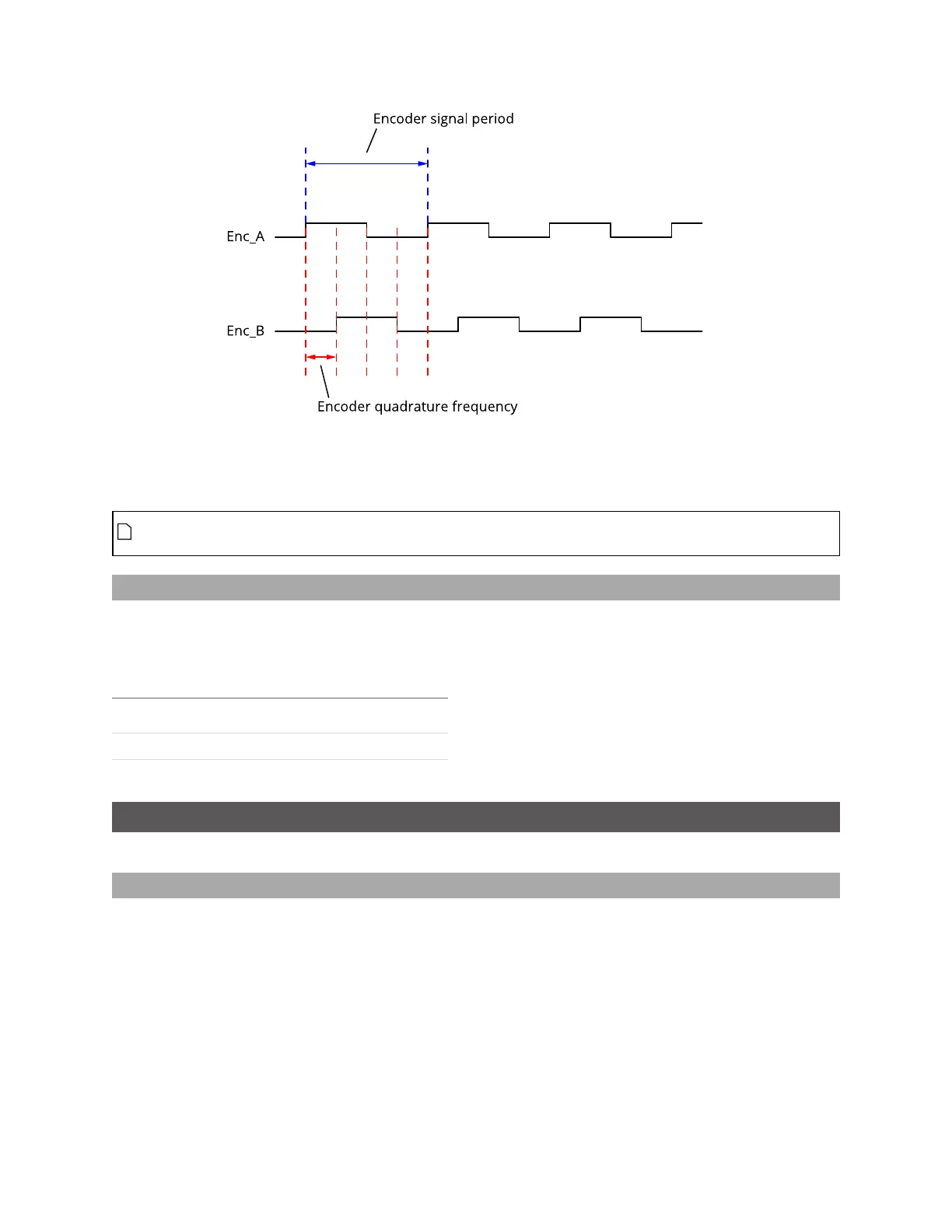
You must use a quadrature frequency when determining which divider to use (see Setting the Divider on
the previous page). Consult the datasheet of the encoder you are using to determine its quadrature
frequency.
Some encoders may be specified in terms of encoder signal frequency (or period). In this case,
convert the signal frequency to quadrature frequency by multiplying the signal frequency by 4.
Setting the Debounce Period
If the quadrature frequency of the encoder you are using is greater than 3 MHz, you must set the
debounce period to “short.” Otherwise, set the debounce period to “long.”
You use switch 4 to set the debounce period.
Debounce period Switch 4
short debounce ON
long debounce OFF
Rut-Scanning System Setup
The following sections describe how to set up a Gocator 2375 rut-scanning system.
Layout
The Gocator 2375 sensor is designed to cover a scan width of up to 4.2 m by using 8 sensors mounted
in parallel.



 To Next Page