33 -
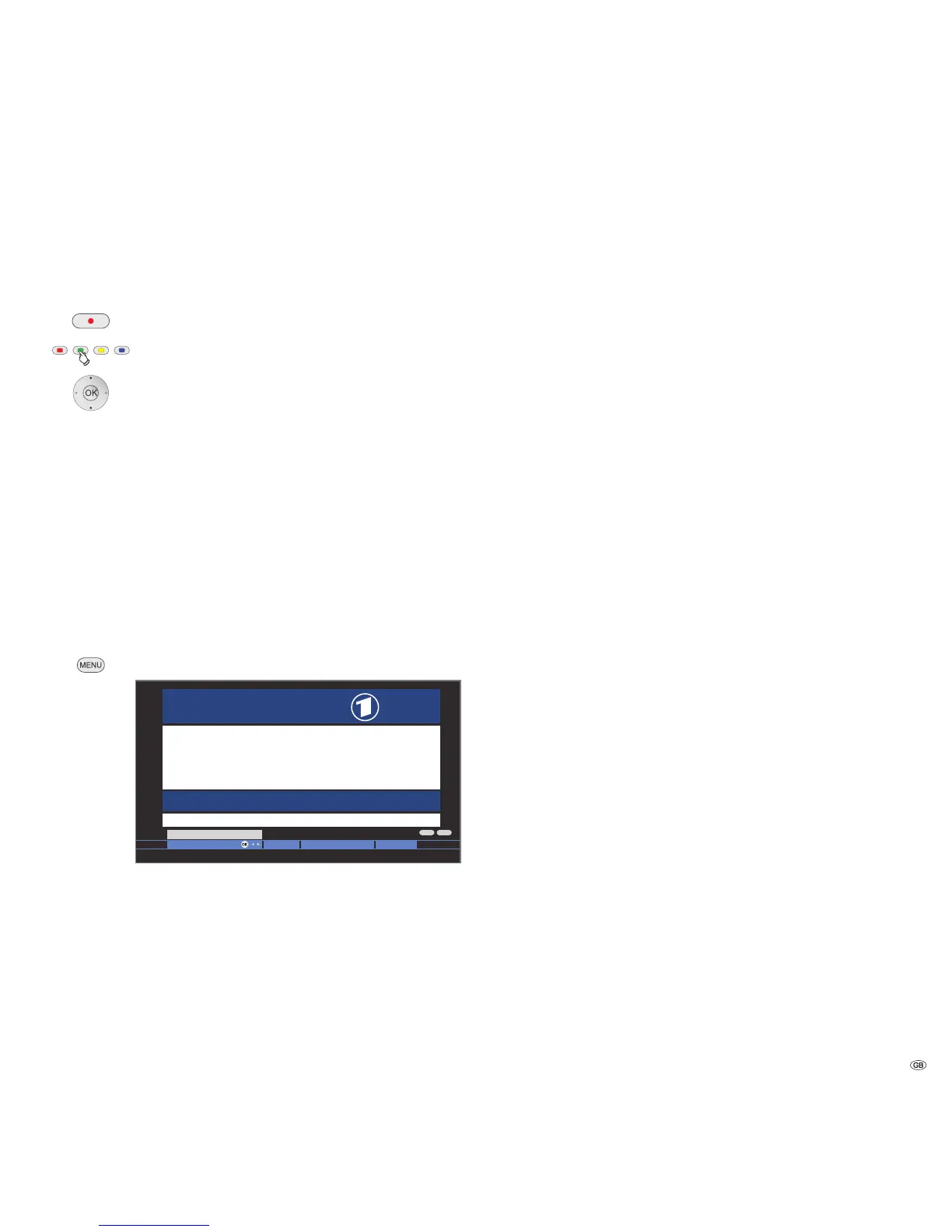
Programming timer recordings via Teletext
➠ Teletext is started,
if not, press the TEXT button.
Call the programme pages of the current station.
Green button: Go to the appropriate page.
6Select the desired programme,
OK to programme the recording.
Change the appropriate recording data in the following
menu Timer data if necessary (see also page 54, "The
direct way to record").
OK Confirm.
Teletext menu
In the Teletext menu you can, among other things, activate news, reveal
pages and configure the teletext with the Settings menu function.
Starting the Teletext menu
➠ Teletext is started,
if not, press the TEXT button.
Call the Teletext menu.
Explanations of the Teletext menu functions:
The current page is hidden when you activate Newsflash.
A symbol at the top left indicates that the function is ac-
tive. If the contents of the message are updated and it is
a small newsflash, this is displayed in the TV picture. If it
is a full screen page, the symbol is displayed in blue and
the page can be called with the OK button.
Shows concealed information, e.g. for quiz questions or
VPS times in the programme preview pages.
Explanations of the Teletext menu functions:
A wizard for recording via teletext helps to programme
an external recorder or the integrated Digital Recorder,
see also the left column.
Other Teletext menu functions:
Input of the first teletext programme preview page if this
deviates from the factory setting (page 301).
Input of the teletext subtitle pages for every station if this
deviates from the factory setting (page 150).
Define up to six teletext pages which can be opened later
from a list in the menu Teletext functions → Personal text
pages (in TV mode press green button, see page 22).
Teletext character set can be switched to other languages
(Russian, Greek, Polish and Turkish).
Improved graphic representation of the Teletext.
(Not offered by all stations.)
Digital teletext (MHEG-5)
In the UK or Ireland, the teletext for DVB-T stations is transmitted as per
the MHEG-5 standard. It contains text, graphics, functions and links.
➠ Only for TV sets with MHEG-5 software.
➠ At the moment only available in United Kingdom and Ireland.
➠
Digital teletext is not available when DVB subtitles are being displayed.
The operation of these menus depends on the particular
provider. Normally after a station is changed, the provider
broadcasting the digital teletext makes an introductory
offer for this service on the screen via menu selection.
Follow these notes.
If no message appears telling you how to switch to digital
teletext after switching to another station, press the TEXT
key. If a selection for DVB subtitles is available, this item
must be hidden before.
Depending on the provider’s respective offer, you can use
the 634buttons and the OK button, the coloured
buttons, the END/TEXT button and sometimes even the
numeric buttons.
If you want to close the digital teletext, just select a dif-
ferent station using the P+/P– buttons or follow the menu
prompts on the screen.
Teletext
Tagess c h a u . . . . 110/112 K u l tur. . . . . . . . . . 500
Wetter . . . . . . . . . . 170 Gesellsc h a f t . . . . . 530
Sport. . . . . . . . . . . 200/600 L o t to/Toto. . . . . . . 6 6 6
TV Gui d e . . . . . . . 300/400 Wirts c h a ft. . . . . . . 700
Seitenauswahl
Politi k : Die neuen Gesetz e s e ntwürfe . . . . . . . . . . . . 12 0
Wird a u c h der Nahverkehr t e u rer? . . . . . . . . . . . . . . 121
Austra l i e n: Keine Zugestä n d n isse . . . . . . . . . . . . . . 122
Tote b e i Zugunglück in Sc h w e den . . . . . . . . . . . . . 53 2
Tennis : A uftaktmatch wurd e a bgebrochen . . . . . . . 204
Formel 1 : Neues Reglement f ü r Motoren. . . . . . . . . 213
Fussba l l : Heimsieg für de n M eister . . . . . . . . . . . . 204
100 1 00 ARDtext Do 07. 09. 0 6 14 : 14 : 42
ARD
Text
– +
Inhalt tagess c h au
13:00 ARD-Mit t a gsmagazin . . . . . . . . . . . . . . . . . 312
14:00 Tagessc h a u



 To Next Page