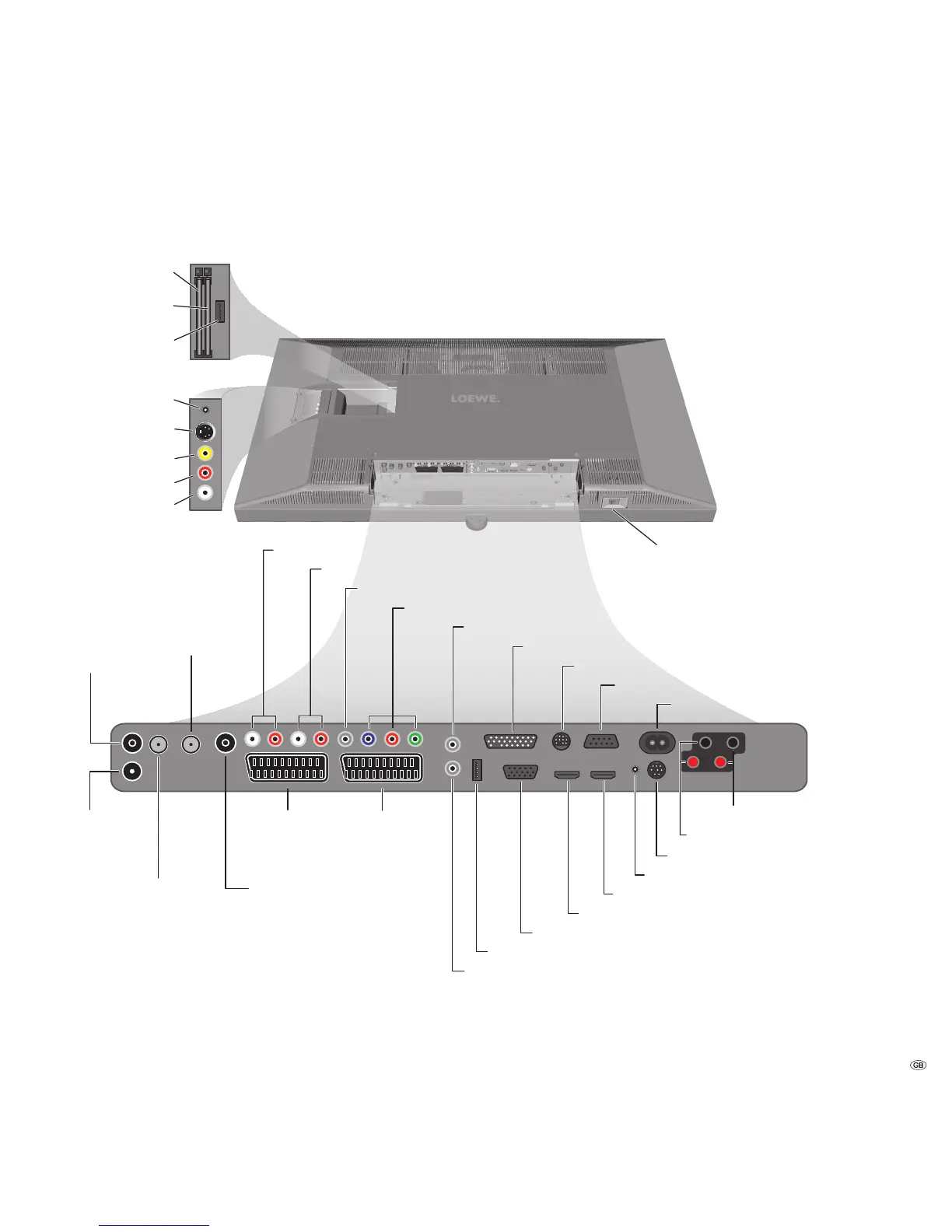
ANT OUT
Connect antenna
output with ANT-TV
(tuner 1)
ANT-TV
Antenna/cable
analogue/digital
(Tuner 1)
mains switch
CONTROL - rotating stand control
RS-232C - serial interface
AUDIO IN1 L/R - audio input left/right (analogue)
AUDIO OUT L/R - audio output left right (analogue)
ANT SAT2
Satellite antenna
(Sat tuner 2)
ANT2
Antenna/cable
analogue/digital
(Tuner 2)
AV1
Euro-AV
socket 1
AV2 (RGB)
Euro-AV
socket 2
SERVICE - service socket
PC IN - VGA/XGA input
HDMI2 - HDMI (DVI) input 2
AUDIO DIGITAL IN - digital audio input
AUDIO DIGITAL OUT - digital audio output
SD/HD-COMPONENT IN Cb/Pb–Cr/Pr–Y - component video inputs
Headphones connection
Common Interface 1
(CI-Slot 1)
S-VHS connection (AVS)
(e.g. for camcorder)
Video in (AVS)
Audio in right (AVS)
Audio in left (AVS)
AUDIO IN1 C - centre audio input (analogue)
AUDIO LINK - surround audio outputs (analogue)
HDMI1 - HDMI (DVI) input 1
USB connection 1
(USB stick/card reader)
ANT SAT
Satellite antenna
(Sat tuner 1)
AUDIO IN2 - audio input (analogue)
Speakers Right (+/-) - Speakers Right (+/-)
Speakers Left (+/-) - Speakers Left (+/-)
Common Interface 2
(CI-Slot 2)
220-240V~ 50/60Hz - mains connection
USB - USB connection 2 (USB stick/card reader)
Factory settings:
AV1: DVD player
AV2: DVD recorder
You can change this during the
initial installation (page
12
) or in
the connection wizard (page
40
).
Before you connect other devices
or make any changes, please start
the connection wizard (page
40
)
and the sound components wizard
(page 47), and then follow the
instructions that are displayed on
the TV set.


 To Next Page