- 4
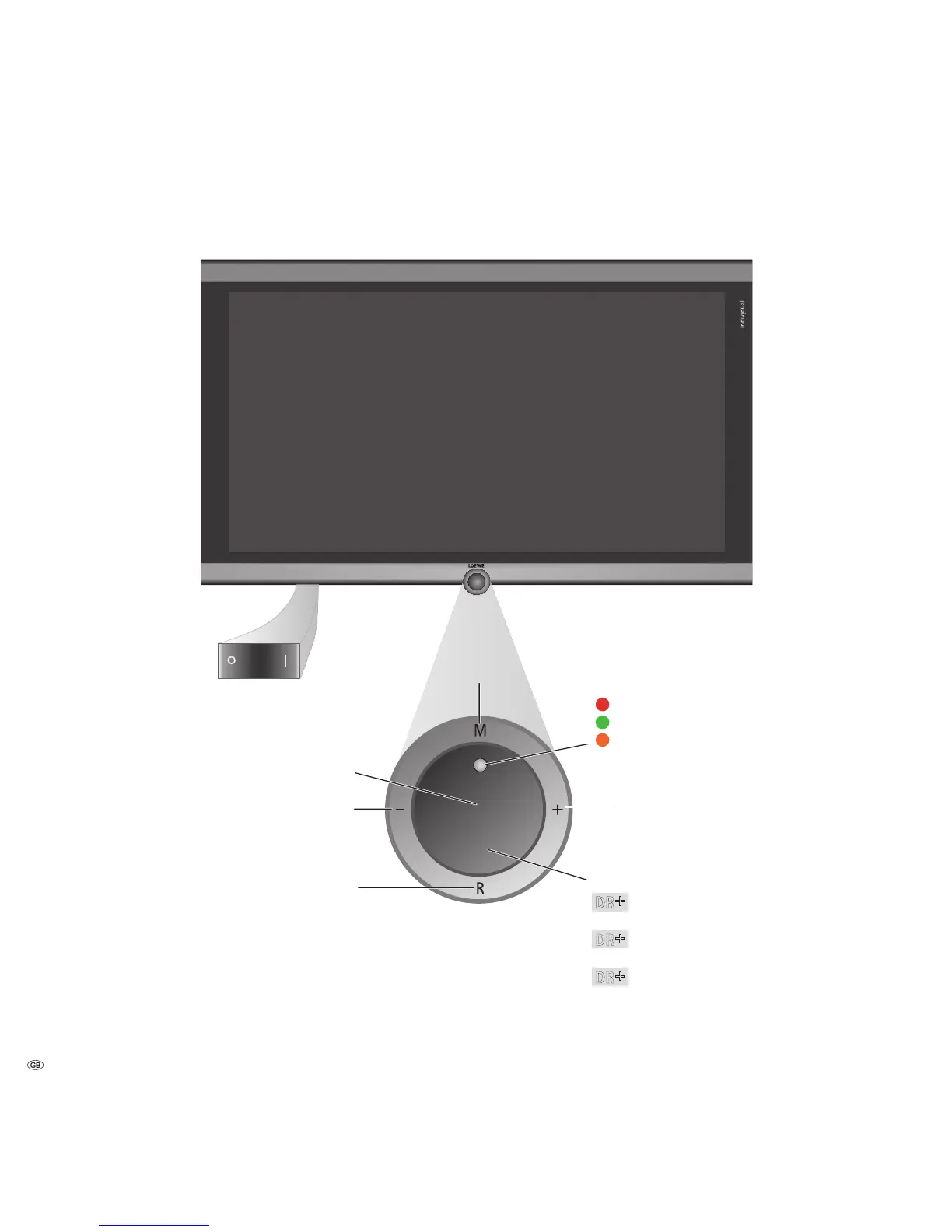
Control unit front side of the device
(1
Radio only for DVB reception, provided the station broadcasts this.
Otherwise switch over to an audio input.
DR
+
Button +:
Station up
in the menu: to the right
On/Off button:
Switch on from the standby mode
Switch off to the standby mode
Button – :
Station down
in the menu: to the left
Display:
= Standby
= Operation
= Operation without on-screen display
(Radio, EPG data capture or timer recording)
Button R:
Radio on/off
(1
(back to TV mode)
Switch on the radio from the standby mode
in the menu: down
Button M:
Call the menu
in the menu: up/down
The mains switch is located
on the bottom of the TV
DR
+
= Digital Recorder inactive
(no recording, no playback)
DR
+
= Digital Recorder active (offset TV viewing
or archive playback)
DR
+
= Digital Recorder active
(archive recording)
Display DR
+
:


 To Next Page