Loewe bild 7
Operating manual 2
13
english
(1
The assignment of these keys can be changed. The description refers to the standard setting. The factory setting of the keys can vary depending on the firmware version
of the remote control.
(2
Depending on the settings HbbTV mode on/off, start behaviour of HbbTV station (System Settings → Control → more ... → HbbTV).
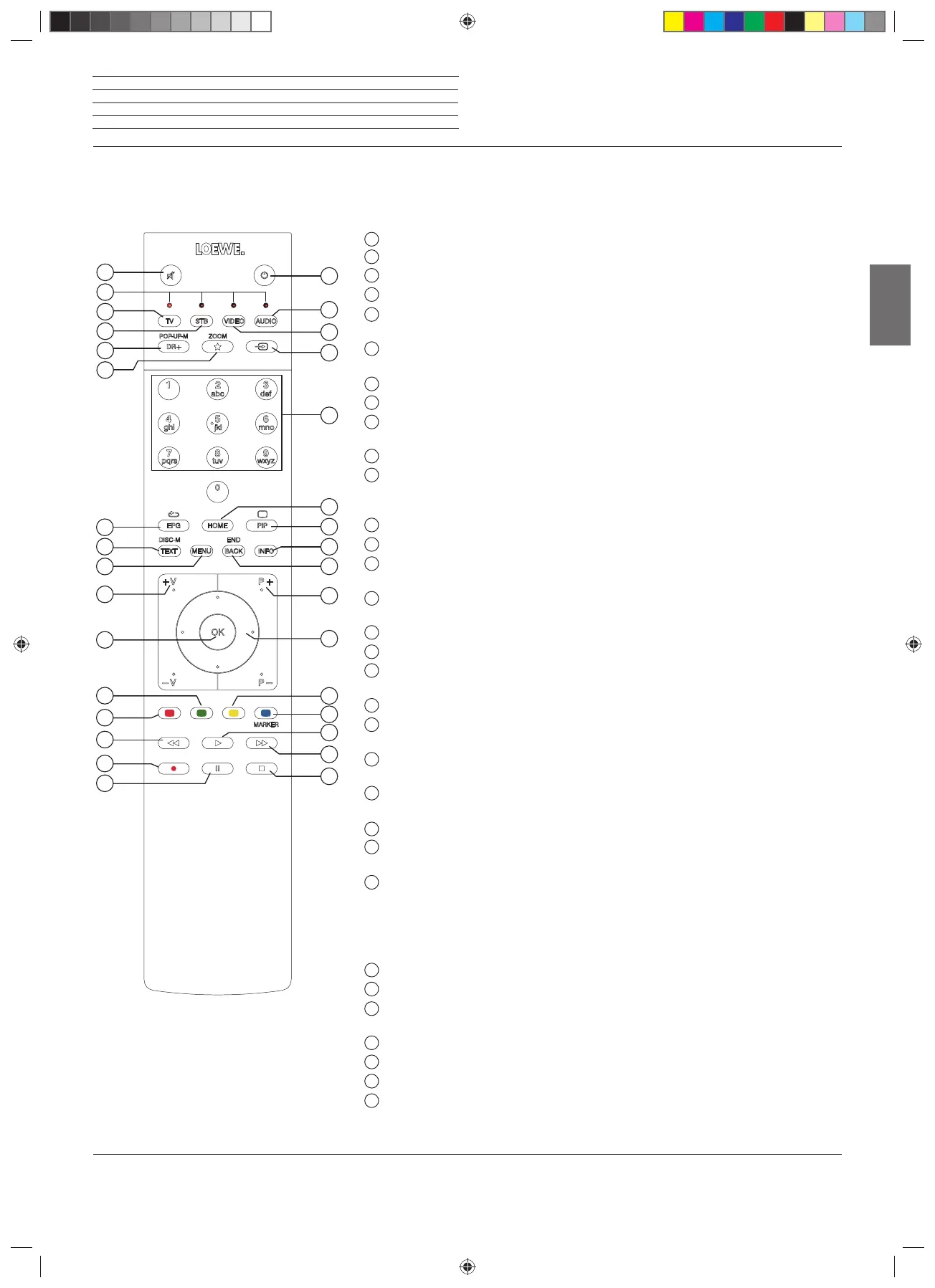
Remote control
1
Sound mute/on.
2
LED display for currently operated device.
3
Call the TV mode.
4
Reassign remote control to SetTop-Box
(1
(presetting: Apple TV).
5
Pressing briefly
: Open the DR+ archive.
P
ressing longer
: Call timer.
6
Pressing briefly:
Add current object to Home favourites.
Pressing longer: call App Gallery (standard assignment)
(1
.
7
EPG (Electronic Programme Guide) on/off.
8
Teletext/MediaText
(2
on/off.
9
Pressing briefly
: Call menu options for the active operating mode.
P
ressing longer
: Call System settings.
10
V+/V- increase/reduce volume.
11
Pressing briefly
:
Call channel list.
Pressing longer
: Call
expanded channel list.
In the menu: confirm/call up.
12
Green coloured key: screen on/off in Audio/Radio mode.
13
Red coloured key: call preferred value-added
network service, if available
(
2
.
14
Pressing briefly: skip backwards.
Pressing longer: winding backwards.
15
Pressing briefly: direct recording (with determination of recording duration).
Pressing longer: One Touch Recording.
16
Pause / Start/pause the timeshift television.
17
Stop / End timeshift (return to live image).
18
Pressing briefly: skip forwards.
Pressing longer: winding forwards.
19
Play / Start/continue timeshift television.
20
Blue coloured key: call channel
menu options
(selection of language/sound, subtitles or channel/video track).
21
Pressing briefly: Yellow coloured key: call history.
Pressing longer: Yellow coloured key: call last channel.
22
Navigation on the user interface, select objects.
In the menu / lists: select/set.
23
P+/P– next/previous channel.
24
Pressing briefly: step / level back.
Pressing long: close all displays.
25
Press briefly during an on-screen display: info display. Info text appropriate to the content
that can assist you further, should you have any questions about your TV set.
Press briefly, without on-screen display: access status display. With status display open
and repeatedly pressing the key call the detailed information on the broadcast.
Press longer: show key explanation.
26
PIP (picture in picture) on/off.
27
Call up the Home view.
28
Select channels with numeric buttons directly.
In the menu: enter numbers or letters
29
Call Sources.
30
Reassign remote control to video device
(1
(presetting: BluTech Vision 3D).
31
Call radio mode (standard assignment)
(1
.
32
Switches the TV set on (mains switch must be turned on) or switches to standby mode.
Press briefly while TV set is switched on: TV set and all CEC-enabled devices connected to
the HDMI ports will be switched off to standby (System Standby).
Remote control button mapping
Depending on the application (TV / video / audio / photo / apps) and function (for example, DR +, EPG, PIP, Teletext, HbbTV etc.), the key
assignment can deviate from the assignment described here (see corresponding chapter of the on-line user handbook).
1
2
3
4
5
6
7
8
9
10
11
12
13
14
15
16
31
18
19
20
21
22
23
24
25
26
27
28
29
30
32
17
36959000_OM2_bild_7_55-77_3_00_ML_Buch.indb 1336959000_OM2_bild_7_55-77_3_00_ML_Buch.indb 13 09.01.2019 14:30:1809.01.2019 14:30:18


 To Next Page
 Loading...









