- 12
english
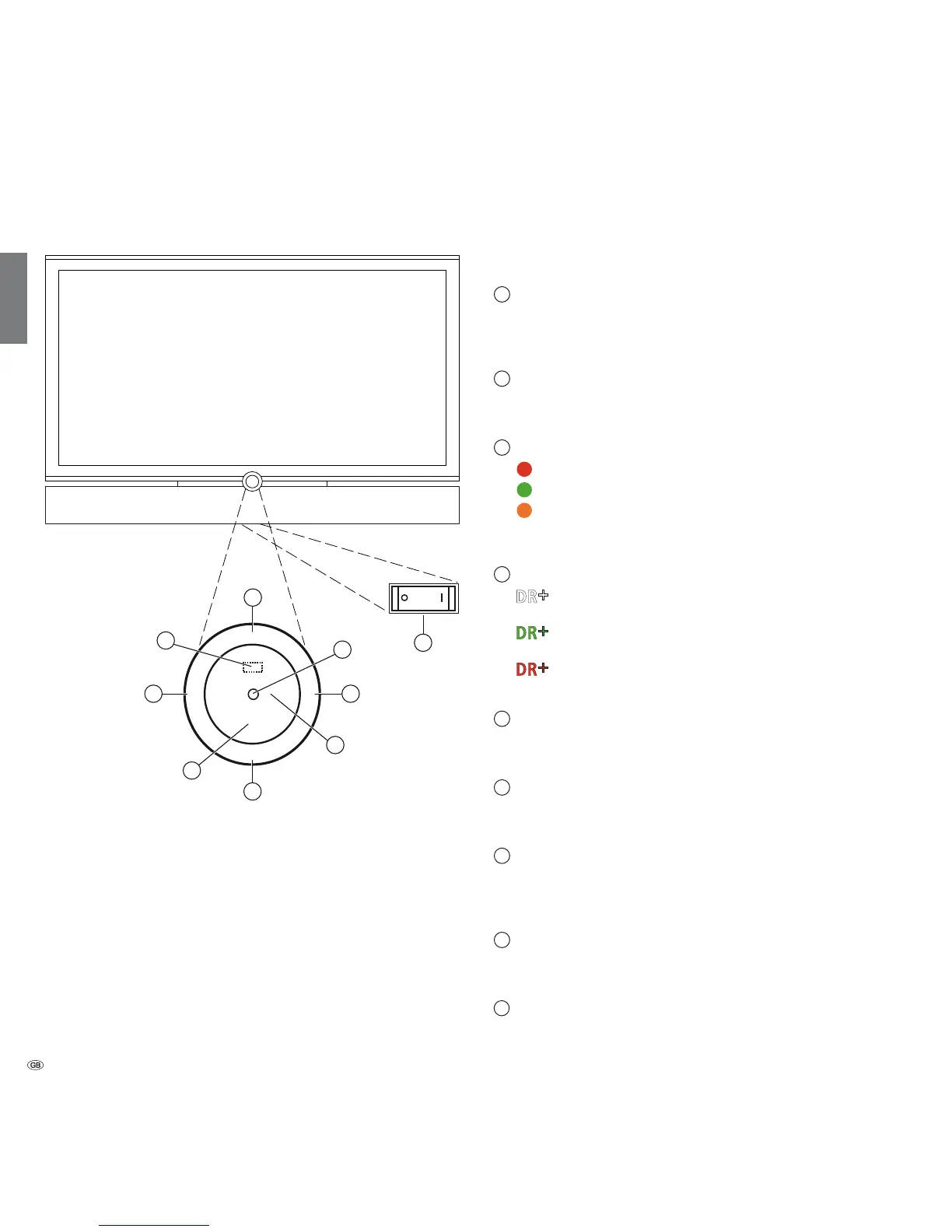
Control unit front side of the device (Individual 32)
Functions of the operating elements
1
Mains switch:
The mains switch is located on the bottom of the set.
Always return the TV set to Standby mode before switching it off
with the main switch.
2
On/Off button:
Switch on from the standby mode
Switch off to the standby mode
3
Display:
red = Standby
green = Operation
orange = Operation without on-screen display
(Radio, EPG data capture, timer recording, software
update).
4
Display DR
+
:
white = Digital Recorder inactive
(no recording, no playback)
green = Digital Recorder active (offset TV viewing or
archive playback)
red = Digital Recorder active
(archive recording)
5
Infrared transmitter:
When showing 3D content, the 3D glasses Loewe Active Glasses 3D
are controlled via the infrared sensor.
6
Button M:
Call the menu
in the menu: up/down
7
Button R:
Radio on/off (back to TV mode)
Switch on the radio from the standby mode
in the menu: down
8
Button +:
Station up
in the menu: to the right
9
Button – :
Station down
in the menu: to the left
DR
+
M
R
+
-
3
1
6
8
9
2
4
7
5














 To Next Page