Speaker 2go - 24 -
Operating instructions
English
Bluetooth link
Linking the audio source via Bluetooth
You can link your Speaker 2go to an audio source, e.g. smartphone, tablet PC, etc. using a
wireless Bluetooth connection. The audio sources must support the Bluetooth A2DP protocol.
The distance between your Speaker 2go and the audio source must be no more than 10m
(line of sight).
Up to 5 audio sources can be memorized by the Speaker 2go via Bluetooth. However, only
one active connection is possible at a time.
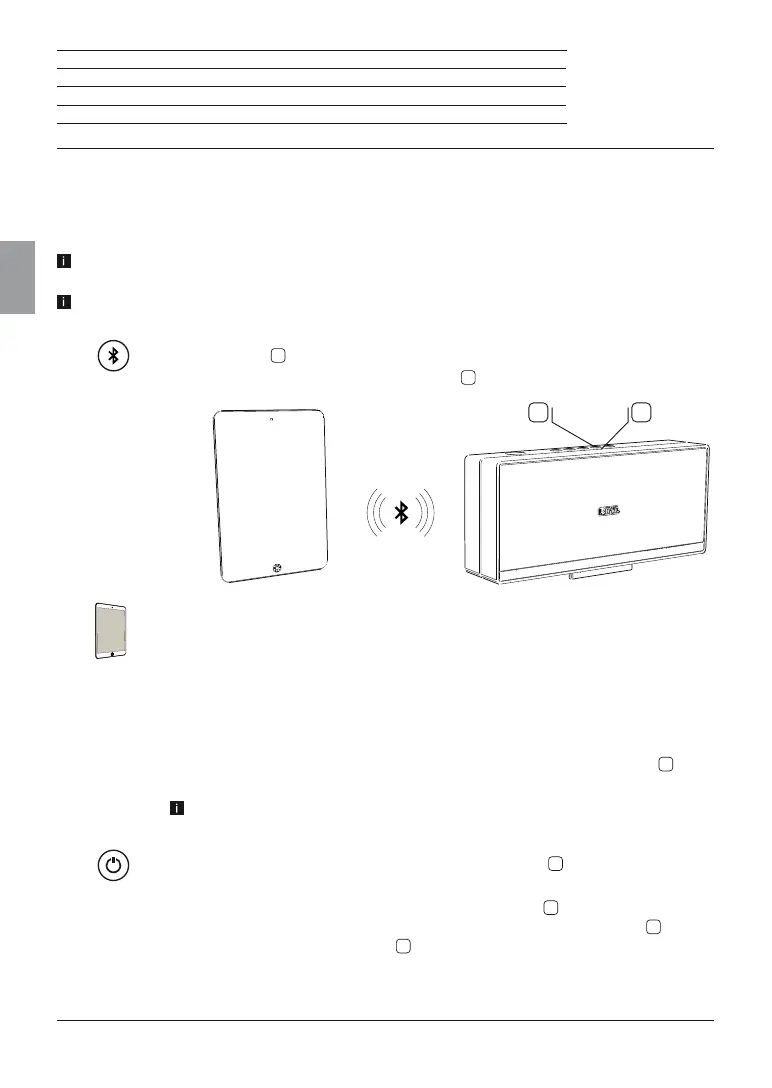
Press the key
3
on the Speaker 2go for a long period (approx. 3 sec).
You hear a signal tone. The LED indicator
4
(Bluetooth) will flash.
Enable the Bluetooth function of your audio source. If necessary, get help
from the instruction manual of your audio source.
If necessary, confirm the Bluetooth Search function of the audio source.
Now, Bluetooth devices will be searched near the audio source.
Select Speaker 2go.
If a code is requested, enter 0000.
After the linking is completed you hear a signal tone. The LED indicator
4
lights
up permanently; the Speaker 2go is now ready for audio playback (page 26).
For some audio sources, the link must be explicitly enabled before music
playback can be heard from the Speaker 2go.
When switching the speaker 2go to standby using the
1
key, the audio source
will be delinked.
After switching the Speaker 2go on again using the
1
key, the Speaker 2go
tries to link to the audio source. In this situation the LED (Bluetooth)
4
pulses.
After successful linking the LED
4
will light up permanently.
3
4




 To Next Page