Speaker 2go - 25 -
Operating instructions
English
Connectivity Easy Pairing Link
Linking the audio source via Connectivity Easy Pairing
It is very simple to link your Speaker 2go to your audio source, e.g. smartphone, tablet PC, etc.,
when using the Connectivity Easy Pairing function (linking with NFC-enabled devices). For
this purpose, the audio source must support the NFC function.
Enable the NFC function and the Bluetooth function of your audio source. If
necessary, get help from the instruction manual of your audio source.
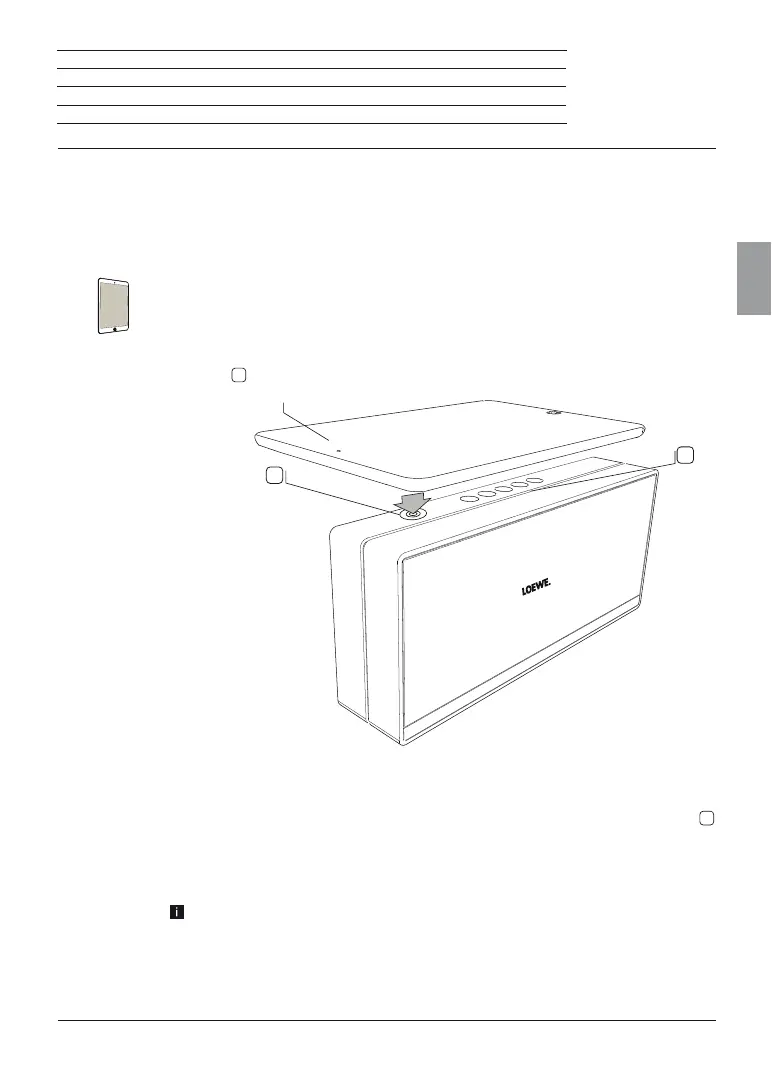
Hold your audio source (A) in the direction of the Connectivity Easy Pairing
antenna
10
of the Speaker 2go.
If necessary, confirm the request of your audio source for linking to the Speaker
2go.
After the linking is completed you hear a signal tone. The LED indicator
4
(Bluetooth) lights up permanently.
Now, the Speaker 2go is linked to your audio source via Bluetooth and is ready
for audio playback (page 26).
For some audio sources, the link must be explicitly enabled before music
playback can be heard from the Speaker 2go.
A
4
10




 To Next Page