EasyManua.ls Logo

Logia LOGLP300 - Page 14

Logia LOGLP300
20 pages
Print Icon
To Next Page IconTo Next Page
To Previous Page IconTo Previous Page
Loading...
7.
Select
“Virtual
printer
port...”
and
click
“Apply.”
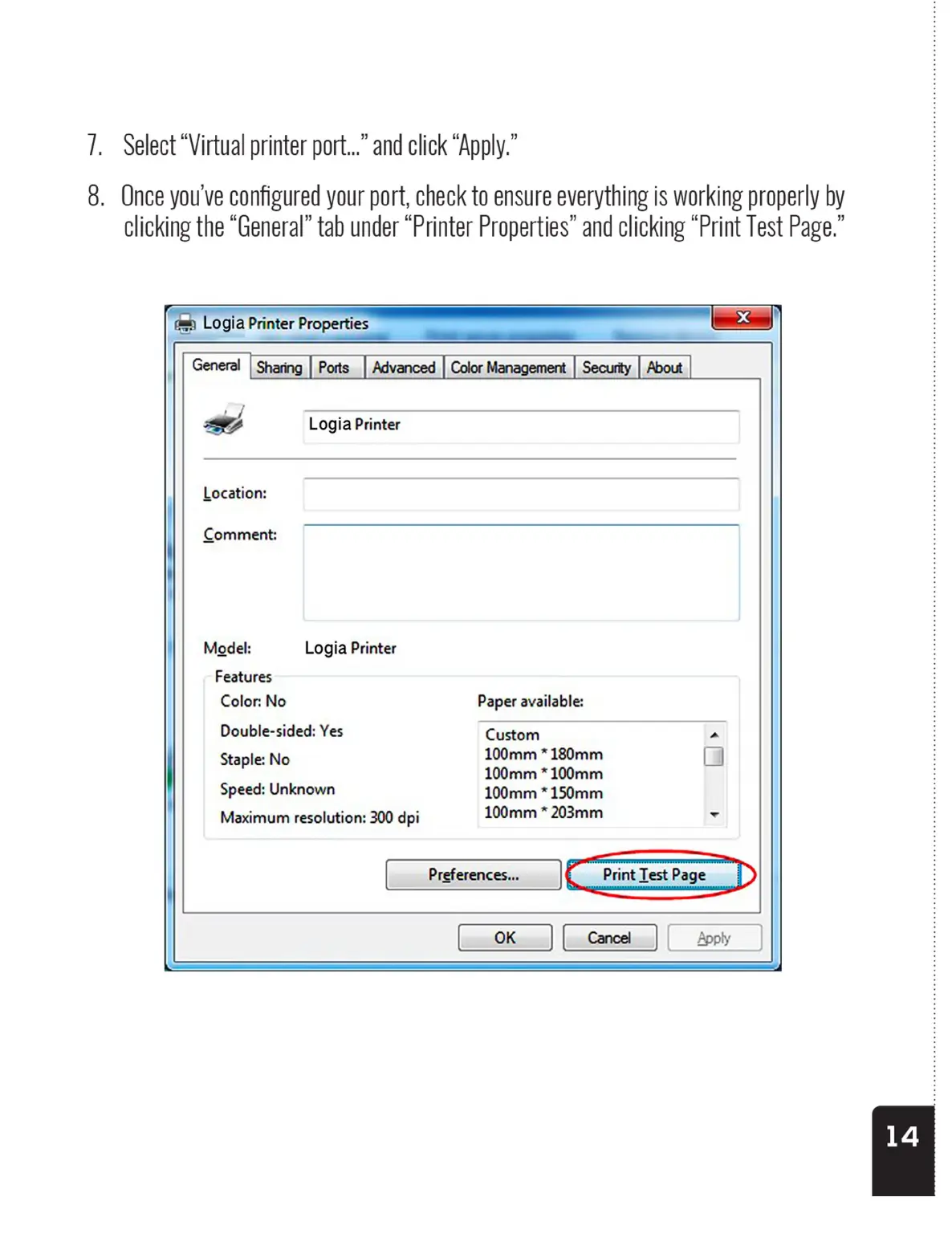
8.
Once
you've
configured
your
port,
check
to
ensure
everything
is
working
properly
by
clicking
the
“General”
tab
under
“Printer
Properties”
and
clicking
“Print
Test
Page.”
=
Logia
Printer
Properties
_
5%
|
General
|
Sharing
|
Ports_|
Advanced
|
ColorManagement
|
Security
|
About
|
A
Logia
Printer
Location:
Comment:
Model:
Logia
Printer
Features
Color:
No
Paper
available:
Double-sided:
Yes
Custom
Staple:
No
100mm
*
180mm
100mm
*
100mm
Speed:
Unknown
100mm
*
150mm
Maximum
resolution:
300
dpi
100mm
*
203mm
Preferences...
7.
Select
“Virtual
printer
port...”
and
click
“Apply.”
8.
Once
you've
configured
your
port,
check
to
ensure
everything
is
working
properly
by
clicking
the
“General”
tab
under
“Printer
Properties”
and
clicking
“Print
Test
Page.”
=
Logia
Printer
Properties
_
5%
|
General
|
Sharing
|
Ports_|
Advanced
|
ColorManagement
|
Security
|
About
|
A
Logia
Printer
Location:
Comment:
Model:
Logia
Printer
Features
Color:
No
Paper
available:
Double-sided:
Yes
Custom
Staple:
No
100mm
*
180mm
100mm
*
100mm
Speed:
Unknown
100mm
*
150mm
Maximum
resolution:
300
dpi
100mm
*
203mm
Preferences...