EasyManua.ls Logo

Logia LOGLP300 - Page 15

Logia LOGLP300
20 pages
Print Icon
To Next Page IconTo Next Page
To Previous Page IconTo Previous Page
Loading...
J.
Set
your
paper
preferences
by
clicking
the
“General”
tab
under
“Printer
Properties”
and
clicking
“Preferences.”
Then
select
“Custom”
from
the
Paper
Name
dropdown
menu
and
click
“Manage.”
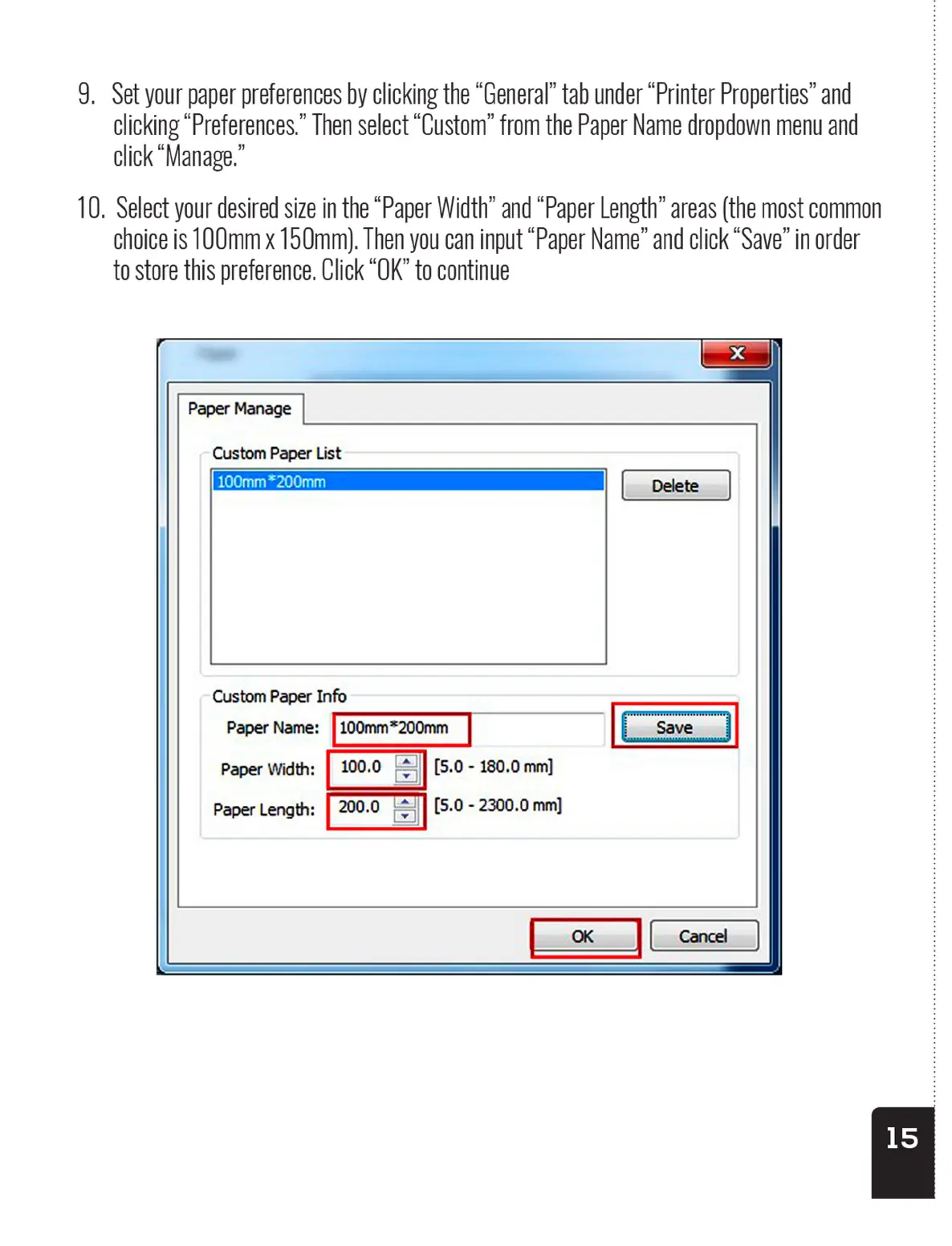
10.
Select
your
desired
size
in
the
“Paper
Width”
and “Paper
Length”
areas
(the
most
common
choice
is
100mm
x
150mm).
Then
you
can
input
“Paper
Name”
and
click
“Save”
in
order
to
store
this
preference.
Click
“OK”
to
continue
Paper
Manage
Custom
Paper
List
Custom
Paper
Info
Paper
Name:
|
100mm*200mm
Paper
Width:
|
100.0
|
[5.0
-
180.0
mm]
Paper
Length:
|
200.0
sl
[5.0
-
2300.0
mm]
J.
Set
your
paper
preferences
by
clicking
the
“General”
tab
under
“Printer
Properties”
and
clicking
“Preferences.”
Then
select
“Custom”
from
the
Paper
Name
dropdown
menu
and
click
“Manage.”
10.
Select
your
desired
size
in
the
“Paper
Width”
and “Paper
Length”
areas
(the
most
common
choice
is
100mm
x
150mm).
Then
you
can
input
“Paper
Name”
and
click
“Save”
in
order
to
store
this
preference.
Click
“OK”
to
continue
Paper
Manage
Custom
Paper
List
Custom
Paper
Info
Paper
Name:
|
100mm*200mm
Paper
Width:
|
100.0
|
[5.0
-
180.0
mm]
Paper
Length:
|
200.0
sl
[5.0
-
2300.0
mm]