30
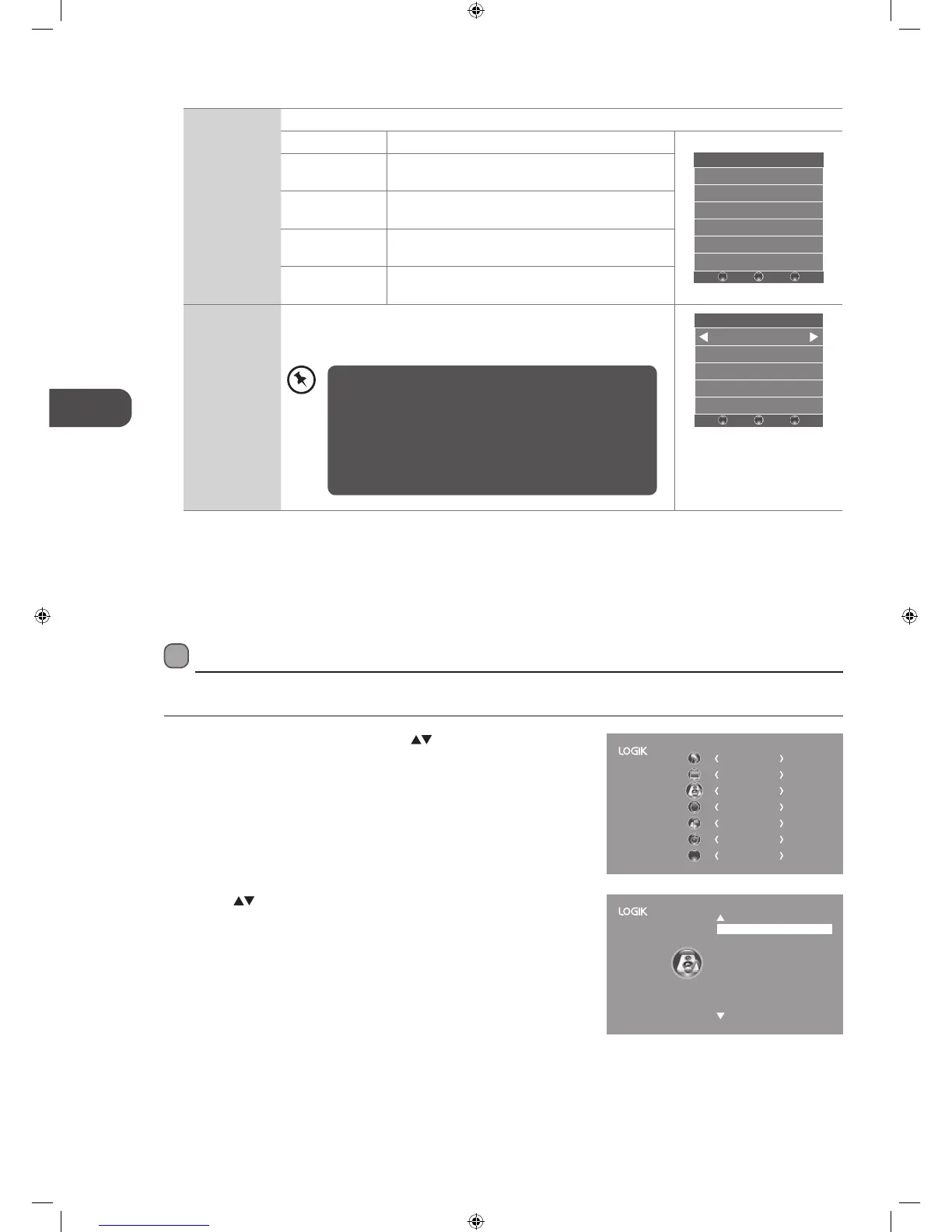
Screen Allows you to adjust the PC desktop content. (PC mode only)
Auto Adjust Allows you to synchronise a PC signal automatically.
Screen
Auto Adjust
Horizontal Pos. 50
Vertical Pos. 50
Size 50
Phase 38
BACK MENU
EXIT
Horizontal Pos. Adjusts the position of the picture left and right in
the window.
Vertical Pos. Adjusts the position of the picture up and down in
the window.
Size Allows you to adjust the picture horizontally, in linear
proportion.
Phase Controls the signal phase, which can improve focus
clarity and image stability based on the PC mode.
Backlight Allows you to adjust the backlight setting of your TV. This controls the
brightness and display performance of the screen.
The default setting for Home Mode is 6 and Shop Mode is 10.
Backlight
6
–
BACK MENU
EXIT
+
4. Press the BACK button to return to the previous menu or press the
MENU button to return to the main menu.
5. Press the EXIT button to exit the menu.
2. Press the
buttons to select the following sound options and then
press the OK button.
Sound Setting
Allows you to select an audio-enhancement technique.
1. Press the MENU button and then press the
buttons to select the
SOUND menu and then press the OK button.
CHANNEL
PICTURE
SOUND
TIME
OPTION
LOCK
EXIT
EXIT
Sound Mode
Balance
Auto Volume
SRS TruSurround HD
AD Switch
SPDIF Mode
Standard
0
On
On
Off
Auto
SOUND
Increasing the backlight setting will increase the brightness
and display performance of the screen. The higher the
setting is, the higher the power consumption. You can
select from 1-10 to strike a balance between the picture
brightness / display performance / power consumption.
Reducing the backlight setting will help you reduce power
consumption and thus save money by reducing electricity
bills.
L22_24FED13_IB_RC131024_Annie.indd 30 24/10/13 5:38 PM



 To Next Page