Chapter 3 – Function Settings
49
Operation
Example (4)
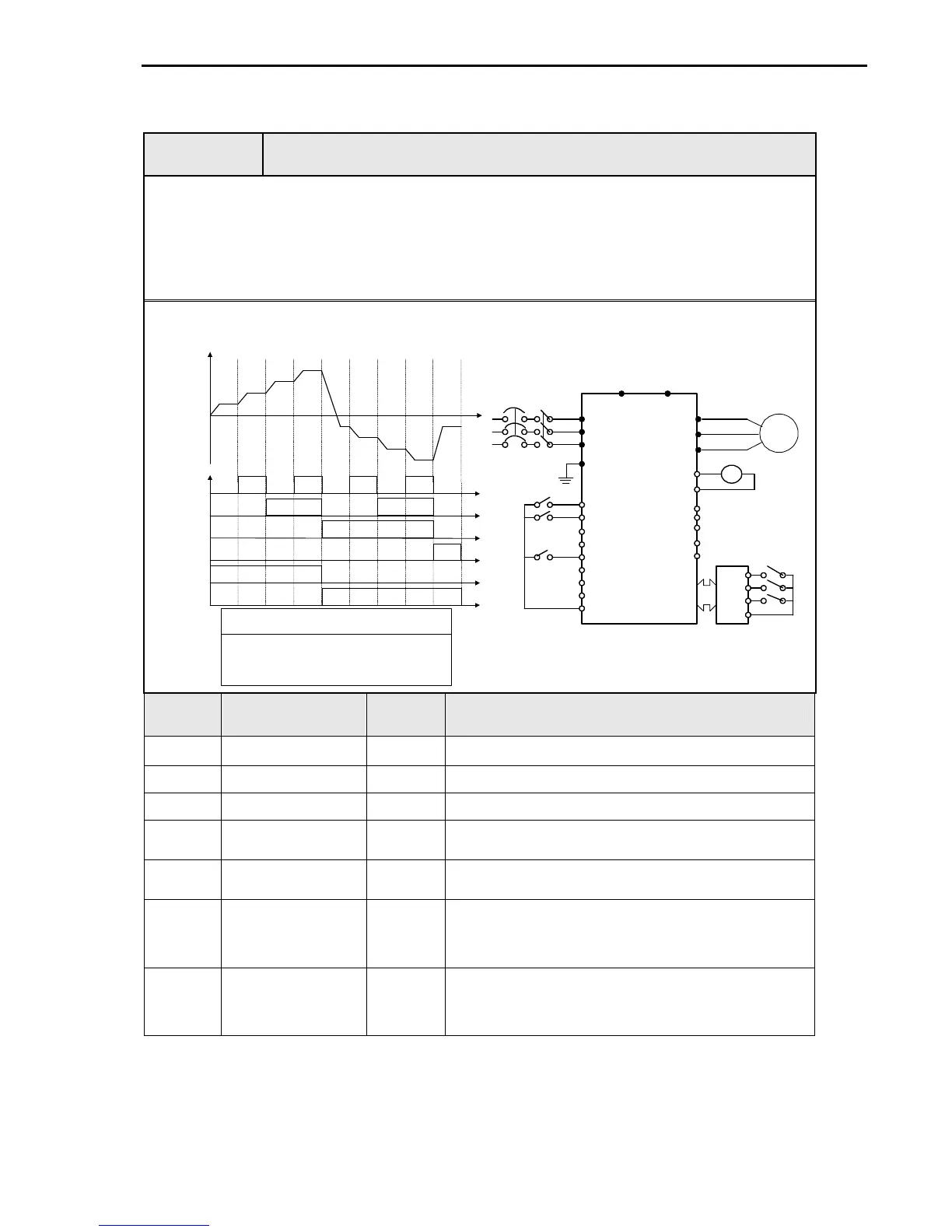
Sensorless_S Control + Multi-speed operation + Analog output (FM)
[Operation condition]
-. Control mode: Sensorless Speed control
-. Frequency command: Multi-function input from SUB-A and 8 step speed operation
(Multi-speed 7 + Jog freq 1)
-. Accel time: 5 [Sec], Decel time: 5 [Sec]
-. Drive mode: Run/Stop and speed output via terminal FX/RX
[Wiring]
I/O-20 Speed 4
I/O-21 Speed 5
I/O-22 Speed 6
I/O-23 Speed 7
Multi-speed freq setting range
DRV-00 Speed 0
DRV-05 Speed 1
DRV-06 Speed 2
DRV-07 Speed 3
ON ON ON ON
ON
ON
ON
ON
ON
ON
SPD 0 SPD 1 SPD 2 SPD 3 SPD 4 SPD 5 SPD 6 SPD 7 JOG
P4
P5
P6
JOG
FX
RX
Output freq [Hz]
Output
freq meter
0 -10 V,
Pulse
R
S
T
G
U
V
W
B1 B2
FX
RX
BX
RST
JOG
P1
P2
P3
CM
FM
5G
30C
30B
AXA
AXC
IM
S/W
P4
CN5
P5
P6
CM
Sub - A S/W
FM
30A
Step Parameter setting Code Description
1 Control Mode Selection
FU2-39 Set it to Sensorless_S.
2 Drive mode DRV-3 Set it to FX/RX-1.
3 Multi-function input EXT-2 ~ 4
Set P3, P4, P5 to Speed-L, Speed-M, Speed-H.
4
FM (Frequency Meter)
Output Selection
I/O-40 Set it to Frequency output.
5 FM Output Adjustment I/O-41
Output V = 10V x output freq x output gain (ex100%) /
(Max freq x 100)
6 Terminal FX
Motor runs in forward direction at the set freq via P3, 4, 5 if Fx
terminal is ON.
Motor decelerates to stop with Decel time 5 [sec] if FX terminal is
OFF.
7 Terminal RX
Motor runs in reverse direction at the set freq via P3, 4, 5 if RX
terminal is ON.
Motor decelerates to stop with Decel time 5 [sec] if RX terminal is
OFF.



 To Next Page
 Loading...