Original Instructions Lumedica OQ LabScope 1.2 | Page 17 of 26
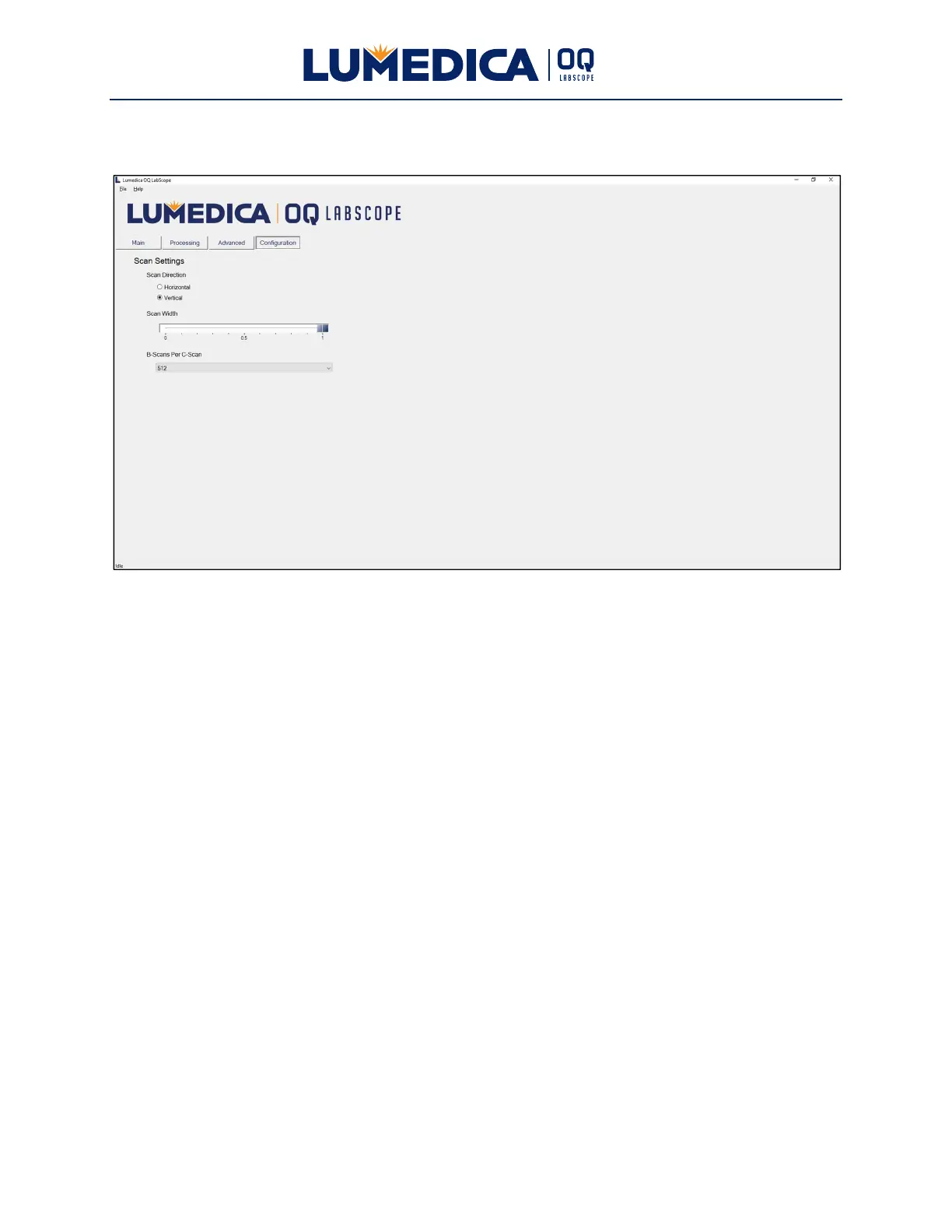
Configuration Tab
Buttons:
Scan Direction — Set to either “Horizontal” or “Vertical”. The vertical scan direction is aligned
with the long side of the handheld scanner. The horizontal scan direction is aligned with the
short side of the handheld scanner. When the scanner is placed in the scanner stand, the
horizontal direction is left to right scanning and the vertical scan is front to back scanning.
Sliders:
Scan Width — Sets the relative length of the B-Scan. The longest scan is “1” and it may be
shortened down to “0”, at which point the scanner is not moving. This will give a time series at
one point, which is referred to as an M-mode scan. A scan length of 1 corresponds to 7
millimeters of scan range. All B-scans have the same number of A-scans, i.e. a shorter scan of
a curved surface will make the image appear flatter.
B-Scans Per C-Scan — Set the number of B-Scans captured in a C-Scan. Options are 32, 64,
128, 256, and 512. C-Scan capture time scales with the number of B-Scans and can be as long
as 120 seconds for a C-scan with 512 B-Scans.


 To Next Page