English -20
5.1.3 Using Lumens VMS Software to View the Images
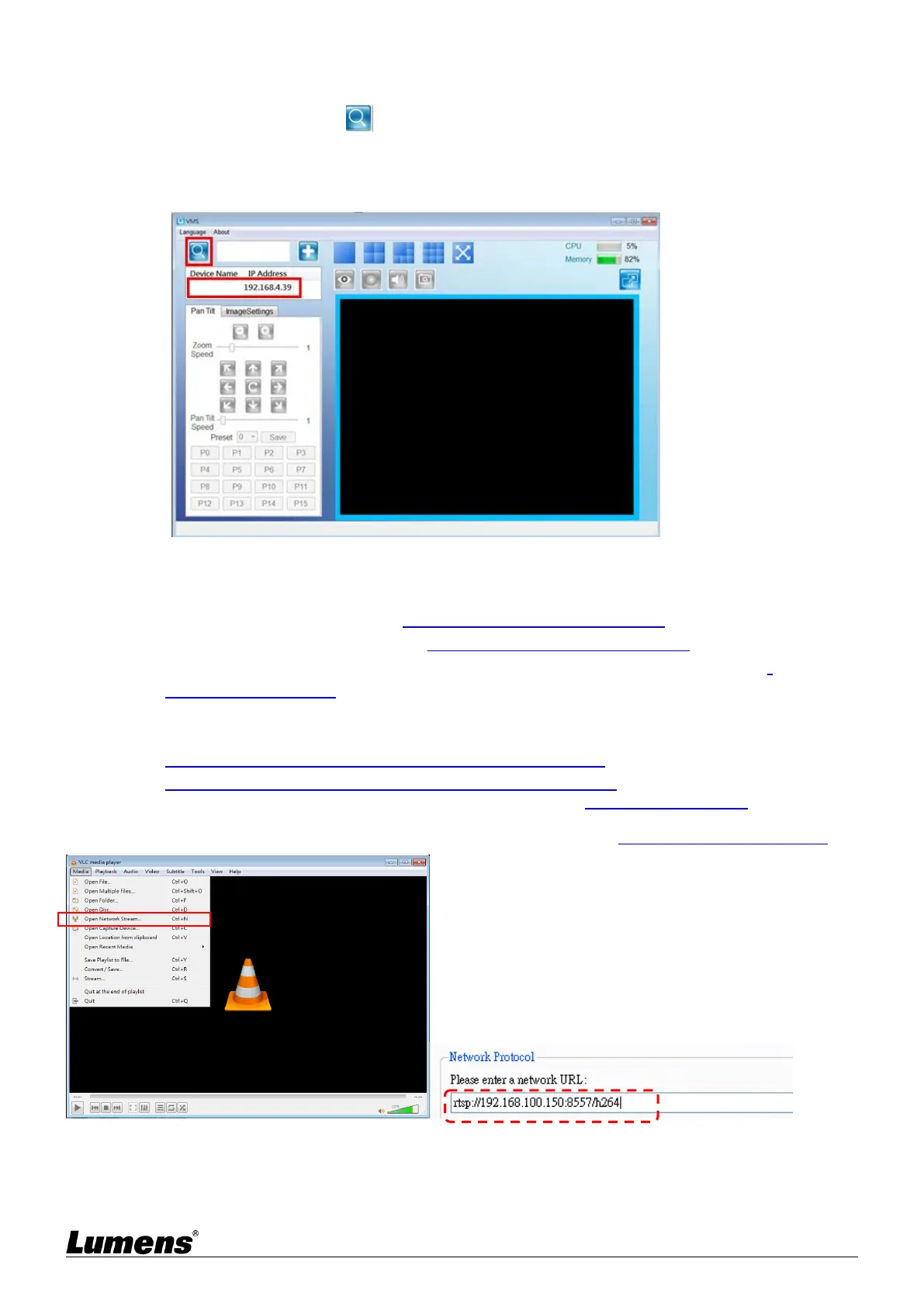
Open LUMENS VMS software (Please download from the Lumens official website)
Search Camera: Press [automatically search for the device] button to locate the
Camera
Click camera in the list and start operation after connecting to network
<Remark> When using automatic search, the camera and computer must be in the same network segment, e.g.:
192.168.4.X
5.1.4 Using RTSP Player to View the Images
RTSP connections can be made using free software, e.g.: VLC, Quick Time, PotPlayer, etc.
RTSP connection address formats are as follows:
RTSP main stream (h264)=>rtsp://VC IP Address:8557/h264
RTSP second stream (h264) =>rtsp://VC IP Address:8556/h264
RTSP second stream (MJPEG) or single stream in MJPEG=>rtsp://VC IP
Address:8555/mjpeg
If password authentication is enabled, the RTSP connection address is as follows:
rtsp://Username:Password@VC IP address:port/hevc
rtsp://Username:Password@VC IP address:port/mjpeg
<Remark> To enable password authentication function, please refer to 5.2.5 Setting - Streaming
Example:
Open the VLC software, click [Open Network Streaming], and enter the URL: rtsp://192.168.100.150:8557/h264


 To Next Page
 Loading...