7. Streetlight Function
Solar charge controller MPPT-DC series User Manual
6.Starting up the controller
6.1 Self T
est
As soon as the controller is connect
ed to batt
er
y, it starts
self t
est. Then the display changes to normal operation.
6.2 Batter
y T
ype
The contr
oller applies t
o Lithium, A
GM, Liquid and Gel
batter
y
, the fact
ory default setting is suitable for Lithium
batter
y.
When the controller is set t
o Lithium batter
y, the
char
ging tar
get voltage and charging r
ecover
y voltage
can be set accor
ding t
o customer requir
ements.
The contr
oller adjusts itself automatically t
o 12V or 24V
system voltage when it is set t
o Gel, Liquid or A
GM
b
atter
y. If the batter
y voltage on star
t
-up is 0V-15.5V
then the controller infers a 12V syst
em.
If the batt
ery voltage is 20V-30V the contr
oller infers a
24V system.If the b
att
ery voltage is not within the normal
operating rang(ca.0 t
o 15.5V or ca.20 t
o 30V) at star
t
-up,
please refer t
o
9.2 F
aults & Alarms.
6
.3 0
℃
Charging Protection
"
" " "
"
"
"
"
" "
"0
℃ Chg
"
can be set to Y
es
", "
Slow or
No
.
When the
contr
oller detects that the ambient temperature is higher
than 0℃,
the char
ging function is normal
.
when the
ambient t
emperature is low than 0℃,
if the
"0
℃ Chg
" is
set t
o
Yes , the char
ging function is normal, else if the
"
0℃
Chg
" is set t
o slow
, the max charging current is
20% of the rated current, else if the
"0℃ Chg
" is set to
No
, the controller does not charge the batt
er
y
.
The user can select the appropriat
e char
ging method.
Num
1
2
3
4
5
6
7
8
9
10
11
12
13
14
15
16
17
18
19
20
21
22
23
24
Name
Time1
Dim1
Time2
Dim2
Time3
Dim3
Time4
Dim4
Time5
Dim5
D/N Thr
D/N Dly
Load I
Dim Auto
Dim V
Dim %
Battery
CVT
CVR
LVD
LVR
DelayOff
Dim NP
Password
5.3 Read the parameters
Press the "Parameter" key of the S/SG-Unit to read the
setting parameters of the controller.
MPPT-DC
4H
100%
0H
100%
0H
100%
0H
0%
0H
100%
5.0V
0min
0.3A
Yes
12.2V
8%
Li
12.6V
12.4V
9.0V
9.8V
10s
10%
0000
Page 3 of 7 pages
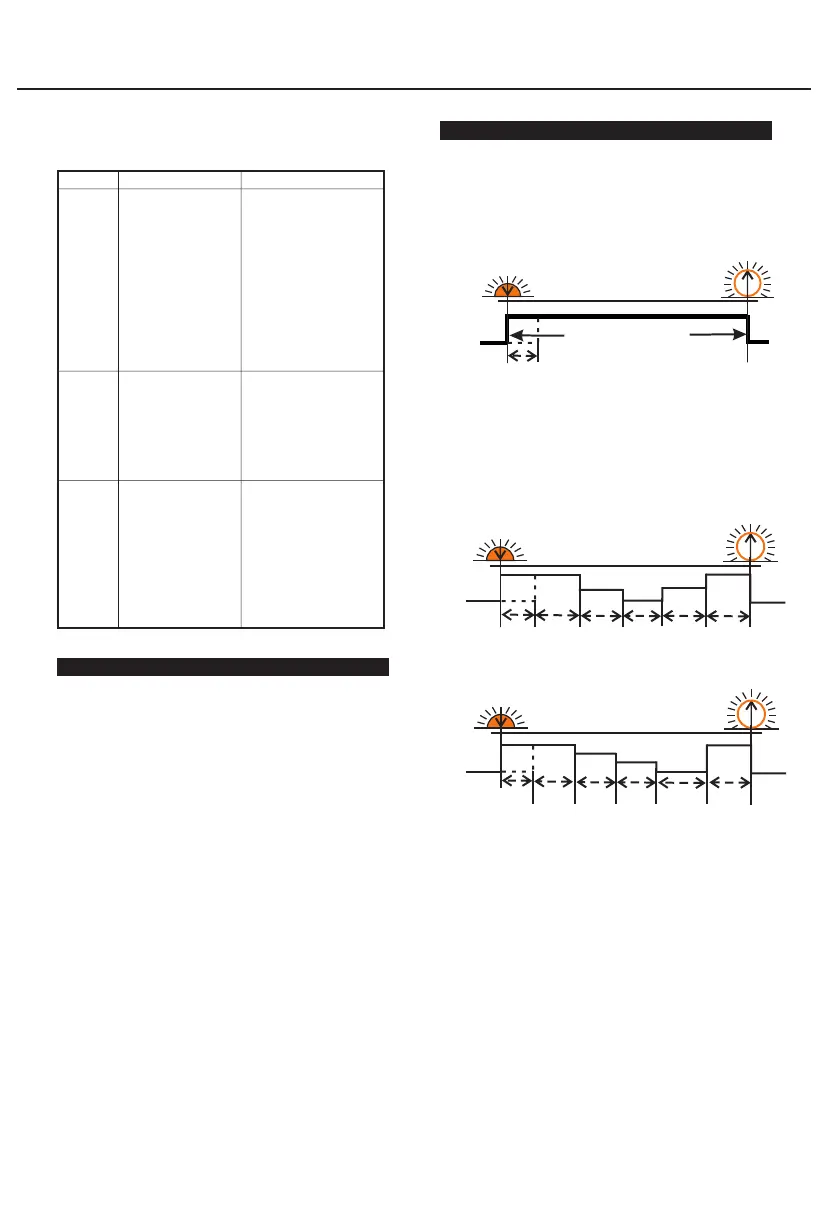
7.1 Dusk to Dawn (D2D, no induction function)
Dusk to Dawn(D2D)
Light on
Light off
D/N Thr
D/N Thr
Sunset
Sunrise
D/N Dly
If Time1 is set to D2D ,the controller works in dusk to
dawn mode.
" " " "
!
1.MPPT-DC controller is set to D2D mode, the
corresponding dimming setting is still valid.
2. If Time1 is set to D2D mode, Time4 can not be set
to T0T mode.
" " " "
7.2 Five-stage Night Mode(Time3、Time4 can induction)
Time1
Time2 Time5Time3 Time4
Light on
Light off
D/N Thr
D/N Thr
Sunset
Sunrise
D/N Dly
You can set the Time 1-5 and Dim 1-5 with S/SG-Unit.
7.3 T0T mode(Time3、T0T can induction)
D/N Thr
Time1
Time2
Time5
Time3 T0T
Light on
Light off
D/N Thr
Sunset
Sunrise
D/N Dly
If "Time4" is set to "T0T", this mode is T0T mode.
* If Time4 is set to T0T mode, Time1 can not set to D2D
mode.
" " " "
Parameter setting example:
Time1: 1.0H/100% Time2: 2.0H/80%
Time3: 3.0H/60% Time4: T0T/40%
Time5: 2.0H/100%
DelayOff: 10s Dim NP: 10%
The controller works as follows:
After the arrival of the evening the first time the load is
lit for 1 hour (full power 100%), the second time the load
is lit for 2 hours (power 80%), the third time load light for
3 hours (when people is near the lamp then the load is
60% light, when people is away from the lamp the load is
60% * 10% light), and then the controller according to
the actual night time automatically calculate the length
of the fourth paragraph (when people is near the lamp
then the load is 40% light, when people is away from the
lamp the load is 40% * 10% light), the fifth time load
light 2 hours (full power 100%).
For controllers with infrared sensing function( R series), if
work mode is set to Five-stage Night Mode or T0T mode ,
"DelayOff and Dim NP work in Time3 and Time4 .
"DelayOff" setting range: 10~150s.
"Dim NP" setting range: 0~100%.
" " " "
" " " " " " "
!
Password only applies to SG-Unit.


 To Next Page
 Loading...