- 20 -
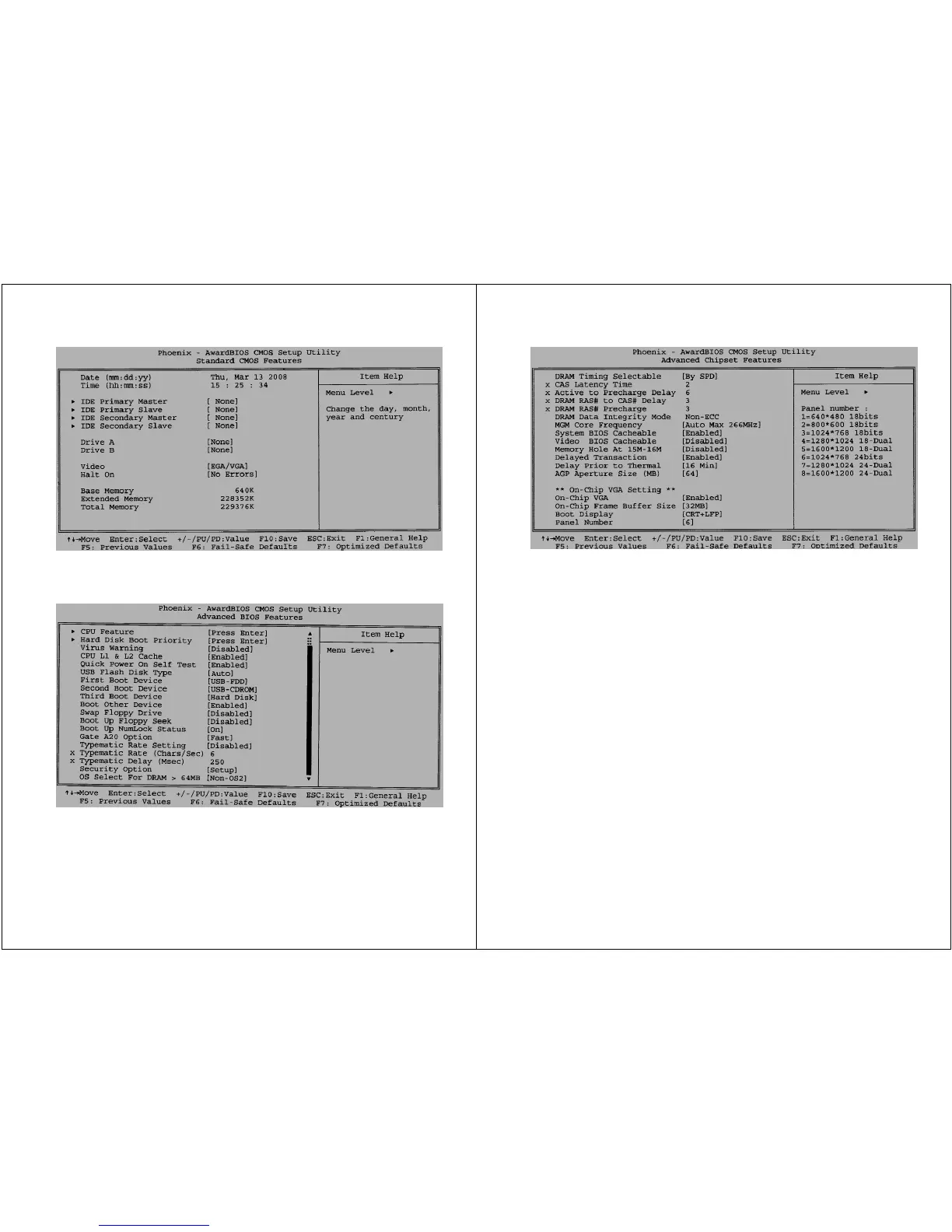
Fig 2.) (Standard CMOS Features) LUVOX AIO systems are
designed to operate without PS/2 peripherals and since there is
no floppy disk present, the options ‘Drive A’ & ‘Drive B’ should be
set to [None] and ‘Halt On’ should be toggled to [No Errors]
Fig 3.) (Advanced BIOS Features) Boot sequence 1.USB-FDD,
2.USB-CD-ROM, 3.HDD. ‘Boot Other Device’ must be [enabled] in
order to boot from removable media like USB and CFII cards. The
sequence between these can be changed at ‘Hard Disk Boot
Priority’
- 21 -
Fig 4.) (Standard Chipset Features) ‘AGP Aperture Size’
(representing the amount of system RAM shared with the graphic
stage) is set to [64MB]. You may increase this amount when
running video intensive applications (at expense of system’s
RAM). In order to have the internal LCD functioning you must
define the LCD panel type that is integrated. A LUVOX AIO F150
‘Panel Number’ should be [6] for newer devices or [3] for devices
made before February 2006. For LUVOX AIO F170 and F190 this
should always be [7]. Make sure you leave ‘Boot Display’ to
[CRT+LCD].
NOTE: When your LUVOX AIO F150 system was ever carried in
for service, your device may be produced before Feb 2006, but
have a panel type [6] on board. When booting the system with an
incorrect panel number set in the BIOS, this will not damage your
device although a distorted image will occur on the screen. In this
case the screen may be unreadable, connect an external screen
to the VGA in order to see BIOS information.


 To Next Page