- 24 -
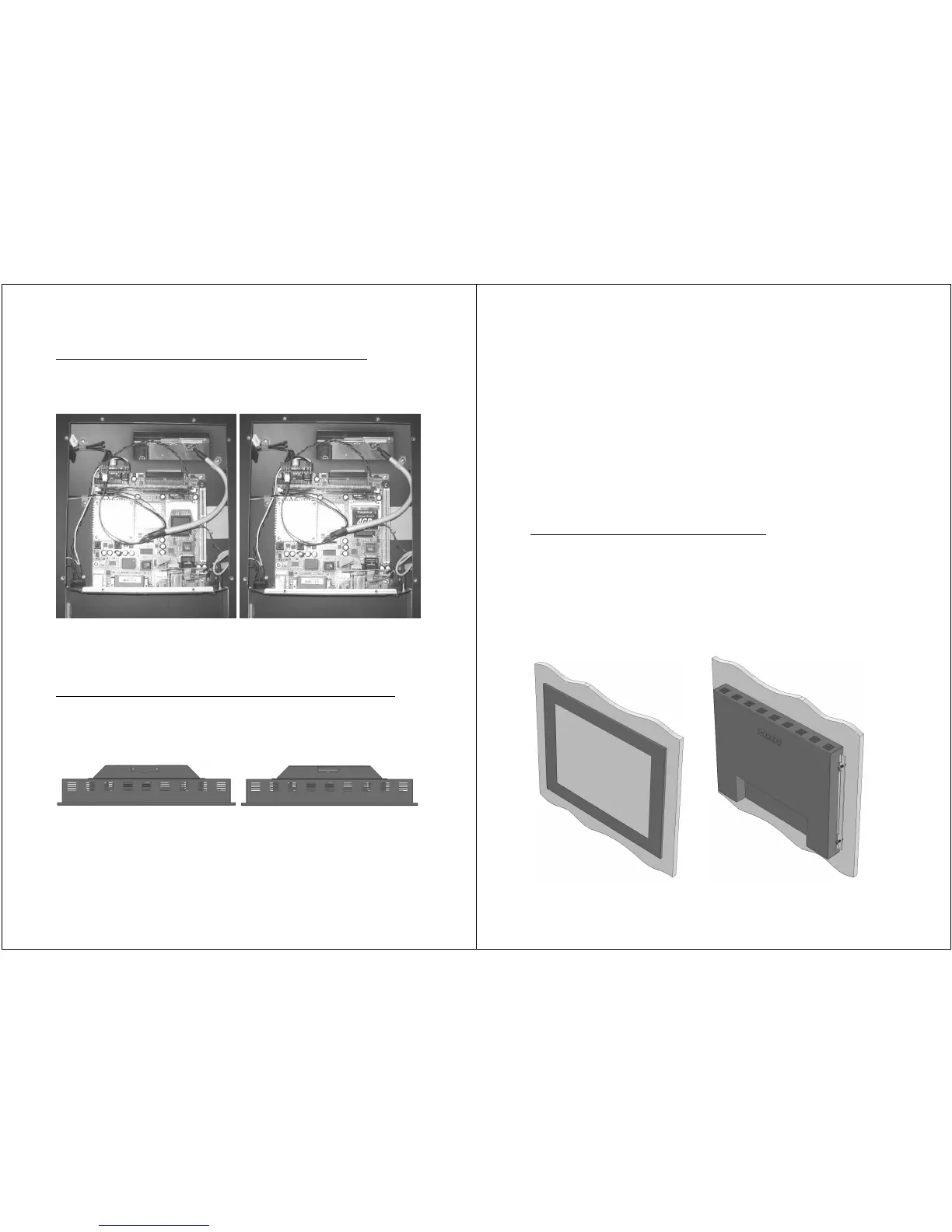
Accessing the internal single True IDE CF Card or Socket
Open the main-board area as described on page 19. Once you
have removed the cover you can access the internal CF Socket:
Always carefully insert the CF card with the lipped edge facing
towards the main board. Opposite insertion will damage the
socket’s pins.
Accessing the external double True IDE CF Cards and Sockets
Remove the cover by unscrewing both M3 bolts. The upper slot as
seen in the drawing below is slot 2, the lower is slot 1. These slot
numbers correspond with the IDE port’s master (1) and slave (2).
Always carefully insert the CF cards with the lipped edge facing
away from the device. Opposite insertion will damage the socket’s
pins. Replace the cover to prevent the cards from vibrating out of
the device.
- 25 -
LUVOX Panel Mounting
LUVOX devices are designed as panel mount devices. This means
the device is inserted into the dedicated cutout from the front
side of the enclosure and subsequently secured from the
backside.
There are basically 2 manners to carry out the backside securing.
• Securing with Front Mount Brackets
• Securing with Side Skirt Bolts
Securing with Front Mount Brackets
We advice this way of securing when the enclosure’s material is
rather thick, board are woodlike. Insert your device into the
dedicated cutout, attach both Front Mount Brackets to the left
and right side of the device and start tightening up the
construction with the included M4x30 mm screws.


 To Next Page